Avoid Lost Video Versions: Git Style Metadata + CAS for Editors
Avoid Lost Video Versions: Git Style Metadata + CAS for Editors
The fix for lost video versions is a hybrid architecture: immutable masters stored in content-addressed storage, timeline edits tracked as diffable JSON metadata, proxies as the default editing surface, and signed manifests for every release. Together, these four pieces give you reliable rollbacks, a clear audit trail of who changed what, and far fewer duplicate binaries clogging your storage.
TL;DR:
- Content-addressed storage with SHA-256 hashes ensures master files are verifiable, deduplicated, and resistant to silent corruption.
- Versioning only timeline metadata and JSON diff files prevents wasteful storage of large raw files, enabling fast, affordable history management.
- Daily automated integrity checks and signed release manifests create an auditable trail, reducing errors and preventing lost versions during delivery.
- Using branch-based workflows for daily editing and mandatory validation before merging minimizes overwrite and merge conflicts.
- Implementing these practices on a pilot project can significantly reduce risks, improve recovery options, and streamline post-production version control.
Table of Contents
- How Do You Avoid Lost Video Versions in Post-Production?
- Core Principles to Enforce in Every Project
- How Do You Version Timelines Instead of Raw Video Files?
- Storage and Transfer Patterns That Keep Assets Safe
- Daily Collaboration Without Overwriting Anyone’s Work
- A Practical Setup Checklist for Your First Pilot
- What Actually Breaks Version Control on Real Productions?
- Set Up Version Control Without Building It Yourself
- Sources
How Do You Avoid Lost Video Versions in Post-Production?
Most lost-version disasters trace back to one habit: editors saving over the same file with a slightly different name, or worse, the same name. Version control as a discipline solves this by treating every edit as a tracked, recoverable event instead of a silent overwrite. The specific method that works for video, as opposed to code, is a hybrid model: content-addressed storage (CAS) for the heavy binary masters, and a small metadata repository for the timeline decisions that actually change day to day.
This isn’t a theoretical fix. Sohonet’s guidance on post-production workflows points out that without centralization, teams duplicate files, apply notes to outdated cuts, and eventually deliver the wrong version to a client. Centralizing the source of truth, then layering proxy-first editing and manifest verification on top, is what closes that gap.
Core Principles to Enforce in Every Project
A few non-negotiable rules separate teams that never lose a version from teams that lose one every quarter.
- One source of truth. Every project gets exactly one canonical master location plus one metadata repo. No side folders on someone’s laptop.
- Proxies are the default editing surface. Editors touch proxies, never masters, during daily work.
- Strict naming and signed manifests. Release tags follow a fixed pattern (project_scene_version_status), and each release ships with a signed manifest documenting what changed.
- Daily integrity checks. Automated jobs scan for missing sidecar files or broken manifest links and alert the team the same day, not the same month.
The Uploadfile backs this structure directly: small Git repos handle metadata, an object store handles binaries, and proxies stay the default so nobody is merging heavy footage by hand.
Pro Tip: Assign one person per project as the “manifest owner.” Their only job is confirming that every release tag has a valid, signed manifest before delivery goes out. It takes five minutes and catches most of the mistakes that turn into missing-version emergencies.
How Do You Version Timelines Instead of Raw Video Files?
Versioning a two-hour raw master every time an editor trims three seconds is wasteful and slow. The better move, borrowed straight from software engineering, is to version the timeline metadata instead of the binary itself.
- Store the edit decision list as diffable JSON (or an open format like OpenTimelineIO). This captures cuts, markers, effects, and relinking data in a form you can actually compare between versions.
- Commit frequently. Every meaningful change to the timeline, a new cut, a color pass, a re-edit, gets saved as a version with a timestamp and a short note.
- Map manifest entries to storage keys. Each master and proxy gets referenced by its content hash in the manifest, so the metadata repo never balloons with binary weight.
- Push to CAS only when a master changes. Metadata commits happen constantly; pushes to the object store happen only when there’s an actual new render.
Tools built around this pattern, like vit, a Git-style version control system for video timelines, serialize timeline data into JSON and give editors branch, commit, and merge commands without ever touching raw footage directly. That’s the mechanism that keeps history reviewable: you can diff two timeline versions the same way a developer diffs two code commits, line by line, instead of squinting at two exported MP4s side by side.
Storage and Transfer Patterns That Keep Assets Safe
Storage architecture is where most “we lost the final cut” stories actually start. Get this part wrong and no amount of naming discipline saves you.
Masters belong in content-addressed storage, keyed by a SHA-256 checksum of the file itself. That checksum becomes the file’s permanent address. Rename it, copy it, move it to a different server, the hash stays the same, so you always know whether two files are truly identical or subtly different. Proxies, meanwhile, live in faster, cheaper storage since editors touch them dozens of times a day.
For transfers, avoid re-uploading whole masters every time something changes. Block-level or frame-level delta transfers move only the parts that changed, which cuts bandwidth use significantly on large projects, a detail confirmed in uploadfile.pro’s breakdown of media versioning practices, which recommends per-frame checksums and delta packaging specifically to reduce transfer load.
Lifecycle policy matters just as much as the initial storage choice:
- Encrypt masters at rest and in transit.
- Apply object-lock (write-once, immutable) to anything marked as a final delivered master.
- Move older projects to cold archive tiers once a client signs off, rather than leaving them on expensive hot storage indefinitely.
- Keep a sidecar metadata file next to every rendition, proxy, master, and mezzanine alike, so verification tools always have something to check against.
Pro Tip: Before you archive a project, run a checksum verification pass on every master one last time. Catching a corrupted file while the team still remembers the project takes minutes. Catching it two years later, when a client asks for a re-edit, can take days.
Daily Collaboration Without Overwriting Anyone’s Work
The daily workflow that prevents accidental overwrites looks a lot like a software team’s Git routine, just adapted for timelines instead of code, as explained in continuity in video series production.
- Branch per task. An editor cutting an alternate ending or a client-requested variant creates a short-lived branch instead of editing the main timeline directly.
- Pull, then switch, then edit. Start the day by pulling the latest metadata, switch to your branch, and edit proxies only.
- Save versions as you go. Each meaningful change becomes a committed version with a short description, not a vague “final_v2_reallyfinal” file name.
- Push and open for review. Push your branch, then let a second editor or supervisor review the diff before it merges into the main timeline.
- Merge, validate, then relink. Once approved, merge the branch, run a manifest validation pass, and confirm every clip reference still points to a real object in storage.
Conflicts happen when two editors touch overlapping sections of the same timeline. Editor-integrated panels that expose Save Version, Switch Branch, and Merge commands directly inside the editing software cut down on this friction, and some, like the panel built into vit, include AI-assisted conflict resolution that flags overlapping edits before they cause a broken merge. The trickiest case is relinking after a deleted clip: if a branch references a clip that another branch removed, the merge should fail loudly and ask a human to resolve it, not silently drop the reference.
Pro Tip: Never let a merge complete without a validation pass. A five-second automated check that confirms every referenced file exists is cheaper than discovering a missing clip during final export.
A Practical Setup Checklist for Your First Pilot
Rolling this out on one project before forcing it across the whole studio saves you from a lot of avoidable pain.
- Provision your object store or CAS layer, and decide on chunk size and archive lifecycle rules up front.
- Create a metadata Git repository with a defined JSON schema, then add automated checks that reject any commit with a broken manifest reference.
- Configure editing software so proxies are the default workspace, and set metadata snapshots to auto-commit on save.
- Define your release tagging convention and require every tagged release to carry a signed manifest.
- Run a rehearsal release, then deliberately test a rollback to confirm you can actually recover a prior version end to end.
| Checklist item | Why it matters | Skip risk |
|---|---|---|
| CAS provisioning with SHA-256 keys | Guarantees master files are verifiable and deduplicated | Silent file corruption goes undetected |
| Metadata repo with JSON schema | Keeps timeline history diffable and lightweight | Repo bloats, history becomes unreadable |
| Proxy-first editor config | Keeps editors off raw masters during daily work | Accidental master overwrites |
| Signed release manifests | Creates a verifiable, auditable release trail | No way to confirm what shipped, when |
| Rehearsal rollback test | Proves recovery actually works before you need it | First real rollback fails under pressure |
For teams building this out, the practical mechanics of naming and organizing the underlying media assets and setting up timeline version tracking are worth reviewing before the pilot starts, not after something breaks.
What Actually Breaks Version Control on Real Productions?
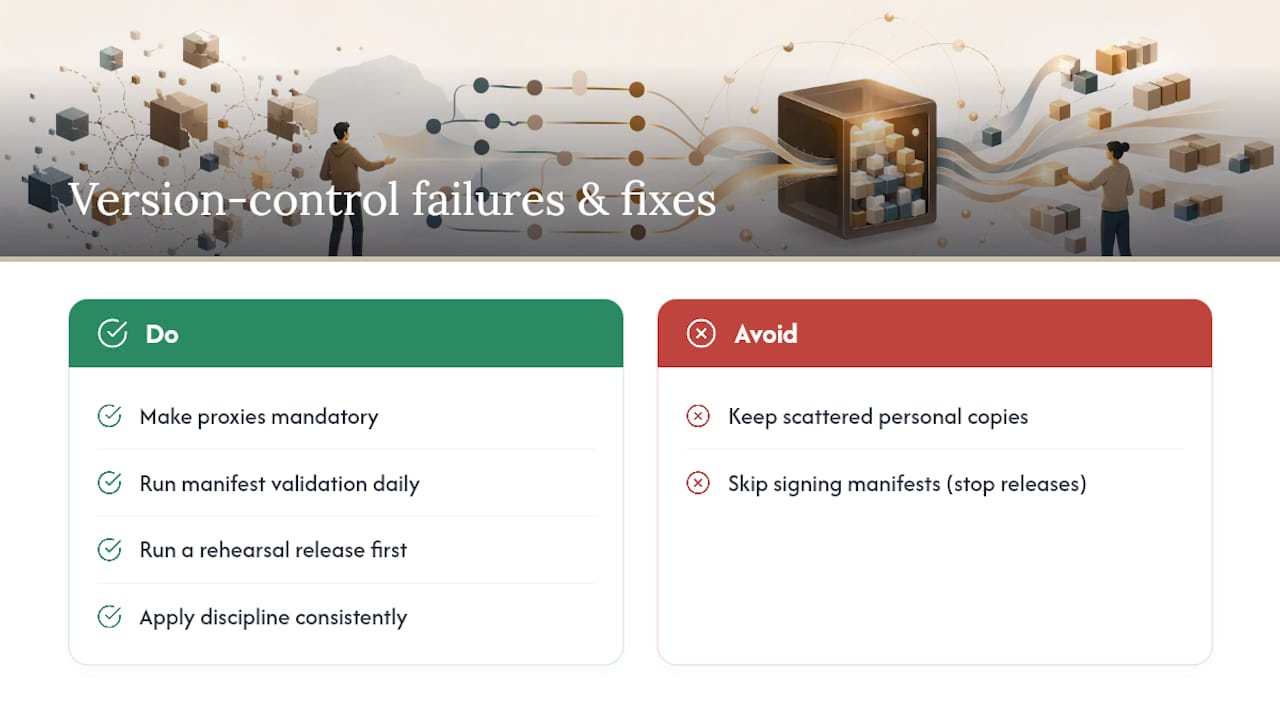
The failure mode I see most often isn’t a missing tool. It’s scattered copies: three editors each keeping their own “current” version in a personal folder, none of them synced to the manifest. The second most common failure is skipped manifests, teams adopt the CAS and metadata repo, then get busy and stop signing releases, which quietly turns an auditable system back into a guessing game.
The fixes that pay off disproportionately are small. Making proxies mandatory, not optional, removes the single biggest cause of master corruption. Running manifest validation daily, instead of only at delivery, catches broken references while they’re still cheap to fix. And running a rehearsal release before the real one exposes rollback gaps you’d otherwise discover during a client emergency. None of this requires exotic tooling. It requires discipline applied consistently, which is exactly what most teams underestimate about version control until they’ve lost a version they can’t get back.
— Lorenz
Set Up Version Control Without Building It Yourself
This kind of system needs version management, task tracking, and secure file sharing without requiring anyone to stitch together a CAS layer and a Git repo by hand. Teams work from one shared source of truth, with manifests and access controls built in.

If you’ve read this far, you already know the cost of a lost version, the re-edit hours, the awkward client email, the missing rollback. The system handles the version history, the secure sharing controls, and the deliverable tracking so your team can focus on the edit instead of the file management around it. Start a trial at Posthive and set up your first project’s version structure this week, before the next deadline makes it harder to fix.
Sources
- Content-addressable storage — Wikipedia
- Version control in post production: 2026 Guide — Sohonet
- Media versioning best practices for albums and videos
- vit — Git-style version control for video timelines (GitHub)