Two Round Creative Approval Workflow for Production Teams
Two Round Creative Approval Workflow for Production Teams

A creative approval workflow is the defined sequence of steps, roles, and rules a team uses to move a design or edit from draft to signed off, without confusion over what changed or who has final say. The single rule that fixes most broken approval processes: name one final approver per asset and lock every approval to a specific version. If your team can’t answer “who approves this, and which version did they approve,” fix that before you touch anything else.
TL;DR:
- Most approval delays stem from unclear ownership and lack of version-specific sign-offs, leading to disputes, rework, and slow decision-making.
- A proper workflow must include a single source of truth, explicit review states, version-locked approvals, and a clear separation between feedback and formal sign-off.
- Assigning one accountable decision-maker and defining SLAs for review times, with automated escalation, significantly reduces stalled reviews and revision limbo.
- Consistent labeling of asset versions and recording approval details prevent disputes, ensuring accurate handoffs and protecting against shipped errors.
- Using tools supporting on-asset comments, true version control, guest access, automation, and integrated deadlines fosters a faster, more reliable approval process.
Table of Contents
- What Is a Creative Approval Workflow, and Why Does It Matter?
- What Should Every Design Approval Process Include?
- Who Should Own Creative Approvals? A Practical RACI
- How Do You Build a Two-Round Creative Approval Workflow?
- What SLAs and Escalation Paths Keep Approvals Moving?
- How Should You Handle Versioning and Approval Handoff?
- How Do You Measure and Improve Your Approval Process?
- What Tooling Capabilities Actually Matter for Approvals?
- How Posthive Supports This Workflow in Practice
- Where Strict Rules Should Bend (and Where They Shouldn’t)
- Get Your Team’s Approvals Running Through One System
- Sources
- FAQ
What Is a Creative Approval Workflow, and Why Does It Matter?
Most creative teams don’t have a broken workflow. They have no workflow at all, just a rotating cast of Slack threads, email chains, and “final_v3_ACTUAL.mp4” files that nobody trusts.
That absence has a cost, and it’s not abstract. A structured approval process built around a single source of truth with asset-anchored comments and version-tied approval states exists precisely because scattered feedback creates defensive re-reviews: reviewers who already approved something get nervous when a new copy surfaces, so they re-check work they’d already signed off on. That’s pure waste, repeated on every project, compounding as your output volume grows.
The practical costs show up in three places:
- Rework from ambiguity. Someone approves “the video,” but three versions exist with the same filename pattern. The wrong one ships.
- Delay from unclear ownership. A brief gets forwarded to five people for “thoughts,” and nobody actually owns the yes or no.
- Trust erosion. When approvals aren’t documented, disputes over scope and payment surface after delivery, not before.
A formal creative approval workflow reverses all three. Speed improves because reviewers know exactly what’s being asked of them and when. Accountability improves because every decision has a name and a timestamp attached. Auditability improves because you can trace exactly which version a client, legal team, or brand lead actually signed off on, which matters enormously the first time a launched asset gets challenged after the fact.
None of this requires elaborate software or a dedicated ops hire. It requires agreeing, in writing, on states, roles, and what “approved” actually means. Teams that skip that step end up rebuilding it informally, asset by asset, which is slower than doing it once and doing it right.
What Should Every Design Approval Process Include?
A workflow that actually holds up under real production pressure needs five structural pieces, not just a checklist someone glances at once. Drop any one of these and the whole system degrades back into chaos, just slower.
A single source of truth. Every asset and every piece of feedback on it lives in one place, not split across email, Slack, and a shared drive. When feedback lives apart from the asset, reviewers work from memory instead of the actual file, and that’s where most miscommunication starts.
Explicit workflow states. Every asset should sit in one clearly named state at any given time:
- Draft — work in progress, not ready for eyes outside the immediate team
- In review — actively with a reviewer, clock running on the SLA
- Changes requested — feedback delivered, back with the creator
- Approved — signed off by the named decision owner, tied to a specific version
- Live — shipped and public
- Retired — replaced or pulled, kept for record only
Version-locked approvals with an audit trail. This is the piece most teams get wrong. An approval isn’t a general thumbs up on “the campaign.” It’s sign-off on one specific version, recorded with a timestamp. That distinction protects everyone: it protects invoicing when a client claims they never approved the change, and it protects the creative team when a stakeholder tries to relitigate a decision after launch.
Separation of feedback from formal approval. A comment is not an approval, and a “looks good to me” in a Slack thread is not a decision. Feedback is exploratory and expected to be messy. Approval is a discrete, recorded action. Conflating the two is how teams end up shipping work that a reviewer thought was still in draft.
The underlying architecture here mirrors what production studios have converged on: one shared home for the asset and its comments, comments anchored to the asset itself rather than floating in a separate thread, a defined reviewer set, one named decision-maker, and a record of exactly who approved what. Build those five pieces once, and most of the friction disappears on its own.
Who Should Own Creative Approvals? A Practical RACI
Confusion over decision rights kills more approval timelines than any tooling problem does. The fix is a role matrix, applied consistently, not reinvented per project.
A minimal RACI for a typical creative asset looks like this:
Notice there’s exactly one Accountable box filled in. That’s deliberate. Craft feedback comes from the brand lead, legal risk gets flagged by compliance, performance concerns might come from a media buyer, but only one person actually decides. Everyone else consults or gets informed.
Where teams break this rule is trying to get consensus instead of a decision. If legal, brand, and the client all need to weigh in, that’s fine. Run those reviews in parallel rather than sequentially, since bringing relevant stakeholders in early and running cross-functional checks in parallel shortens calendar time compared to a chain of one-at-a-time handoffs. But collapse all that input into a single final decision made by one named person. If your organization genuinely requires two sign-offs (say, brand and legal both have to clear an asset before it ships), define that explicitly as a rule, not as an informal expectation that “someone will eventually say yes.”
Pro Tip: Write the approver’s name into the project brief before work starts, not after the first draft is ready. If you can’t name that person on day one, you have a governance problem, not a creative one.
How Do You Build a Two-Round Creative Approval Workflow?
Here’s a copyable process that works whether you’re running a five-person in-house team or a production company juggling a dozen concurrent campaigns.
-
Kickoff and brief lock. Before any creative work starts, lock a brief with required fields: objective, audience, mandatory claims, brand guidelines reference, format specs, deadline, and the named final approver. An unlocked brief is the single biggest predictor of a project running past two review rounds, since when approval rounds stretch past two, the root cause is almost always upstream — a vague brief, the wrong reviewers, or missing spec checks, not a stubborn creative disagreement.
-
Round 1: structural review. The first review pass checks message accuracy, claims compliance, and layout logic, nothing more. Is the headline correct? Does the CTA match the offer? Is the layout hierarchy doing its job? Reviewers in round 1 are explicitly told not to comment on kerning or color grading yet.
-
Automated spec and QC checks. Before anything reaches a human stakeholder for round 2, run automated checks on format, duration, aspect ratio, and safe zones. Catching a wrong export dimension with a script costs seconds. Catching it after a brand lead has already reviewed the asset costs an entire review cycle.
-
Round 2: polish review. With structure and claims already locked from round 1, this pass covers microcopy, kerning, small visual fixes, color consistency, and audio levels. Splitting rounds this way works because separating structural review from polish review stops reviewers from relitigating the headline while someone else is fixing a typo, which is exactly the kind of overlapping feedback that turns a two-day approval into a two-week one.
-
Final approval, tied to a version. The named approver takes one explicit action: approve or request changes, attached to a specific version number or timestamp, never a verbal or implied yes. This single action is what actually protects your team downstream. An explicit, logged approval action turns an informal nod into a record you can point to if a client questions scope or billing after the fact.
-
Handoff. Once approved, the asset moves to a “ready for launch” state with all metadata intact: who approved it, when, which version, and any usage restrictions.
-
Hotfix path for emergencies. Standard SLAs exist for standard work. Build a separate, faster path for genuine launch blockers, one that skips the two-round structure but still requires the named approver’s sign-off and logs the exception explicitly. If your hotfix lane becomes the default lane, that’s a signal your standard process is too slow, not that hotfixes are working.
The pattern readers consistently expect from a good creative process, and rightly so, is a copyable step list paired with concrete tooling guidance rather than abstract principles. The steps above are designed to be lifted directly into a brief template or project management tool without modification.
What SLAs and Escalation Paths Keep Approvals Moving?
Approval delays rarely come from disagreement. They come from silence, an asset sitting in someone’s queue with no deadline attached to it.
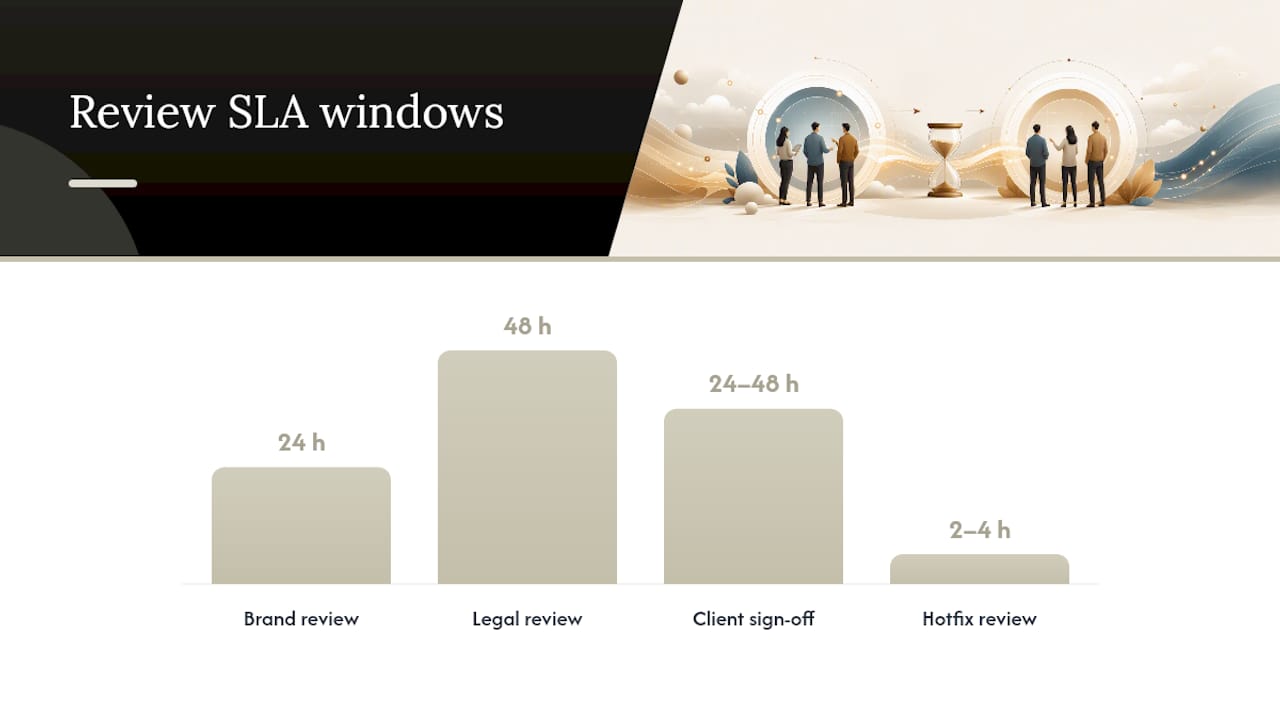
Publishing simple, specific service-level windows fixes most of that on its own. A reasonable starting set:
- Brand or craft review: 24 hours from submission
- Legal or compliance review: 48 hours from submission
- Client or stakeholder final sign-off: 24 to 48 hours, depending on account size
- Hotfix/emergency review: 2 to 4 hours, reserved for genuine launch blockers only
Standardizing SLAs at these kinds of windows, with escalation paths attached, prevents what one industry writeup calls “revision limbo”: the state where an asset technically has a reviewer assigned but no one is actively moving it forward. Adjust the exact numbers to your team’s volume and risk tolerance. A pharmaceutical brand’s legal review window should probably run longer than 48 hours. A fast-moving social team might need brand review down to same-day.
Escalation only works if it triggers automatically, not if it depends on someone remembering to chase a stalled review. Set clear triggers:
- SLA missed by more than 50% of its window (a 24-hour review still open at hour 36)
- Any asset flagged as a launch blocker sitting in “in review” for more than 4 hours
- Three or more rounds on a single asset, which almost always signals an upstream brief or reviewer problem rather than a creative disagreement
Publish these SLAs somewhere the whole team actually sees them, not buried in a wiki page nobody opens. A shared calendar with review deadlines, automated reminders at the halfway point of each SLA window, and a named escalation owner (usually a producer or project lead, not the original reviewer) turns SLAs from aspiration into enforced practice. Partner tools built around managed social workflows, like SocialGrove’s approach to review turnaround, show the same principle applied at a smaller scale: predictable timelines only hold when someone owns enforcing them.
How Should You Handle Versioning and Approval Handoff?
Version ambiguity is where most “but I approved this!” disputes are born, and it’s entirely preventable with a few consistent habits.
Label versions unambiguously. Skip the “final_v2_REAL_final” naming convention. Use a consistent scheme, sequential version numbers tied to a date and a one-line change summary, so anyone can look at a filename and know exactly what changed since the last review.
Record approval metadata alongside every sign-off:
- Approver’s name and role
- Exact timestamp of approval
- Version number or file identifier approved
- Usage rights and licensing terms attached to that specific asset
- Market or regional variant, if the campaign runs in multiple locales
That metadata isn’t paperwork for its own sake. It’s what lets your team answer, instantly and correctly, any question a client or legal team raises six months after launch about what was actually signed off.
Build a handoff checklist before the asset leaves the approval stage. A short pre-launch check should confirm the final file matches the approved version exactly, all usage rights are documented, market-specific variants are correctly labeled, and the launch team has the actual approved file, not a draft that got mixed into the same folder. Posthive’s own post-production checklist walks through this ingest-to-archive sequence in more detail, and it’s worth adapting even if you’re not using Posthive as your system of record.
Handoff failures are almost always a labeling problem, not a communication problem. Fix the naming and metadata discipline, and most “wrong version shipped” incidents disappear before they happen.
How Do You Measure and Improve Your Approval Process?
You can’t fix a bottleneck you haven’t measured. Most creative teams have a gut feeling about where approvals stall, but gut feelings are usually wrong about which specific stage is actually slow.
Track four numbers consistently across every asset:
- Median hours in review, from submission to first reviewer response
- Rounds per asset, how many review cycles a piece goes through before approval
- First-pass approval rate, the percentage of assets approved without any changes requested
- Post-approval edit rate, how often something changes after it’s already been signed off, which usually signals a process failure, not a creative one
Statistic to watch: teams that instrument these metrics by asset type and project phase consistently find that bottlenecks cluster in specific spots, localization reviews or legal checks tend to be repeat offenders, rather than spreading evenly across the whole process. That pattern is the whole point of tracking: it turns a vague sense that “approvals take too long” into a specific, fixable target.
Visualize these numbers by project type on a monthly or quarterly basis. A social team’s numbers should look different from a broadcast team’s, and averaging them together hides where the real problem lives.
Run a retrospective every quarter with the data in front of you. Pick one specific bottleneck the numbers point to, run one targeted experiment (a revised brief template, a tighter SLA, an added QC check) for a full cycle, and measure whether the number actually moved. Sweeping process overhauls based on hunches waste more time than they save.
What Tooling Capabilities Actually Matter for Approvals?
Skip the vendor comparison spreadsheets for a minute. What matters is whether a tool supports the workflow you’ve already defined, not which logo is on the login screen.
The capabilities worth prioritizing:
- On-asset commenting, feedback anchored directly to the frame, layer, or timestamp it refers to, not a separate comment thread disconnected from the actual work
- True version control, where an approval locks to a specific version and any new upload creates a new reviewable state rather than silently overwriting the old one
- Guest reviewer access without paid seats, since external clients and stakeholders reviewing through guest links keeps their feedback attached to the asset instead of scattered across their own inbox
- Automated spec and QC checks, catching format, duration, and safe-zone issues before a human reviewer wastes time on them
- Task and deadline tracking tied directly to the SLA windows your team has published
On integrations, prioritize the connections that remove manual re-entry: plugins for the non-linear editors your team already works in, calendar sync so review deadlines show up where people actually look, and cloud storage links so final assets don’t require a separate delivery step after approval.
Don’t roll a new workflow tool out to every team and every campaign at once. Pilot it on a single campaign or project type, measure the four metrics above against your current baseline, and only scale once you’ve confirmed it actually shortens cycle time rather than just moving the friction somewhere new. Testing acceptance criteria on a pilot campaign also gives you a clean chance to validate creative effectiveness before wider rollout, an idea covered well in this dealership executive playbook on ad creative testing.
How Posthive Supports This Workflow in Practice
Posthive is built around the same structural pieces this article has walked through: version management, task tracking, and cloud connectivity in one workspace, rather than scattered across five different tools.
The version control feature maps directly to the “version-locked approval” rule covered earlier: teams and clients see exactly which version is under review and which one carries the approval stamp. Task tracking maps to the RACI structure, assigning clear ownership so a review doesn’t sit unassigned in a queue. Cloud connectivity keeps the asset and its feedback in one place, avoiding the exact fragmentation problem that causes most approval delays.
Three Posthive blog resources go deeper on specific pieces of this workflow:
- Cut Review Time: 7 Step MVP Creative Ops Workflow for Creative Leads walks through a condensed operational sequence for teams trying to shorten review cycles specifically.
- Creative Change Requests: A Practical Workflow for Teams covers how to handle scope changes that surface after an asset has already entered review, a scenario this article’s RACI section touches on but doesn’t fully resolve.
- Editor Task Tracking: A Practitioner’s System for Post-Production applies the task ownership principles above specifically to post-production teams managing multiple concurrent edits.
Teams evaluating whether their current setup meets these capabilities can check Posthive’s technical documentation for specifics on how version control, integrations, and task tracking are implemented.
Where Strict Rules Should Bend (and Where They Shouldn’t)
The temptation, once you’ve built a formal approval workflow, is to apply it uniformly everywhere. Resist that. A 24 hour SLA makes sense for a paid social ad running through its third campaign of the quarter. It makes far less sense for a brand film that took six weeks to shoot and deserves a synchronous review session where the director and brand lead actually talk through notes together, not a written comment thread with a countdown clock attached.
Synchronous review earns its cost when the stakes are high enough that misread written feedback would be expensive to unwind. Asynchronous, SLA-driven review earns its cost everywhere else, which is most of your volume.
Governance should scale with team size, not stay fixed. A five-person shop can run informally with a shared drive and a Slack channel and get away with it. Past a certain volume of concurrent projects, that same informality is what creates the version chaos this entire article exists to fix. The workflow isn’t a moral position. It’s a tool that should get more structured exactly as fast as your output volume demands it, and no faster.
— Lorenz
Get Your Team’s Approvals Running Through One System
Posthive is the direct alternative to duct-taping your approval process together from email threads, shared drives, and Slack DMs. Every team member and every client gets full access on every plan with no per-seat pricing, so your approvers, your reviewers, and your clients all work inside the same version history instead of forwarding files around.

That matters most exactly where this article has focused: version-locked approvals, task tracking tied to named owners, and cloud connectivity that keeps feedback anchored to the actual asset. Posthive’s plugins for major NLEs and Google Calendar integration mean the workflow steps covered here, brief lock, round 1 and round 2 reviews, final sign-off, don’t require your team to leave the tools they already use.
Posthive offers two paid tiers: Pro at $49 per month and Enterprise at $99 per month, each with unlimited seats for your team and your clients. If you’re running the two-round approval model described above and want it enforced by the system instead of by memory, check the plan details and see which tier fits your project volume.
Sources
- How Should a Studio Design a Creative Review and Approval Workflow?
- Design approval process
- Creative approval process for marketing teams (end Slack jury duty)
- How to get design approval from clients
FAQ
What Is a Creative Approval Workflow?
A creative approval workflow is a defined sequence of review stages, named roles, and sign-off rules that moves a design or edit from draft to final approval. The strongest versions tie every approval to a specific version and assign one named decision owner, rather than relying on informal group consensus.
How Many Review Rounds Should a Creative Approval Process Have?
Two rounds work for most assets: a structural review focused on message, claims, and layout, followed by a polish review covering microcopy and small visual fixes. When a single asset regularly needs three or more rounds, the root problem is usually an unclear brief or the wrong reviewers, not the creative work itself.
Who Should Have Final Approval Authority on Creative Assets?
Exactly one named person should hold final approval authority per asset, even when brand, legal, and client stakeholders all provide input beforehand. Splitting formal sign-off across multiple people without a clear rule for resolving disagreement is one of the most common causes of stalled approvals.
What Metrics Should Teams Track to Improve Approval Speed?
Track median hours in review, rounds per asset, first-pass approval rate, and post-approval edit rate. Teams that break these numbers down by asset type and project phase usually find bottlenecks concentrated in specific stages, like legal or localization review, rather than spread evenly across the process.
Does Posthive Support Version-Locked Creative Approvals?
Yes. Posthive’s version management ties task tracking and client review directly to specific asset versions, so an approval always points to an exact file rather than a general “the campaign” sign-off. Pricing starts at $49 per month for the Pro plan, with unlimited seats for teams and clients on every tier.