Deliverable Version Tracking: A Media Team's Practical Guide
Deliverable Version Tracking: A Media Team’s Practical Guide

Deliverable version tracking means keeping immutable, hash-verified snapshots of every iteration, each tied to metadata and a formal approval state. It’s the difference between knowing exactly which cut, comp, or document a client signed off on, and digging through a folder of files named “final_v3_REALFINAL.”
Three things make this work:
- Snapshot every iteration the moment it leaves review, before it gets touched again.
- Compute and store checksums so you can prove a file hasn’t been altered or corrupted.
- Record approvals with timestamps, linked to the exact version they cover.
Done right, this looks simple from the outside, anyone on the team can point to the current version without asking around, and anyone can pull up a version from three months ago and verify it’s bit-for-bit what it was the day it got approved.
TL;DR:
- Immutable snapshots should be taken immediately after review to prevent untracked edits and ensure accurate version recordkeeping.
- Checksums like SHA-256 or BLAKE3 must be verified both after upload and before final delivery to detect silent corruption.
- Large media files should be stored in content-addressable storage with pointer files rather than direct versioning copies to keep repositories manageable and verifiable.
- All feedback, comments, and approvals need to be linked to specific versions with timestamps for traceability and dispute resolution.
- Implementing this system requires defining clear version identifiers, states, and policies, with a four-week rollout plan focused on automation and policy ownership.
Table of Contents
- What Deliverable Version Tracking Actually Covers
- The Core Components: Snapshots, Manifests, Checksums, and Sign-Offs
- Why Media Files Break the Standard Version Control Playbook
- Versioning Conventions Your Team Can Adopt This Week
- A Four-Week Rollout Plan for Version Tracking
- How Posthive Puts These Principles Into Practice
- Key Takeaways
- The Overlooked Part of Version Tracking Nobody Budgets For
- Version Tracking That Doesn’t Live in a Spreadsheet
- Sources
What Deliverable Version Tracking Actually Covers
Deliverables are not the same thing as tasks. A task tracker tells you a cut is “in progress.” Deliverable version tracking tells you which specific file, at which specific hash, was reviewed, by whom, and whether it’s still the one currently in play. Confusing the two is how teams end up managing project status carefully while the actual files drift into chaos.
The failure modes are familiar to anyone who’s shipped creative work under deadline pressure:
- Someone can’t find “the real final” among four files with nearly identical names.
- Two people independently create competing “final” versions, and nobody notices until delivery.
- A file gets silently corrupted or truncated during transfer, and nobody catches it until playback fails at a client screening.
Fixing this isn’t about tighter file-naming discipline alone. It’s about treating deliverables the way version control principles for data and code treat any tracked asset: with traceability and recoverability built in, not bolted on after something breaks. The payoff shows up in three places. Disputes get resolved in minutes instead of days, because you can point to a timestamped approval instead of relying on someone’s memory of a Slack thread. Handoffs to a new editor or a new studio go faster, because provenance travels with the file. And reviews speed up, because reviewers stop wasting time confirming they’re looking at the right thing before they even start giving notes.
The Core Components: Snapshots, Manifests, Checksums, and Sign-Offs
Every reliable version tracking system rests on five elements, and skipping any one of them creates a gap someone eventually falls through.
- Immutable snapshots. Once a version is saved, it never changes. If a change is needed, that becomes a new version. This single rule prevents the most common disaster in creative production: someone opening an “approved” file to make a “tiny fix” and accidentally invalidating a signed-off deliverable.
- Manifests or catalogs. A manifest lists every file in a snapshot, along with its path, size, and hash. This is the pattern ovpackage uses for Omniverse deliverables, snapshotting a directory into a named, immutable package and publishing a catalog that lets anyone verify the contents later without opening every file by hand.
- Checksums. Hashing algorithms like SHA-256 and increasingly BLAKE3 let you detect corruption or tampering by comparing a computed hash against the one recorded at save time. BLAKE3 is considerably faster on large files, which matters once you’re checksumming multi-gigabyte masters instead of text documents.
- Metadata fields. Author, timestamp, a short change summary, approval state, and a link to the originating task or ticket. Miss the change summary and you lose the “why” behind a version, which is often more useful during a dispute than the “what.”
- Approval recording. Pin the exact version that got approved, and store a signed, timestamped record of who approved it. Don’t let “approved” live as a verbal agreement or a thumbs-up emoji in a chat thread.
Pro Tip: Run your checksum verification at two points, not one: right after upload, and again right before final delivery. Corruption during storage or transfer is rare but it happens, and catching it at delivery is far too late.
Techniques like SHA-256 verification and BLAKE3 hashing are increasingly standard for confirming file integrity during version transitions in large-artifact workflows, and there is no reason creative production should hold itself to a lower bar than software engineering does.
Why Media Files Break the Standard Version Control Playbook
A standard Git repository chokes on EXR sequences, DPX frames, and multi-gigabyte MOV files. Every commit duplicates the binary, repository size balloons into hundreds of gigabytes within weeks, and clone times stretch from seconds to hours. Tools built for tracking code changes line by line simply weren’t designed to diff a rendered frame.
The fix used across media pipelines is to stop storing the binaries directly in the versioned history. Instead:
- Store a small pointer file in the tracked repository or manifest, containing an ID or hash that references the actual content.
- Store the heavy binary itself in content-addressable storage (CAS), where the file’s own hash becomes its address.
- Let deduplication happen automatically: if two versions share identical footage, the CAS layer stores it once, not twice.
This is exactly the architecture behind tools like c4git, which swaps tracked media for pointer files containing content IDs and restores the real files from a content store on checkout, and HyperTide, which pairs BLAKE3-hashed CAS with file locking and an audit trail for large-asset workflows.
Content-addressable storage plus pointer files solves the two problems media teams actually have at the same time: keeping repositories fast, and keeping every byte verifiable back to its origin.
File locking matters just as much as storage architecture. When two editors can open and save the same project file simultaneously, someone’s work vanishes silently. Lock leases and atomic check-ins prevent that by giving one person exclusive write access at a time. Run integrity checks on ingest and again before delivery, the same fsck-style verification a filesystem runs, just aimed at your asset library instead of your disk.
Versioning Conventions Your Team Can Adopt This Week
Vague version names cause vague accountability. Replace “final_v2_client_notes” with a system that has actual rules.
- Adopt immutable, structured version identifiers. Something like
campaign-name@2026.06.15for date-based delivery cycles, or semantic versioning (v1.2.3) when a deliverable goes through incremental revisions with a clear major/minor/patch logic. Either works. Ad-hoc filenames never do. - Define explicit states: draft, review, changes-requested, approved, released. A file’s state should be visible at a glance, not inferred from its filename or its folder location.
- Pin approved versions. Once a version hits “approved,” lock it. Any further edit creates a new version, full stop. This is the same principle Istari Digital’s documentation applies to resource versioning: pin a specific version within a composition so you always know exactly what shipped.
- Link feedback to a version, not a file. A comment on “the video” is useless six versions later. A comment tied to version 4, timestamp included, still makes sense a year from now.
Scale up to automated manifests, CAS, and lock leases only once manual tracking starts causing real friction, not before.*
A Four-Week Rollout Plan for Version Tracking
Getting this running doesn’t require a quarter-long initiative. It requires four weeks of deliberate setup.
- Week 0: Inventory every deliverable type your team produces, decide on retention targets (how long old versions live before archiving), and assign one owner for the versioning policy. Someone has to own the rules, or they erode within a month.
- Week 1: Adopt a manifest format, turn on automatic checksum generation at upload, and define the required metadata fields, no exceptions, no optional columns.
- Week 2: Configure your approval states and connect feedback threads to specific versions. Pilot the whole system on one real deliverable before rolling it out team-wide.
- Weeks 3 and 4: Run integrity verification on your pilot files, train reviewers on the new workflow, and stage a mock client handoff to confirm you can roll back to any prior version and prove its provenance on demand.
Once live, keep it running with:
- Periodic integrity checks (fsck-style scans) on stored assets.
- Enforcement of your retention policy, not just documentation of one.
- A standing audit-readiness check, so you’re never scrambling to reconstruct a version history under deadline pressure.
How Posthive Puts These Principles Into Practice
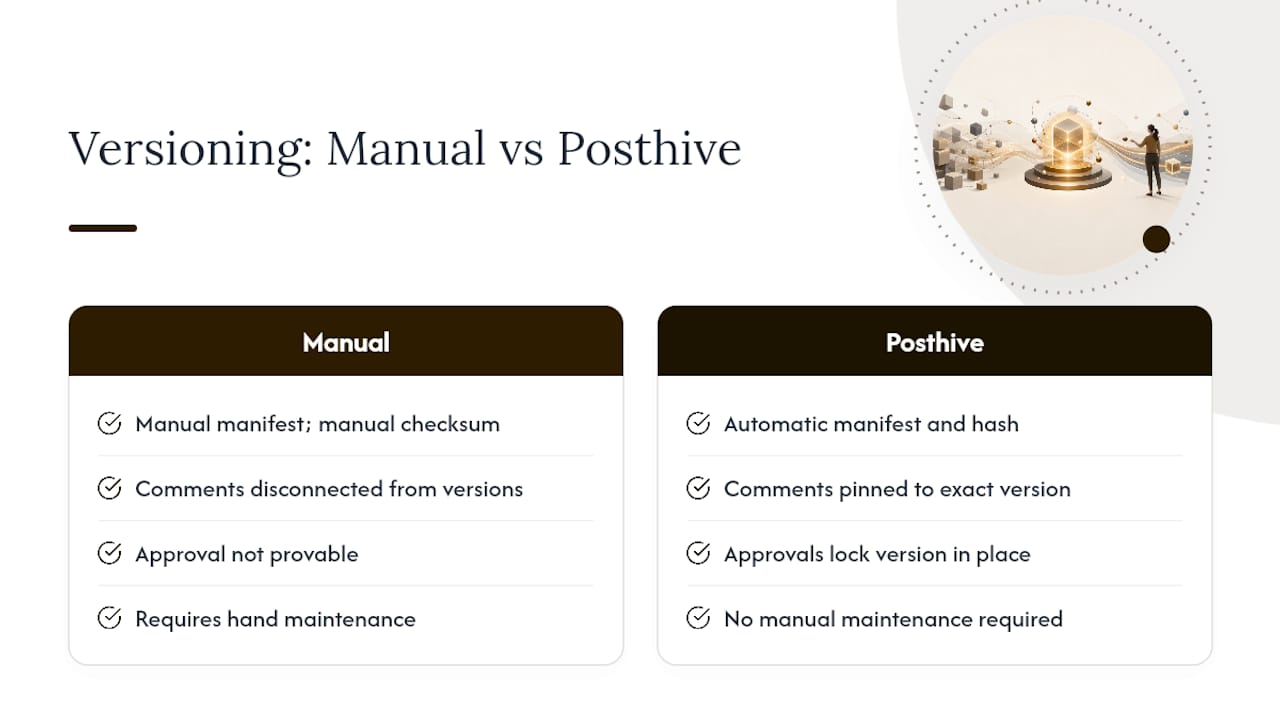
Posthive builds these exact mechanics directly into a project’s workflow instead of leaving them to individual discipline. Upload a file and the platform generates an automatic manifest and hash, capturing version metadata without anyone manually logging it.
The workflow runs like this:
- A file is uploaded and automatically versioned, with a manifest and hash generated at that moment.
- Review comments attach to that specific version, not to “the project” in general.
- Approval gets recorded formally, pinning the version that was signed off.
- Delivery pulls from the pinned, verified version, so what ships matches exactly what was approved.
This mirrors the pattern seen in deliverable tracking features across the industry, including automatic version numbering and version-linked client comments, which exist precisely to eliminate “which one is final” confusion on client-facing work.
Key Takeaways
Deliverable version tracking works when immutable snapshots, checksum verification, and timestamped approvals combine into a single enforceable workflow.
| Point | Details |
|---|---|
| Never overwrite approved files | Treat every approved deliverable as locked; edits always create a new immutable version. |
| Hash everything | Run SHA-256 or BLAKE3 checksums at upload and again before delivery to catch corruption early. |
| Separate binaries from metadata | Use pointer files and content-addressable storage for large media assets instead of standard repositories. |
| Tie feedback to versions | Link every comment and approval to a specific version, never to a file in general. |
| Posthive automates the mechanics | Posthive generates manifests and hashes automatically and pins the exact version tied to each approval. |
The Overlooked Part of Version Tracking Nobody Budgets For
Most advice on this topic focuses on tools: pick the right software, turn on the right settings, done. That misses the actual failure point. Teams don’t lose track of versions because they lack a manifest generator. They lose track because nobody owns the policy once the initial excitement fades. A checklist gets followed diligently for three weeks and quietly abandoned by week six when a deadline crunch hits.
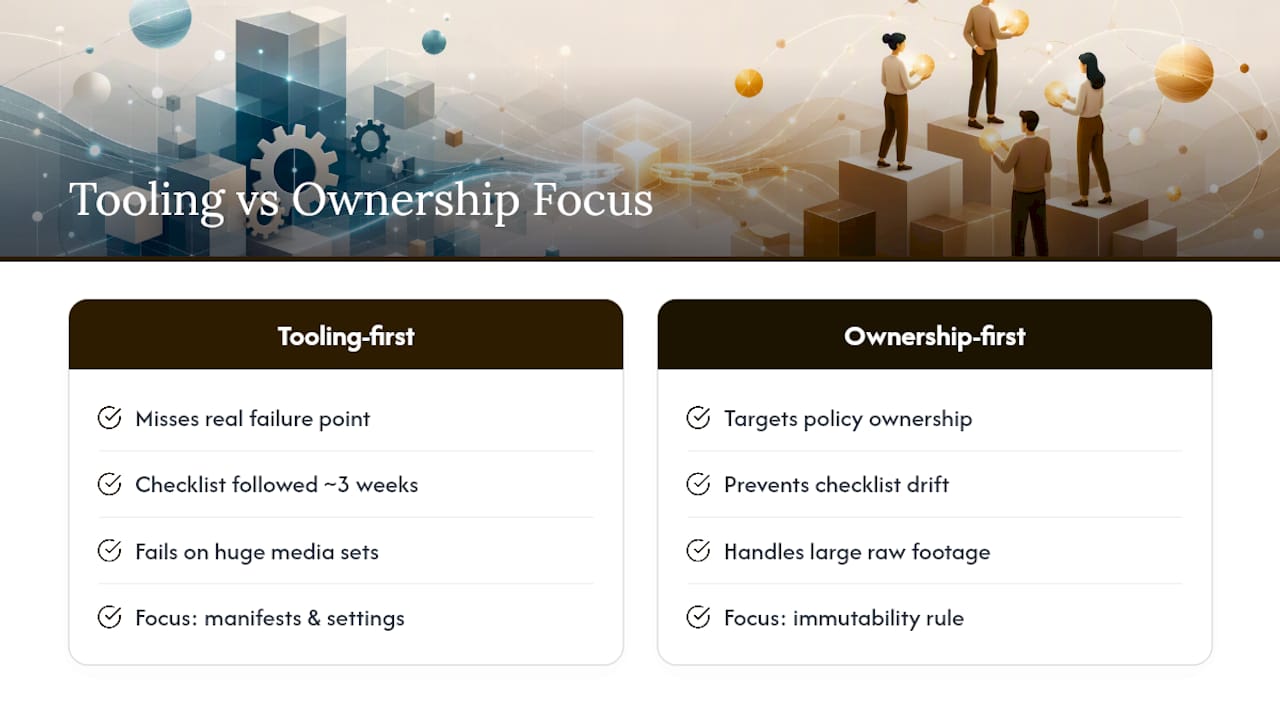
The conventional advice also underrates how differently media deliverables behave compared to documents or code. A contract redline is small enough that ad-hoc version control barely matters. A four-terabyte project folder full of raw footage is a different problem entirely, and treating it with document-era habits, folders named “v1,” “v2,” “v2_final,” is how studios end up with unrecoverable ambiguity at the worst possible moment: right before delivery.
If there’s one thing to prioritize first, it’s the immutability rule, not the tooling. Decide, as a team, that an approved version is never touched again, before you decide which manifest format or hashing algorithm to use. The technical layer is replaceable. The discipline underneath it is not.
— Lorenz
Version Tracking That Doesn’t Live in a Spreadsheet
Posthive gives creative teams the version discipline this article just walked through, without asking anyone to maintain a manifest by hand or remember to run a checksum before delivery.

Every upload gets an automatic manifest and hash. Every review comment pins to the exact version it was written against. Every approval locks a version in place, so the file a client signed off on is provably the same file that ships. For teams juggling raw footage, project files, and client feedback across a dozen open jobs at once, that’s the practical alternative to chasing down “which one is final” over email threads and shared drive folders.
If your team is still naming files “final_v3_REALFINAL” and hoping for the best, start a Posthive workspace and set up automatic versioning on your next deliverable before it ships.
Sources
For teams building or auditing their own system, these sources go deeper on the mechanics covered here: