A Deliverables Checklist Keeps Every Project Output on Track
A Deliverables Checklist Keeps Every Project Output on Track

A deliverables checklist is a running record of every output a project must produce, each one tagged with an owner, a due date, acceptance criteria, and a current status. Its job is to make responsibility and completion visible instead of assumed. Use it from the planning phase through execution and into closure, whenever you need proof that something specific got done, by someone specific, and was actually accepted.
TL;DR:
- Clear acceptance criteria are essential for each deliverable; without them, disputes over completion are inevitable.
- Using a dedicated platform like Posthive ensures version control, approvals, and deadlines stay linked to actual work files.
- Larger projects require splitting the checklist by phases or workstreams to maintain oversight and prevent losing track of tasks.
- Formal sign-off at project close is critical to prevent unresolved issues from causing future disputes or incomplete closure.
- Updating and reviewing the deliverables checklist at every project milestone is necessary to catch missed outputs early.
Table of Contents
- What Deliverables Are (and How They Differ From Tasks and Milestones)
- Types of Deliverables: Internal, External, and Everything In Between
- How Do You Build a Deliverables Checklist From Scratch?
- How Do You Track and Manage Deliverables Once Work Starts?
- What Belongs on a Closing-Phase Deliverables Checklist?
- How Posthive Maps Checklist Fields to Real Production Workflows
- What Actually Keeps a Deliverables Checklist From Failing
- Posthive Brings Your Deliverables Checklist Into One Workspace
- Where to Find Ready-Made Deliverables Checklist Templates
- Sources
What Deliverables Are (and How They Differ From Tasks and Milestones)
A deliverable is a tangible or intangible output the project has to produce, something a client, stakeholder, or team can inspect and accept. Atlassian defines deliverables as checkpoints for measuring progress, not just to-dos. A tangible deliverable might be a final video file or a signed contract. An intangible one could be a brand style guide, a training session, or a documented process improvement.
Deliverables get confused with tasks and milestones constantly, but the distinction matters:
- Tasks are the work performed; a deliverable is what the work produces.
- Milestones are dates or events marking progress; a deliverable is the actual thing handed over.
- Deliverables are the only one of the three a stakeholder can accept, reject, or request revisions on.
Defining deliverables early, before work starts, keeps scope from expanding quietly. When nobody has written down what “done” looks like, teams end up delivering extra rounds of revisions nobody asked for and nobody’s paying for.
Types of Deliverables: Internal, External, and Everything In Between
Most projects generate at least four categories of deliverables, and a checklist for deliverables should sort them so nothing slips through:
- Internal deliverables: status reports, budget reconciliations, internal style guides.
- External deliverables: the client-facing final product, invoices, contracts.
- Process deliverables: workflow documentation, approval logs, quality-control records.
- Product deliverables: the finished asset itself, whether that’s software, a building, or a video file.
In creative and post-production work, a single project can spin off a dozen distinct deliverables from one shoot: the graded final cut, a social media cutdown, closed-caption files, a music cue sheet, and a translated version for a second market. Each one needs its own line item, not a shared bucket labeled “video.”
Tag every deliverable with an owner (who’s accountable, not just who’s doing the work) and acceptance criteria (what “approved” actually means, in writing). Skip the acceptance criteria and you’ll spend more time arguing about whether something’s finished than actually finishing it.
How Do You Build a Deliverables Checklist From Scratch?
Building a usable deliverables tracking template starts with your scope statement or work breakdown structure. Every branch of the WBS that ends in a client-facing or stakeholder-facing output becomes a checklist row. Internal work packages that just feed into a deliverable don’t get their own line.
A solid deliverables management checklist needs these columns, at minimum, and Smartsheet’s downloadable templates follow roughly this same structure:
- Deliverable name: specific enough that two people wouldn’t describe it differently.
- Description: one or two lines on what it includes and excludes.
- Owner: the person accountable for delivery, not the whole team.
- Due date: tied to the project schedule, not an estimate.
- Acceptance criteria: the exact standard that triggers sign-off.
- Status: not started, in progress, in review, approved, or rejected.
- Dependencies: what has to happen first, and what’s waiting on this.
- Artifact or version link: a direct link to the current file or asset, not “check the shared drive.”
Small projects can run this in a single spreadsheet tab with eight or nine rows. Complex, multi-phase productions usually need it split by phase or workstream, with a summary view rolling up status across all of them. ProjectManager’s Excel template works well for the simpler version; anything with more than 20 to 30 deliverables tends to outgrow a flat spreadsheet fast.
Pro Tip: Assign one person to own the checklist itself, not just individual rows. Someone has to update statuses weekly or the whole document goes stale within a month, and a stale checklist is worse than no checklist because people trust it anyway.
Review the checklist at every phase gate, not just at the end. Catching a missed deliverable during a mid-project review costs you a conversation. Catching it during closeout costs you a client relationship.
How Do You Track and Manage Deliverables Once Work Starts?
A spreadsheet works fine for projects with a handful of deliverables and one or two owners. Once you’re coordinating across five or more contributors, or juggling file versions that change daily, a spreadsheet starts losing the thread. That’s when a dedicated PM tool or production tracker earns its cost, mainly because it can tie status changes to notifications instead of relying on someone remembering to check a tab.
Whichever tool you use, keep status values consistent across every deliverable:
- Not started — work hasn’t begun.
- In progress — active work, no review requested yet.
- In review — submitted for approval, waiting on feedback.
- Approved — signed off against the stated acceptance criteria.
- Rejected/revise — sent back with specific notes.
Execution-phase checklists exist because documented requirements and actual delivered work drift apart constantly once a project is underway, and a five-status system is one of the simplest ways to catch that drift before it compounds. Managing dependencies matters just as much: if a color-graded cut depends on an approved rough cut, the checklist should show that link so nobody starts final delivery on an unapproved foundation. Version control belongs here too. Every status change on a deliverable should point to a specific file version, not a folder.
Reporting cadence depends on project length. Weekly stakeholder updates work for anything running longer than a month; shorter sprints can run on a single milestone-based report. Escalate the moment a deliverable’s due date passes without a status change. Silence on the tracker is the earliest warning sign something’s stuck.
What Belongs on a Closing-Phase Deliverables Checklist?
Closing a project without a formal checklist is how deliverables get “finished” informally and nobody ever signs off on them. A complete closing-phase checklist covers final acceptance, financial closure, and knowledge transfer, and a solid version runs six to nine steps:
- Confirm every deliverable status shows “approved,” not “in review.”
- Collect formal sign-off or acceptance documentation from the client or stakeholder.
- Reconcile the budget and close out any open invoices or contracts.
- Release contracted vendors or freelancers from active obligations.
- Transfer all final files, assets, and documentation to the client’s system of record.
- Capture lessons learned while the team still remembers what went wrong and why.
- Archive the project checklist itself as a reference for future scoping.
Skipping the sign-off step is the single most common closure mistake, since formal acceptance is what actually protects both sides if a dispute comes up later.
How Posthive Maps Checklist Fields to Real Production Workflows
Every field on a deliverables checklist has a direct counterpart in how Posthive structures a project. The artifact/version link becomes a version history tied to the actual file. The owner and approver columns map to assigned review roles. Acceptance criteria live as comments attached to the specific cut under review, not buried in an email thread.
Picture a final-cut deliverable moving through three rounds of client review. Instead of tracking approval status in a spreadsheet next to a folder full of “v3_final_FINAL” files, the checklist row and the actual asset stay linked, so the status update and the file it describes never drift apart.

What Actually Keeps a Deliverables Checklist From Failing
The checklists that fail aren’t the ones missing columns. They’re the ones where nobody agreed on acceptance criteria before work started, so “done” turns into a negotiation every single time. Lock that down before the first task list gets assigned, not after the first dispute.
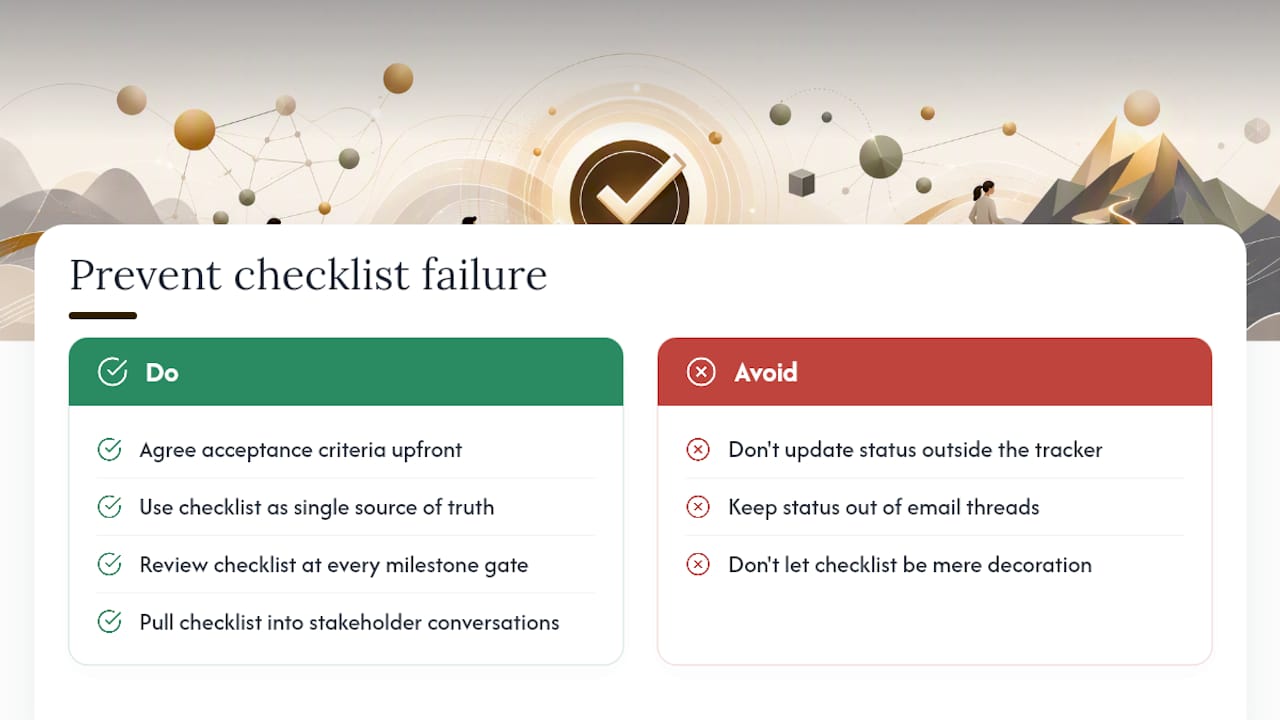
Treat the checklist as the single source of truth, and mean it. If a status update happens in a meeting or a text message instead of on the tracker, it didn’t happen. Review the checklist at every milestone gate, not just when something feels overdue.
The biggest mistake I see teams make is letting deliverable status live in email threads instead of on the tracker itself. A checklist that isn’t the thing people actually check is just decoration. Pull it into every stakeholder conversation instead of summarizing it after the fact. That’s the difference between a checklist that manages the project and one that just documents it after the fact.
— Lorenz
Posthive Brings Your Deliverables Checklist Into One Workspace
Posthive turns a static deliverables checklist into a live workspace where version control, approval tracking, and task deadlines all sit next to the actual files being reviewed. Instead of updating a spreadsheet in one tab and hunting for the right file version in another, owners, due dates, and acceptance criteria stay attached to the artifact itself.

Creative teams, production companies, freelancers, and agencies managing multiple deliverables at once benefit most, since Posthive keeps client feedback, file versions, and sign-off status in one place instead of scattered across email and shared drives. If your team is juggling more deliverables than a spreadsheet can comfortably track, visit the Posthive workspace to see how version links, approvals, and deadlines work together in practice.
Where to Find Ready-Made Deliverables Checklist Templates
Columbia University’s design and construction group publishes a formal Project Deliverables Checklist PDF that works as a solid institutional baseline. Smartsheet and ProjectManager both offer downloadable spreadsheet templates covering owner, due date, and status fields already discussed above. For closing-phase specifics, the Project Management Formula closing checklist lays out sign-off and financial closure steps in more detail than most general templates include.
Sources
- What Are Project Deliverables in Project Management? — Atlassian
- Free Project Deliverables Templates | Smartsheet
- Closing phase deliverables checklist — Project Management Formula
- Project Deliverables Template for Excel (Free Download) — ProjectManager