30 Minute Edit Change Log Setup for Post Production Teams
30 Minute Edit Change Log Setup for Post Production Teams

An edit change log is a connected version history and audit trail that records what changed in a media deliverable, who acted on it, and when. Post-production teams need this because a version history alone shows what changed between drafts, but only a linked audit trail proves who approved which exact snapshot. Posthive builds this connection directly into its workspace, which matters when a client asks “who signed off on this cut?” six months after delivery.
TL;DR:
- Audit trails must capture actor, action, object, timestamp, sequence, and permanence to ensure the record is reliable and dispute-proof.
- Connecting audit trail entries to specific version snapshots prevents confusion about who approved what and when, avoiding repeated review cycles.
- Using sequential version numbers with dates and linking approvals directly to exact versions reduces file naming conflicts and miscommunications.
- Manual systems like spreadsheets or email threads fail in transparency and permanence; dedicated tools provide secure, append-only logs suitable for complex projects.
- Posthive offers a cloud-connected workspace with version control, named approvals, and guest review links designed to meet the full audit trail requirements at scale.
Table of Contents
- Version History vs. Audit Trail: What Each One Actually Records
- Six Essential Elements Every Audit Trail Must Capture
- The 30-Minute Setup: Four Decisions That Make Logs Reliable
- Naming, Versioning, and Approvals: Conventions That Stop Confusion
- Tools vs. Manual Workarounds: When Spreadsheets and Email Fail
- How Posthive Maps These Rules Into a Post-Production Workspace
- Speed vs. Traceability: When to Cut Corners and When Not To
- Posthive: A Practical Workspace for Edit Change Logs
- Sources
- FAQ
Version History vs. Audit Trail: What Each One Actually Records
Version history answers “what changed.” It stores diffs and snapshots: the color grade shifted, a scene got trimmed by four seconds, a voiceover track got swapped. An audit trail answers a different question: “who did what, and when.” It logs the actor, their decision, and the timestamp, and that distinction is not academic.
Here’s the failure mode teams hit constantly: a client approves “the cut” in a chat message, but three versions have been uploaded that week. Nobody can prove which one they meant. The editor publishes v3. The client swears they approved v2. Now everyone is re-litigating a decision that should have taken thirty seconds to confirm.
Version history and audit trails work as a pair, not as substitutes for each other:
- Version history shows the technical delta between rounds, so a reviewer never has to guess what changed.
- Audit trail shows the human decision layered on top: who reviewed it, what they said, and whether they signed off.
- Connecting the two means an approval always points to a specific version, not a vague “the project” or “the latest one.”
- This connection stops the most common time-waster in review cycles: a stakeholder leaving feedback on a round that already got replaced.
Without that link, teams end up doing the same round of notes twice. With it, a single click shows exactly which cut a comment belongs to.
Six Essential Elements Every Audit Trail Must Capture
A trustworthy audit trail isn’t a vague activity feed. It needs six specific fields, and if even one is missing, the record falls apart the moment someone disputes it. The core checklist comes down to actor, action, object, timestamp, sequence, and permanence.
| Element | What it captures | Why it matters |
|---|---|---|
| Actor | The named person tied to a login or a named guest reviewer link | Removes ambiguity about who actually made the call |
| Action | Approved, requested changes, or submitted, with a comment attached | Turns a status into a documented decision |
| Object | The specific asset and its version snapshot | Ties the decision to one exact file, not “the project” generally |
| Timestamp | Date and time, uneditable after the fact | Establishes a defensible sequence of events |
| Sequence | Enforced order of approvals in a sortable chain | Prevents a later step from appearing to precede an earlier one |
| Permanence | An append-only record nobody can quietly rewrite | Makes the log usable as evidence, not just a status board |
Permanence is the one most manual systems fail outright. A shared spreadsheet or a Trello card can be edited by anyone with access, which means the “record” is only as reliable as everyone’s discipline. An append-only log removes that risk because nothing gets overwritten, only added to.
The 30-Minute Setup: Four Decisions That Make Logs Reliable
You don’t need a long rollout plan to get a working edit change log. Most teams can lock this down in a single 30-minute meeting by settling four decisions.
- Name approvers per stage. Decide who approves internally at each round, and name the actual client decision-maker, not “the client team” generically.
- Decide re-approval rules. Agree on what kind of change forces a fresh approval (a new cut, a swapped asset) versus what doesn’t (a typo fix, a minor color tweak).
- Route feedback into the tool. Any note that arrives by email, text, or a call gets pasted into the system before anyone acts on it, so it’s never floating outside the record.
- Agree on the record’s purpose. State plainly that the log exists for mutual protection and fast reconciliation, not to catch anyone out.
Pro Tip: Write the re-approval rule down as a single sentence and pin it to the project. “Any change to picture lock, VO, or licensed music requires new approval” ends more arguments than a paragraph of policy ever will.
Naming, Versioning, and Approvals: Conventions That Stop Confusion
Loose file naming is where most version disputes actually start. The fix is mechanical, not clever: use sequential version numbers with dates, like ProjectName_v04_2026-09-14. Never use “FINAL” or “final_v2.” Those labels expire the moment someone requests one more change, and then you’re stuck with a file literally named FINAL that isn’t.
Keep one live link pointing to the current cut, and archive superseded versions the moment a new one goes up. Sending five labeled files through email or generic file sharing is how teams end up with three people reviewing three different rounds simultaneously.
Approval has to snapshot the version itself. A generic “approved” flag on a post or a task card is not enough. A short approval request works best:
- Link to the exact version.
- List what changed since the last round.
- State the direct ask (“approve for delivery” or “confirm color pass”).
- Set a deadline for response.
That structure alone cuts back-and-forth dramatically compared to an open-ended “thoughts?” message.
Tools vs. Manual Workarounds: When Spreadsheets and Email Fail
A spreadsheet fails the audit trail test on two fronts at once: permanence and sequence. Anyone can edit a cell, backdate a note, or delete a row, so the moment a dispute arises, the “record” has no evidentiary weight. Email fares no better. Threads fork, replies land out of order, and a decision made on message four can get buried under twelve replies about scheduling.
A tool built for this needs a minimal, specific feature set:
- Version snapshots that lock what a reviewer actually saw.
- On-asset, timecoded comments instead of vague notes in a separate thread.
- Named approvals tied to a version, not a project status.
- Guest reviewer links that let clients weigh in without needing a paid seat.
- Append-only history that nobody, including admins, can quietly edit.
For a two-person team doing low-stakes social cuts, a disciplined spreadsheet plus a shared drive can hold up. Once a project involves paid media, licensed music, multiple external stakeholders, or contractual sign-off, manual systems stop being defensible and a platform becomes the safer bet.
How Posthive Maps These Rules Into a Post-Production Workspace
Posthive is built around version management, review tools, and cloud connectivity, which lines up directly with the six-element checklist above. Version snapshots, named approvals, and audit records live in one place instead of being scattered across email and shared drives, and clients retain ownership over their own deliverables and versions while the team keeps working inside the same system.
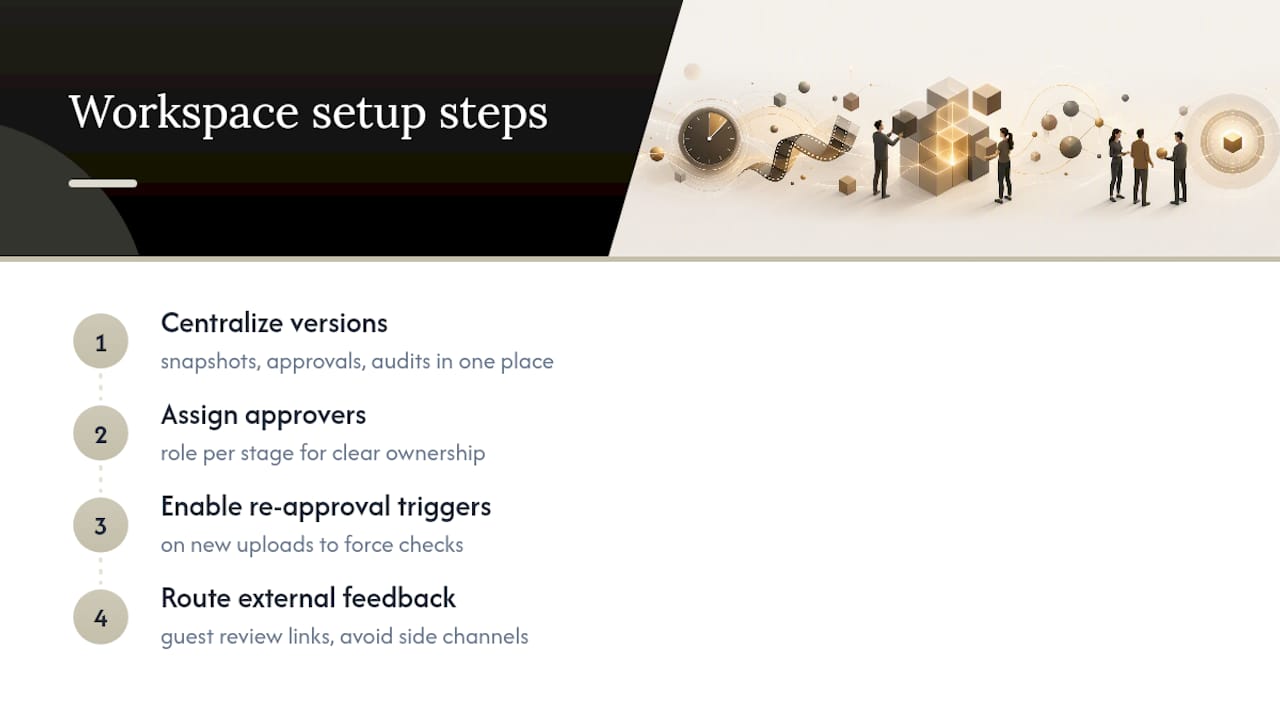
Inside the 30-minute setup, a post-production workspace’s role gets specific: assign approver roles for each stage, set re-approval triggers on new uploads, and route external feedback through guest review links so nothing arrives by side channel. The result is a record built for the exact purpose teams agree on: fast reconciliation, not blame.
Speed vs. Traceability: When to Cut Corners and When Not To
Quick overwrites are fine for low-value social posts. Nobody needs a full audit trail for a caption typo fix. Regulated campaigns, paid media, and anything with licensing terms are a different story. One missed re-approval there can turn into a legal or financial problem.
Tier your governance by risk: light logging for disposable content, full traceability for anything a client or a regulator might ask about later. Scale past a couple of people, and a workspace stops being optional.
— Lorenz
Posthive: A Practical Workspace for Edit Change Logs
Posthive is the alternative to stitching together spreadsheets, email threads, and shared drives for version control. It gives you version snapshots, named approvals tied to a specific cut, guest reviewer links for clients without extra seats, and an append-only history that nobody can quietly rewrite. Cloud connectivity and calendar integration keep the whole record in one place instead of scattered across five tools.

Small teams with real discipline can run a manual system for a while and get away with it. The moment a project involves multiple approvers, paid media, or client sign-off with real stakes, that discipline stops scaling and the gaps start showing. Posthive’s Pro and Enterprise plans are built for exactly that jump, with unlimited free seats for teams and clients on every tier. Check the plans and see which fits your next production cycle.
Sources
For teams building out their own review process, the creative approval workflow setup guide covers version comparison tools in more depth, and the video project management guide walks through review rounds specific to video. For audio-focused teams, mix engineer client communication tips covers how to route feedback without losing it to side channels.
- Version history and audit trails in content approval: who approved what, and why it matters
- How to Manage a Video Project With a Team in 2026 (Review Rounds, Versions and Feedback That Works) | Storyflow
- Shoots
FAQ
What Is the Difference Between a Version History and an Audit Trail?
Version history tracks what changed between drafts, like a new color grade or a trimmed scene. An audit trail tracks who made a decision and when, and the two need to be linked so an approval always points to one exact version.
How Do I Edit a Change Log Without Losing the Original Record?
You don’t edit the existing entries. A properly built change log is append-only, meaning new actions get added on top while old entries stay locked. If you need to correct something, add a new entry noting the correction rather than overwriting the original.
Why Should I Avoid Naming Files “FINAL”?
Because it almost never is. Sequential naming with dates, like ProjectName_v04_2026-09-14, keeps the version order clear even after three more rounds of “final” changes.
Can a Spreadsheet Work as an Edit Change Log?
For small, low-stakes projects, yes, as long as the team is disciplined about entries. Spreadsheets fail the permanence test because anyone can edit or delete a row, which makes them unreliable once a project involves paid media, licensing, or multiple external approvers.
Does Posthive Track Approvals by Version or by Project?
Posthive ties approvals to a specific version snapshot rather than a general project status, so a later edit never silently inherits an earlier sign-off. Pricing for Pro and Enterprise plans, including unlimited seats for teams and clients, is listed on the Posthive pricing page.