Production Teams: 72 Hour GDPR Rules for Video Files
Production Teams: 72 Hour GDPR Rules for Video Files

Yes. GDPR applies to any video where a person is identifiable, whether that’s a clear face, a voice, or a license plate, and only exempts truly private household use like a home doorbell camera. If your organization records, stores, or shares such footage, you’re a controller with real obligations: a lawful basis, a documented purpose, minimal capture, adequate security, and a process for handling access or deletion requests. Before anything else, document your legal basis and freeze external sharing until you’ve settled your retention and redaction policy.
TL;DR:
- Video footage containing identifiable individuals is subject to GDPR unless it is used strictly for private domestic purposes with no organizational involvement.
- Organizations must document the purpose, perform DPIAs for large-scale or biometric monitoring, and minimize data collection through careful camera placement and resolution choices.
- Redaction must be irreversible, and automated deletion rules should be implemented to ensure footage is retained only within justified time frames, typically not exceeding 72 hours for security.
- Security measures such as encryption, role-based access, detailed logs, and secure sharing are essential to protect footage from breaches and unauthorized access.
- When sharing with external vendors or processors, contracts must specify processing scope, security obligations, and deletion timelines, especially for cross-border transfers outside the EU/EEA.
Table of Contents
- Your GDPR for Video Files Compliance Checklist
- When GDPR Applies and Which Legal Basis Actually Fits
- Minimizing Footage and When Anonymization Gets You Out of Scope
- DPIAs for Video: When You Need One and How to Scope It
- How Long to Keep Video Files and How to Delete Them Automatically
- Locking Down Video Files: Security Controls That Actually Hold Up
- Sharing Footage With Editors, Vendors, and Partners Across Borders
- Handling Access, Deletion, and Objection Requests for Video
- Sector-Specific Rules Worth Knowing
- Practical Production Workflow Controls Worth Building In
- Where to Go for the Official Guidance and Templates
- An Editor’s Take: Compliance Doesn’t Have to Kill Creativity
- Keep Your Production Workflow GDPR-Ready With Posthive
- Sources
- FAQ
Your GDPR for Video Files Compliance Checklist
This is the order to work through, not a wish list. Each item below maps to something a regulator or a data subject complaint could actually ask you to prove.
- Write down the legal basis and purpose for every camera or recording type. “Security” alone won’t hold up under scrutiny, so name the specific risk you’re addressing, whether that’s theft, safety incidents, or contractual delivery proof.
- Run a DPIA trigger check first. Biometric identification, large-scale monitoring, or filming public spaces systematically almost always require one.
- Minimize what the lens actually captures. Angle cameras away from public sidewalks, mask non-essential zones, and ask whether a lower-resolution or audio-only alternative would do the job.
- Anonymize before anything leaves your secure environment. That means irreversible redaction, not a blur layer someone could strip out later.
- Set automated deletion rules tied to your stated retention window, not manual cleanup that depends on someone remembering.
- Encrypt files at rest and in transit, restrict access by role, and log every share. If you can’t show who touched a file and when, you don’t have a real audit trail.
Treat this as a gate, not a suggestion. Skipping step one, the documented purpose, is the single most common reason organizations fail an audit even when their technical security is solid.
When GDPR Applies and Which Legal Basis Actually Fits
Identifiability is the test, not resolution or intent. If a viewer, combined with other available information, could reasonably work out who’s on screen, GDPR applies. The household exemption is narrower than most people assume: it covers footage confined to genuinely personal or domestic activity, like a family reviewing home movies, not a home office worker recording client calls or a small business owner’s storefront camera facing a public sidewalk.
Once GDPR applies, you need a lawful basis under Article 6. In practice, most video use in creative and production settings falls into a few buckets:
Legitimate interests covers most CCTV for asset protection and premises security, but only after a real balancing test weighing your business need against the person’s privacy expectation. That test needs to be written down, not just assumed. Consent fits scenarios like customer testimonial footage or marketing interviews, where the person can meaningfully say no without consequence. Contract performance covers footage tied to delivering a paid service, such as filming a client event you were hired to document. Legal obligation and public task are narrower and mostly relevant to regulated industries or public bodies.
Article 9 raises the bar sharply. If footage involves biometric identification, health information visible on screen, or data revealing someone’s racial or ethnic origin, religious belief, or similar special categories, you generally need explicit consent or a narrowly defined legal basis, and the EDPB’s guidance on video devices treats this as a distinct, higher standard from ordinary CCTV footage. A staff training recording used purely for internal skills review sits in a very different risk category than facial recognition software scanning a lobby.
Minimizing Footage and When Anonymization Gets You Out of Scope
Anonymization and pseudonymization are not the same thing, and confusing them is where a lot of production teams get exposed. Pseudonymized footage, where you’ve replaced a name with a code but the face is still visible and reversible, remains personal data under GDPR. True anonymization has to be irreversible: nobody, not you, not a court order, not a determined third party with access to other data sources, should be able to reconstruct the original identity.
That distinction has teeth. Comparative privacy guidance on video redaction confirms that irreversible anonymization, such as re-encoding or overwriting pixel data, is what’s actually required to place footage outside GDPR’s scope, not a cosmetic blur layer applied in a preview window. A blur overlay that sits on top of the original frames in your editing timeline is reversible the moment someone exports the underlying source or disables the effect. It looks compliant in a client review; it isn’t.
Real technical redaction means the face data is gone from the encoded file itself: frame overwrite, permanent pixelation baked into the export, or a full re-encode that strips the original pixel information along with embedded metadata like GPS tags or device serial numbers. Metadata stripping matters more than most editors realize. A redacted face with an intact EXIF timestamp and location can still narrow down identity fast.
For a practical post-production workflow, anonymize at the export or delivery stage, never in the raw ingest footage you might need to revisit. Keep one secured, access-logged master with faces intact for legitimate internal use, and generate a separately redacted version for anything leaving that environment. Document which version went where and when, because if a regulator or a data subject asks, “who saw the unredacted footage,” you need an answer with a timestamp attached.

Pro Tip: Build redaction into your export template rather than treating it as a manual step someone remembers to do. If a producer has to consciously choose to redact, it will eventually get skipped under deadline pressure.
DPIAs for Video: When You Need One and How to Scope It
A Data Protection Impact Assessment isn’t optional once your footage crosses certain thresholds. You need one when processing involves:
- Biometric identification or verification, including facial recognition systems layered on top of standard footage.
- Systematic, large-scale monitoring of a publicly accessible area, which covers most retail, transit, and venue CCTV networks.
- Novel or invasive technology, such as AI-based behavior analysis, gait recognition, or automated demographic profiling from video.
A DPIA doesn’t need to be exhaustive to be defensible. At minimum, it should describe the processing (what’s captured, by what device, for how long), justify necessity (why this method, why not something less intrusive), map the realistic risks to the people being filmed, and record mitigations you’ve actually implemented, not ones you plan to get to eventually.
Use this scoping checklist before you write the assessment: which cameras or recording tools are in scope, where footage is stored and for how long, who has access and under what role, whether footage ever leaves your organization, what your retention trigger is, and how easily someone could be re-identified from the output. Once the DPIA is done, involve your data protection officer or equivalent lead, record the final decision in writing, and revisit it whenever the camera setup or purpose changes.
How Long to Keep Video Files and How to Delete Them Automatically
Storage limitation isn’t a suggestion; it’s Article 5 in plain terms, and it means you need a specific reason for every day footage stays on your servers, not a default “keep everything” policy. Regulator guidance is blunt on this point: vague retention justifications don’t survive scrutiny, and holding footage beyond roughly 72 hours generally needs a stronger, documented reason than “we might need it someday.”
For security or incident-detection footage, a short window, often measured in days rather than weeks, is usually enough to catch and act on whatever you’re trying to prevent. Production and creative footage runs on different logic: raw client deliverables might need retention tied to project completion and any warranty or dispute period in your contract, while marketing footage used for ongoing campaigns might justify a longer, but still bounded, retention period tied to the campaign’s active life.
The fix that actually works is automating deletion rather than relying on someone to remember. Event-based triggers (delete 30 days after project sign-off) and case-based triggers (delete once a security incident is closed and documented) both remove the human failure point. A tool like Posthive’s version control system can help attach retention metadata to a project at the point files are ingested, so deletion rules apply automatically as the project moves through its lifecycle instead of depending on a spreadsheet nobody updates.
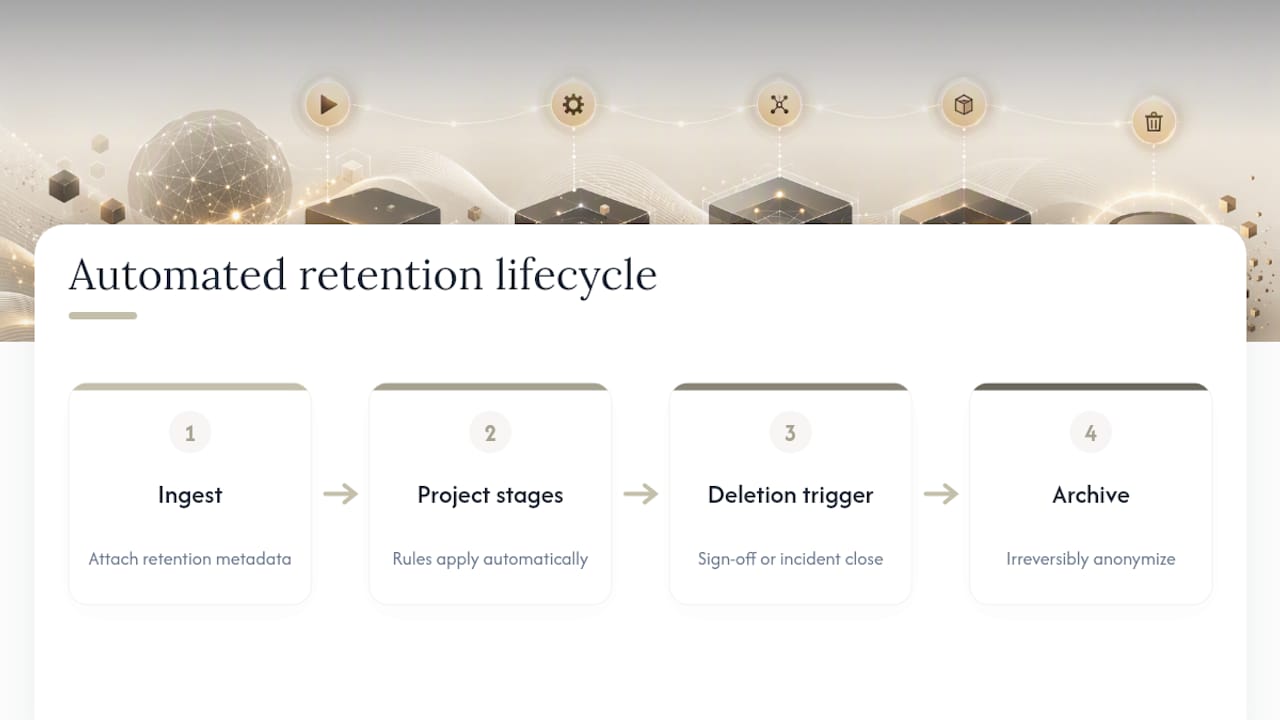
If you need to keep material for historical, training, or archival value, anonymize it first. Once identifying data is irreversibly stripped, the footage falls outside GDPR’s retention limits entirely, letting you preserve institutional knowledge without an indefinite compliance liability sitting on a hard drive.
Locking Down Video Files: Security Controls That Actually Hold Up
Article 32 requires security measures “appropriate to the risk,” which is deliberately vague on paper but fairly concrete in practice for video. Here’s what regulators and auditors expect to see:
- Encryption at rest and in transit, with key management handled by a dedicated system rather than shared passwords sitting in a spreadsheet.
- Role-based, time-limited access, so an editor sees only the projects they’re assigned to, and access expires when the project or contract ends.
- Audit logs that record who accessed, downloaded, or shared a file, and when, creating a chain of custody you can actually produce on request.
- Secure sharing methods for anything leaving your environment: expiring links, password protection, and visible watermarking for review cuts sent to clients or stakeholders.
- Vetted subprocessors for any external tool touching raw footage, with contracts that specify security obligations rather than a handshake agreement.
Most breaches in production environments don’t come from sophisticated attacks. They come from a raw client cut sent over a consumer file-sharing link with no expiration date, still sitting there months later. Tools built specifically for password-protected video sharing close that gap without adding friction to a review cycle, and a quick internal audit using something like a media file security checklist can surface these gaps in an afternoon rather than after an incident forces the issue.
Sharing Footage With Editors, Vendors, and Partners Across Borders
When you send footage to an outside editor, colorist, or analytics vendor, you’re usually still the controller, and they’re acting as a processor on your behalf, which means the compliance obligation doesn’t transfer with the file. Your contract with that processor needs to spell out the scope of processing allowed, the security measures they must maintain, deletion timelines once the work is done, and whether they can bring in their own subprocessors without asking you first.
Cross-border transfers add another layer. If footage moves to a processor outside the EU/EEA without an adequacy decision covering that country, you generally need Standard Contractual Clauses in place, or you need to minimize what’s actually transferred, sending a redacted or lower-resolution cut instead of raw masters where the full-resolution original isn’t strictly necessary for the work.
Before onboarding any video vendor, run a short due-diligence pass: where do they store data, what’s their retention default, do they encrypt in transit, and will they sign a processor agreement with real teeth rather than a generic terms-of-service page. A zero-data-retention approach is worth understanding here, since some vendors now offer processing that never persists your footage past the immediate task, which meaningfully shrinks your transfer risk footprint.
Handling Access, Deletion, and Objection Requests for Video
Someone asking “can I see the footage you have of me” is a legitimate, common request, and you generally have one month to respond. Here’s the operational sequence:
- Search and locate the footage, using timestamps, location, and any identifying details the requester provides to narrow the search rather than reviewing everything you hold.
- Verify the requester’s identity before disclosing anything, since handing over footage to the wrong person is its own data breach.
- Redact any third parties visible in the frame before disclosure, since you can share footage of the requester without exposing everyone standing near them.
- Deliver through a secure, access-logged channel, never an unprotected email attachment, and log the disclosure date and method.
Erasure requests follow a similar path, but you can lawfully refuse or delay deletion when you have an active legal obligation to retain the footage, such as an ongoing investigation or litigation hold. Whatever you decide, notify any processor holding a copy, document the reasoning in writing, and keep that record as part of your audit trail. Loughborough University’s guidance on using video and photographs in an institutional setting offers a useful real-world framework for handling requests involving crowds versus identifiable individuals, a distinction that comes up constantly in event and campus footage.
Sector-Specific Rules Worth Knowing
Healthcare recordings frequently touch special-category health data the moment a patient’s condition is visible on screen, which pushes you toward explicit consent and stronger internal governance than standard footage requires. Education and assessment recordings, common in online learning and exam proctoring, demand tight data minimization and a purpose statement that survives scrutiny beyond “we might need it later.” Marketing and customer-facing video should default to explicit consent for anyone identifiable, with anonymization as the fallback whenever consent isn’t practical to obtain. Webinars and recorded calls need a clear notice the moment recording starts, plus a retention answer ready if a participant asks how long that recording sticks around, since silence on this point is one of the most common complaints filed with data protection authorities.
Practical Production Workflow Controls Worth Building In
The gap between knowing GDPR’s rules and actually operating inside them comes down to workflow design, not intent. Most teams don’t skip compliance out of carelessness; they skip it because nobody built the guardrail into the daily process.
- Attach legal-basis and purpose metadata at the ingest step, so every file carries its retention rule and justification from the moment it enters your system rather than getting sorted out later from memory.
- Make redaction a required gate before external distribution, not an optional pass, so a project can’t ship to a client review without it if the footage requires it.
- Use role-based shares and expiring links for every external collaborator, especially freelancers and vendors who don’t need permanent access after their task is done.
- Keep a running record of processing activities, since a Record of Processing Activities isn’t just a regulator formality, it’s the fastest way to answer your own team’s questions about what footage exists and why.
Embedding legal-basis metadata at ingest, rather than trying to reconstruct it after the fact, is one of the clearest structural fixes available to post-production teams, and it’s a principle Posthive builds directly into how projects move through a workspace. A workflow where retention and access rules travel with the file, instead of living in someone’s memory or a separate compliance spreadsheet, closes most of the gap between policy and practice.
Where to Go for the Official Guidance and Templates
Start with the EDPB’s Guidelines 3/2019 on video devices, the primary regulator source behind most of the practical guidance in this article, and check your national data protection authority for local DPIA templates, since several publish free, fillable versions. For anonymization method comparisons across jurisdictions, the BGBlur guide to video redaction is a useful cross-reference if your footage touches multiple regulatory regimes. Posthive’s own privacy policy is worth a read as a plain-language example of the notice and transparency language regulators expect to see.
An Editor’s Take: Compliance Doesn’t Have to Kill Creativity
The tension people worry about, locking down footage versus keeping it usable, is mostly a false choice. What actually breaks projects is retrofitting compliance after a client already has the raw cut. Build privacy into the export template from day one, and redaction becomes a five-minute editorial habit rather than a scramble.
The real trade-off is between full editability and anonymization; you can’t have both on the same file forever. Keep one secured master with faces intact for legitimate revisions, and generate the redacted version at delivery. That single workflow decision solves most of the friction teams describe.
— Lorenz
Keep Your Production Workflow GDPR-Ready With Posthive
Posthive is built for the exact gap most compliance advice skips: the messy middle where footage moves between editors, clients, and freelancers before anyone stops to think about who has access to what. Instead of chasing down which version went to which reviewer over email, some centralized workspaces offer version control, secure sharing, and task tracking in one place, so retention rules and access permissions travel with the project instead of living in someone’s inbox.

That centralization matters more than it sounds. Every ad-hoc share link, every “just send it over WeTransfer” moment, is a compliance gap you can’t audit later. A single workspace with role-based access and a visible history of who touched a file, and when, gives you the audit trail regulators expect without slowing down your review cycles. If your team is still coordinating video projects across scattered tools and email threads, take a look at Posthive’s workspace and see how it fits into your next production cycle.
This article is general information, not a substitute for advice from a qualified lawyer. Consult a qualified legal professional about your own circumstances before acting on anything here.
Sources
- Guidelines 3/2019 on processing of personal data through video devices | European Data Protection Board
- I want to use video, sound-recordings, and photographs — Loughborough University
- CCPA vs GDPR: Video & Image Privacy Guide — Medianonymizer
FAQ
Does GDPR apply to video recordings?
Yes, whenever a person is identifiable in the footage, whether through their face, voice, or another distinguishing detail. The main exception is the household exemption, which covers strictly personal or domestic recording, not business use like a shopfront camera or a client project.
What can you not do under GDPR when handling video?
You can’t collect footage without a documented, specific purpose, keep it longer than that purpose justifies, or share it externally without adequate security and, where required, a processor agreement. You also can’t ignore a valid access, erasure, or objection request from someone in the footage.
What are the core GDPR requirements for video files?
The practical requirements are a lawful basis under Article 6 (and Article 9 for special categories), a documented and specific purpose, data minimization, appropriate security under Article 32, a DPIA when high-risk triggers apply, and a working process for responding to data subject rights.
Can anyone ask for security camera footage?
Yes, a person appearing in the footage can request a copy of the recording that shows them, and you generally have one month to respond after verifying their identity. You should redact any other identifiable people visible in the same frame before disclosing it.
How long should we keep video footage before deleting it?
There’s no fixed universal number, but regulator guidance treats retention beyond roughly 72 hours as needing a stronger justification for typical security footage. Production and client footage can justify longer retention tied to project or contract timelines, provided that reasoning is documented and enforced through automated deletion rather than manual cleanup.