Production Teams: Media File Security You Can Test in an Afternoon
Production Teams: Media File Security You Can Test in an Afternoon
Restrict every media endpoint behind authentication, serve shared files through signed URLs that expire in seconds to minutes, and keep encrypted, immutable backups off your primary storage. Disable directory listing on any webserver hosting media. These four moves close the gaps that account for most leaks, and match how Google Cloud’s Media CDN and platforms like Posthive already handle delivery. Reach for DRM and forensic watermarking only when you’re distributing high-value premieres or unreleased screeners.
TL;DR:
- Signed URLs should expire within 30 to 60 seconds to prevent forwarded links from being useful after short periods.
- Disabling directory listing and implementing referrer checks can drastically reduce accidental or intentional exposure of media files.
- Applying role-based access control and permission checks at the CMS, server, and CDN levels prevents unauthorized access and hotlinking.
- Backups must be encrypted, stored offsite, and kept immutable with strict access controls to ensure recoverability after ransomware or accidental loss.
- Using delivery platforms like Posthive integrates security, version control, and client access, reducing reliance on insecure file sharing and email-based workflows.
Table of Contents
- Quick Checklist for Hardening Your Media Library
- Why Media File Security Actually Matters for Production Teams
- The Threat Vectors That Actually Expose Media Files
- Protection Methods by Layer: CMS, Server, CDN, and DRM
- Setting Up Protections and Verifying They Actually Work
- Backup and Recovery Strategies That Actually Hold Up
- Governance That Keeps Media Security From Decaying
- Where Posthive Fits Into a Secure Media Workflow
- A Pragmatic Take on Locking Down Media Files
- Try Posthive for Secure, Version-Controlled Media Delivery
- Authoritative Resources for Advanced Media Protections
- Sources
Quick Checklist for Hardening Your Media Library
You can knock out the fundamentals in an afternoon. The deeper controls take longer, but they’re worth scheduling this quarter.
- Disable directory browsing on every server folder that stores media.
- Put role-based ACLs on all media endpoints, not just the admin dashboard.
- Replace public links with signed URLs that expire quickly for sensitive assets.
- Set up encrypted, versioned backups stored outside your primary hosting environment.
- Walk through every access path yourself, pretending to be an outsider, and confirm each one fails the way it should.
Once these are live, schedule DRM and forensic watermarking for anything tied to unreleased content, festival screeners, or contractual non-disclosure terms. Those tools take longer to integrate and aren’t worth the overhead for routine project files.
Why Media File Security Actually Matters for Production Teams
A leaked cut of an unreleased film or a client’s unannounced ad campaign isn’t just embarrassing. It’s lost revenue, a broken contract, and sometimes a lawsuit. Studios budget entire release strategies around controlled reveals, and a single leaked screener can undercut box office projections before a film even opens.
For healthcare, education, or government clients, media file security intersects with HIPAA and CCPA obligations. A training video with a patient’s face in the background, or a webinar recording with personal data exposed, can turn a storage misconfiguration into a compliance violation with real penalties attached.
There’s also a quieter cost: hotlinking and unauthorized downloads. Every time another site embeds your video or image directly from your server, you pay the bandwidth bill for their traffic. At scale, that’s a real line item, not a rounding error.

The Threat Vectors That Actually Expose Media Files
Most media leaks trace back to a handful of repeatable mistakes, not sophisticated attacks.
- Hotlinking and bandwidth leeching: another site embeds your image or video URL directly, and your server pays to serve their visitors.
- Directory indexing left enabled: a misconfigured server exposes an entire folder of raw files to anyone who guesses the URL.
- Leaked or overshared links: a “view-only” link gets forwarded outside the intended audience, and there’s no expiry to stop it from circulating indefinitely.
- Weak or missing ACLs: files sit on shared drives or CMS uploads folders with no role restriction, so anyone with an account (or a stolen one) can grab them.
- Credential compromise: a single reused password on a contributor account gives an attacker access to your entire media library, not just their assigned project.
Each of these shows up constantly in real production workflows. A freelancer’s Dropbox link gets shared in a group chat. A WordPress uploads directory sits open because directory browsing was never turned off. The fixes are boring, but that’s exactly why they get skipped.
Protection Methods by Layer: CMS, Server, CDN, and DRM
Media file security works best as layers, not one silver bullet. Here’s how the controls stack, from your CMS out to the edge network.
- CMS-level controls. If you’re running WordPress or a similar platform, use private attachment settings and role-based access instead of relying on “unlisted” URLs, which are just security through obscurity. Password-protect sensitive pages, and pick plugins that enforce server-side permission checks rather than just hiding links in the front end with CSS. Avoid plugins that only obfuscate URLs client-side. That’s cosmetic, not a control.
- Webserver-level rules. Disable directory listing outright with
Options -Indexesin your Apache.htaccessfile, and block hotlinking by checking the referrer header before serving image or video requests. On Nginx,X-Accel-Redirectlets you authenticate a request in your application layer, then hand the actual file transfer off to Nginx internally, so the real file path never gets exposed to the client. - CDN and signed-URL tokens. This is where most professional media platforms concentrate their defense. Google’s Media CDN documentation describes a dual-token approach: short-duration tokens (around one minute) for manifest requests, and longer tokens for the actual playback session. Many professional platforms issue signed URLs that expire in as little as 30 to 60 seconds, which makes a forwarded link functionally useless within a minute. Pair token expiry with origin validation so requests that bypass your CDN entirely get rejected outright.
- DRM and forensic watermarking. Reserve these for content where a leak carries real financial or contractual weight. AWS Elemental MediaPackage integrates DRM through SPEKE key exchange, supporting Widevine, PlayReady, and FairPlay across standard container formats. Forensic watermarking embeds a per-session identifier invisible to viewers but traceable if a copy leaks, which matters more for deterrence than prevention. The trade-off is integration complexity and player compatibility testing, so don’t add DRM to a file library that doesn’t need it.
Pro Tip: Test your signed URLs by copying one and opening it from a different network or device after its expiry window passes. If it still loads, your token validation isn’t actually enforcing expiry, and that’s worth fixing before anything else on this list.
Setting Up Protections and Verifying They Actually Work
Configuration without verification is just guessing. Run through these steps and confirm each control behaves the way you expect.
- Apply server-level rules first. Disable directory indexing, add hotlink protection via referrer checks, and confirm with a direct browser request that folder listings return a 403, not a file tree.
- Configure CDN signed tokens. Set expiry windows matching your use case (seconds for previews, longer for authenticated playback), then test that an expired token returns an access error rather than serving the file.
- Set ACLs on every endpoint. Confirm a logged-out request and a logged-in request with the wrong role both fail, not just the completely anonymous case.
- Enable logging and monitoring. Turn on access logs at the server and CDN level before you need them, not after an incident.
- Run domain allowlist and origin tests. Try loading media directly from the origin server, bypassing the CDN, and confirm that path is blocked.
Check your logs for repeated 403s from the same IP (a sign someone is probing) or unexpected 200 responses on URLs that should require a token. Re-run this whole sequence after any CMS update, plugin change, or CDN configuration edit. Configuration drift is the most common way a working control quietly breaks.
Backup and Recovery Strategies That Actually Hold Up
Encryption and access control protect you from theft. Backups protect you from loss, and the two problems require different architecture. Keep encrypted backups offsite, separate from your primary storage provider, so a compromised primary account doesn’t take your recovery copy down with it.
Immutable snapshots matter here specifically because of ransomware: if backups can be overwritten or deleted by the same credentials that access production files, they’re not really backups. Set immutability windows that a compromised account can’t touch. File security overlaps heavily with data security in general, and encryption combined with strict ACLs and monitoring is the baseline most frameworks converge on.
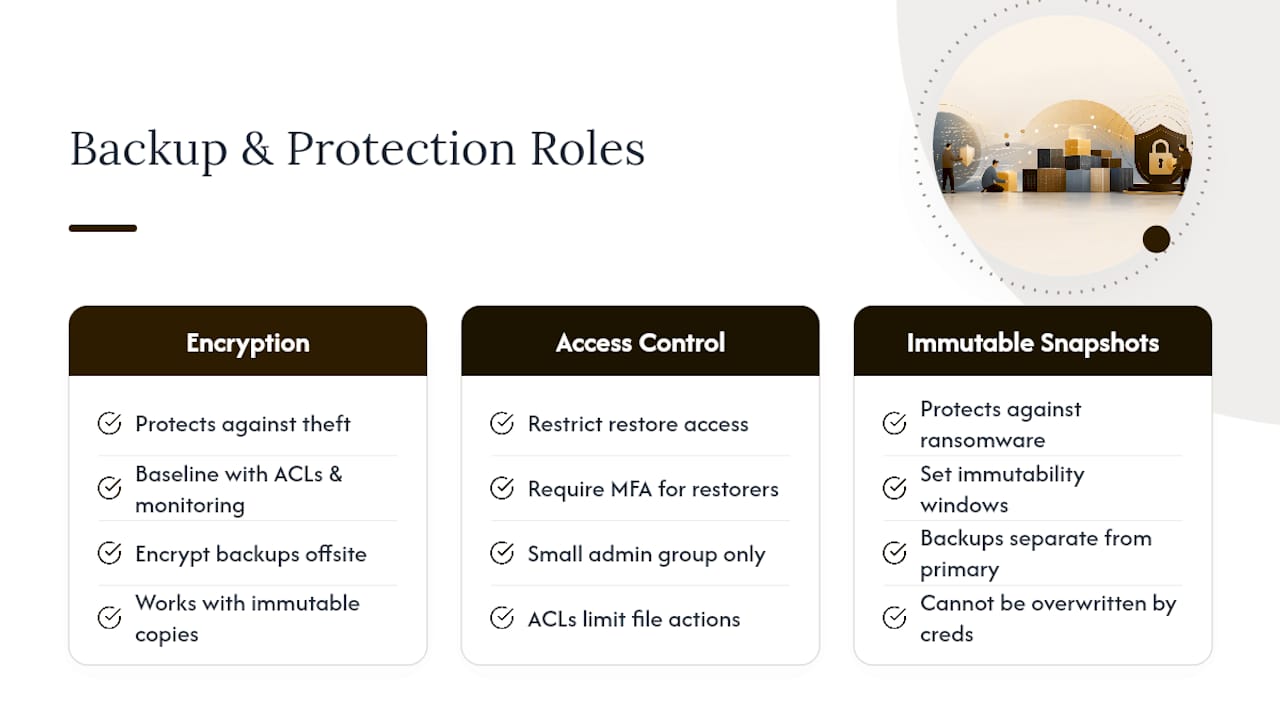
Restrict backup system access to a small group, require multi-factor authentication for anyone with restore permissions, and actually run a test restore on a schedule. A backup you’ve never restored from is a hypothesis, not a safety net.
Governance That Keeps Media Security From Decaying
Controls degrade the moment nobody’s watching them. Access reviews, offboarding discipline, and logging policy are what keep day-one protections working a year later.
- Review access permissions on a fixed schedule, not just when someone complains.
- Revoke access immediately when a contributor or freelancer’s engagement ends, not at the next audit cycle.
- Retain access logs long enough to investigate an incident after the fact, and define who’s responsible for reviewing them.
- Loop in legal or compliance early when a leak involves client contracts, personal data, or unreleased IP.
CISA’s guidance on multi-factor authentication treats MFA as a foundational control, not an optional extra, and that’s the right framing for any account with media library access. A single reused password is still one of the most common paths into an otherwise well-configured system.
Where Posthive Fits Into a Secure Media Workflow
Most of the controls above only work if your team actually uses them, which is where general-purpose cloud storage tends to fall apart. Posthive builds access control, versioning, and delivery into the workflow itself: role-based permissions replace guesswork about who can see a cut, controlled share links replace forwarded Dropbox URLs, and version history means there’s no ambiguity about which file a client approved. That combination of audit visibility and controlled delivery is exactly what enterprise-grade platforms offer that consumer-grade sharing tools typically skip.
A Pragmatic Take on Locking Down Media Files
Absolute secrecy sounds appealing until it breaks your review process. Lock a file down so tightly that a client can’t leave a timestamped comment, and you’ve traded security for chaos, because someone will just export a copy to get around you. Where I’d hold the line without exception: tokenized delivery for anything leaving your organization, and a full audit trail on every review. Everything else is a trade-off worth making consciously.
— Lorenz
Try Posthive for Secure, Version-Controlled Media Delivery
Posthive replaces the patchwork of expiring Dropbox links, forwarded WeTransfer files, and unlabeled folder exports most production teams default to. Instead, you get one workspace where access control, versioning, and delivery are built in from the start.

That means:
- Controlled share links you can revoke or expire, instead of a public URL floating in someone’s inbox forever.
- Version management that keeps clients looking at the correct cut, with a clear history of what changed and when.
- Secure delivery built for creative teams, agencies, and production companies managing client approvals under deadline.
If your team is still tracking file versions over email threads, start with Posthive and see how a centralized workspace changes what “sharing a file” actually means for your next project.
Authoritative Resources for Advanced Media Protections
- Prevent unauthorized distribution overview — Google Cloud Media CDN documentation
- Using encryption in AWS Elemental MediaPackage — AWS documentation
- Turn on multi-factor authentication (MFA) — CISA
- AFA Summit 2026 in Atlanta — American Film Association