Production Gantt Charts for Film and Video Teams
Production Gantt Charts for Film and Video Teams

A production Gantt chart maps every phase, task, versioned deliverable, and review cycle in your project onto a single visual timeline so your team can see what’s happening, who owns it, and when it’s due. For film and video work, that means pre-production through final delivery, with explicit milestones for internal QC, client review rounds, and version sign-offs. Start right now by drawing three phase bars: pre-production, production, and post-production. Add a review milestone for internal QC, one for first client review, one for final approval, and a delivery milestone at the end. That skeleton is your working chart. The sections below give you the column set, step-by-step build process, three annotated templates, and guidance on hosting it in a post-production workspace like Posthive.
Key Takeaways
A production Gantt chart works when it combines phase-based structure, named owners, explicit version labels, and a fixed update cadence — hosted in a workspace that links tasks to assets and approvals.
| Point | Details |
|---|---|
| Start with phase bars | Define pre-production, production, post sub-phases, and delivery before adding any tasks. |
| Version every deliverable | Use a consistent version label (e.g., v03_ClientR1) in the chart and the filename so approvals stay traceable. |
| Scope review rounds explicitly | Treat each review round as a milestone with a named owner, a duration, and a link to the contract clause. |
| Name a timeline owner | Set a fixed update cadence (daily or weekly) and one named person responsible for keeping the chart accurate. |
| Host in Posthive | Posthive links timeline tasks to versioned files and client approvals, removing the sync work between separate tools. |
Table of Contents
- What should a production Gantt chart include?
- How to build a production Gantt chart step by step
- Templates and annotated examples for three project types
- How to model versions, review rounds, and approvals
- Keeping the Gantt accurate: update cadence and common pitfalls
- Where should you host your production Gantt?
- Printable one-page checklist for your first production Gantt
- What actually keeps a delivery on time
- Posthive keeps your production schedule and versions in one place
- Sources
What should a production Gantt chart include?
Gantt charts help video producers break large projects into manageable tasks, reveal task overlap, and prevent omissions — but only when the columns are right. A chart missing owner fields or version labels becomes a decorative graphic by week two.
| Column | Expected value | Who owns it |
|---|---|---|
| Task name | Short verb phrase (“Sync dailies”) | PM |
| Phase | Pre-prod / Production / Post | PM |
| Owner | Named person or role | Department lead |
| Start date | Calendar date | PM |
| End date | Calendar date | PM |
| Duration | Working days | PM |
| Dependencies | Task ID(s) | PM |
| Milestone flag | Yes / No | PM |
| Deliverable / version label | e.g., “Cut v3 — client” | Editor / VFX lead |
| Review round | Internal / Client R1 / Client R2 | Producer |
| Status | Not started / In progress / Complete | Owner |
| Linked asset location | URL or folder path | Post supervisor |
The deliverable/version column matters more than most teams realize. Editing produces versioned files constantly, and without an explicit version label in the chart, review conversations lose their anchor. The linked asset location column keeps that anchor traceable: when a client asks “which cut did we approve?”, the answer is one click away.
Post-production scheduling guidance recommends allocating discrete days for copying media, project prep, audio/visual syncing, VFX prep, conform, and exports — each of those steps deserves its own task row, not a single “post” bar.
For larger shows, add optional columns: resource pool (which editor or colorist), room or studio booking, render queue slot, and ETA for VFX shots. Keep them optional until the project needs them; cluttered charts get abandoned.
How to build a production Gantt chart step by step
- Define your phases. List discovery/prep, production, post (assembly edit, VFX, grade, mix), and delivery. Each becomes a parent row or color band.
- Break phases into tasks. Group by work type in post (all VFX tasks together, all audio tasks together) rather than by scene, unless you’re tracking scene-level editorial progress on a feature.
- Estimate durations. Pull from crew input and historical data first. Scheduling guidelines advise determining delivery dates first, then sizing editorial resources — work backward from the delivery date to set every upstream task.
- Add buffers. Apply a 20% buffer to editing tasks and a 30% buffer to VFX tasks. Keep the chart flexible: add time cushions for crew availability and allow for rapid insertion of unplanned tasks.
- Set dependencies. Sound editorial can run in parallel with picture editorial after picture lock on some shows — model that explicitly rather than stacking it sequentially.
- Assign owners. Every task needs a decision owner, an approval owner, and a backup contact. A task with no named owner is a task that will slip.
- Add review milestones. Internal QC, client R1, client R2 (if scoped), and final approval each get a milestone row with a date and an owner.
- Link assets. Paste the folder path or review link into the linked asset location column before the first review goes out.
Sample task list for a single deliverable (30-second commercial):
- Media copy and project prep: 0.5 days
- Assembly edit: 1 day
- Director review (internal): 0.5 days
- First cut: 1 day
- Client R1 review window: 2 days
- Revisions: 1 day
- VFX passes: 2–3 days
- Color grade: 1 day
- Audio mix: 1 day
- Client final approval: 1 day
- Export and delivery: 0.5 days
Templates and annotated examples for three project types
Three project types cover most of what U.S. production teams encounter. Each has different pressure points.
| Project type | Typical post duration | Key pressure point |
|---|---|---|
| Short film | 2–6 weeks | VFX and festival delivery deadlines overlap |
| Episodic episode | 2–4 weeks editorial per episode | Parallel episodes create resource conflicts |
| 1-day commercial | Overnight edit, delivery within two days | Client approval window compresses everything |
Short film. Phase bars run from production wrap through festival delivery. Version tags appear at assembly, rough cut, fine cut, and picture lock. The pressure point is VFX: shots often arrive late, which compresses grade and mix. Build a contingency task (“VFX slippage buffer: 3 days”) between VFX delivery and grade start.

Episodic episode. Each episode gets its own row group. Sound editorial starts in parallel with picture editorial after picture lock — model this as a parallel branch, not a sequential dependency. Resource conflicts appear when two episodes hit client review in the same week; flag that in the resource pool column.
1-day commercial. The timeline compresses to hours, not days. Overnight edit, morning internal review, afternoon client R1, revisions, and delivery by end of day two. The review window is the critical path: a two-hour client delay cascades into a missed delivery.
Template pack. A usable template set includes a CSV file for import into PM tools, a native file for common project management applications, and a printable one-page PDF. Keep the CSV as the authoritative source; the PDF is for stakeholder read-only distribution. The PM or post supervisor owns duration updates; department leads own status and version labels.
Pro Tip: Color-code phases or departments — pre-production in one color, VFX in another, audio in a third. Teams adopt the chart faster when they can find their section at a glance.
How to model versions, review rounds, and approvals
Treat every review round as a scoped deliverable with its own milestone and duration. That one shift stops review loops from appearing as schedule failures and makes scope creep visible before it becomes a budget conversation.
- Internal review: assign to director or supervising producer; duration is typically 0.5–1 day; output is a notes document linked in the chart.
- Client R1: assign to producer as decision owner; duration is the contractually agreed review window (commonly 2–3 business days); output is a marked-up version or written approval.
- Client final approval: assign to executive producer; this milestone gates delivery; no downstream task starts until it’s marked complete.
Checklist for scoping review rounds:
- Confirm the number of included revision rounds in the contract before building the chart
- Link each review milestone to the relevant payment or milestone clause
- Add a “scope change” flag column to log any revision request that falls outside the agreed rounds
- Name a decision owner for every review milestone — not just a department, a person
For version naming, use a convention that maps directly to the file in your review tool: ProjectName_v03_ClientR1_YYYYMMDD. That string should appear identically in the Gantt’s deliverable/version column and in the filename. When a client asks which version they approved six weeks later, the answer is in the chart.
Pro Tip: Add a “decision log” tab or linked document to your Gantt. Every approval, rejection, and scope change gets a one-line entry with a date and a name. This single habit removes most “I thought we agreed” conversations.
Keeping the Gantt accurate: update cadence and common pitfalls
Name one person as the timeline owner and set a fixed update cadence before the project starts. Without a named owner, the chart drifts from reality within days.
Recommended cadences: daily standups with a chart check for rapid-turn commercial work; weekly updates for standard episodic or feature post. Frequent, short updates enable earlier detection of schedule conflicts — a five-minute weekly review catches a slipping VFX task before it hits the grade.
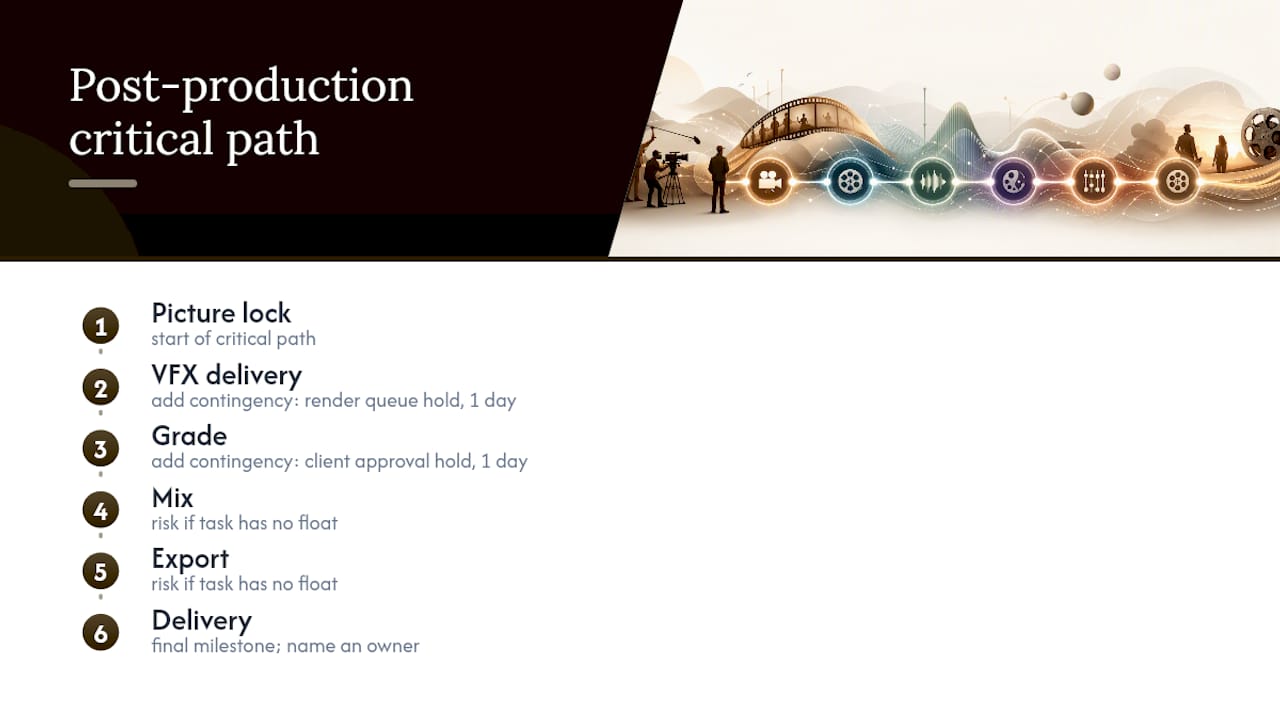
The critical path in a post-production timeline typically runs: picture lock → VFX delivery → grade → mix → export → delivery. Any task on that chain with no float is a risk. Add contingency tasks (“render queue hold: 1 day,” “client approval hold: 1 day”) at the two most likely bottlenecks.
The most common failure mode in creative project timelines isn’t slippage — it’s treating discovery as slippage. When a director finds a better cut in week three, that’s not a failure; it’s the work. Gantt charts assume the work ahead is knowable; for creative projects that surface decisions mid-flight, phase-based planning, decision logs, and scoped revision rounds are more effective than rigid task-level timelines. Build the chart to absorb discovery, not to punish it.
Common pitfalls: front-loading decisions before the team has enough information, treating every delay as a scope problem rather than a planning problem, and not logging decisions so the same conversation repeats three times. The mitigation for all three is the same: a decision log linked to the chart and a named owner for every milestone.
Where should you host your production Gantt?
Short answer: in a collaborative post-production workspace that links timeline tasks directly to assets and review links. Post-production studios benefit from timeline views that visualize dependencies, critical paths, and resource bookings while linking assets and feedback to tasks to avoid version confusion.
Spreadsheets work for solo freelancers and very small jobs. They break down fast when multiple people update the same file, when you need to link a task to a review asset, or when a client needs permissioned read-only access.
General PM tools give you better collaboration and dependency modeling, but most weren’t built for versioned media deliverables. You end up maintaining a separate folder structure and a separate review tool, then manually keeping them in sync.
A dedicated post-production workspace solves the sync problem. When the Gantt lives inside the same platform as your versioned files and review links, version tags, review milestones, and approval status update in one place. A post-production workspace that ties timeline tasks to review links, versioned files, and decision logs removes repeated “did we approve this?” conversations and reduces rework time.
A practical hybrid: keep a master Gantt for executive stakeholders (a clean PDF or read-only view), and run the living, task-linked timeline inside your post-production workspace where the team actually works.
Pro Tip: Look for a workspace that supports calendar sync and owner fields at the task level. When a colorist’s availability changes, the calendar sync surfaces the conflict before it hits the schedule.
Printable one-page checklist for your first production Gantt
Complete these six items and your chart is operational:
- Define phases: pre-production, production, post (with sub-phases), delivery
- Add deliverables: one row per versioned output, with a version label column
- Add review milestones: internal QC, client R1, client final approval, each with a named owner and a date
- Assign owners: decision owner, approval owner, and backup for every task
- Set update cadence: daily or weekly, with a named timeline owner
- Link assets: paste the folder path or review URL into the linked asset location column before the first review
Before the first shoot day, lock the phase dates, delivery date, and review windows. Those three anchors don’t change without a formal scope conversation. After kickoff, lock the column structure so no one adds or removes fields without the PM’s sign-off — schema drift makes the chart unreadable within two weeks.
For fast imports, build a CSV with columns matching the table in the “What to include” section above. Most PM tools accept a CSV import; populate task names, phases, owners, and dates in the spreadsheet, then import once rather than building row by row in the tool.
What actually keeps a delivery on time
The Gantt chart is not the thing that keeps a delivery on time. The decision log is.
Every production I’ve seen slip past its delivery date had one thing in common: decisions made in a room that never made it into the chart. The director approved a cut verbally. The client said “looks good” on a call. Nobody wrote it down. Three weeks later, the same conversation happens again, except now it’s a week before delivery and the grade is already booked.
The practice that prevents it is simple: every approval, every scope change, and every “we’ll revisit this” gets a one-line entry with a date and a name, linked from the milestone in the chart. When that habit is in place, the Gantt becomes a trusted document rather than an optimistic fiction.
What I check every morning: which milestones are due in the next 48 hours, whether the linked asset is actually in the review tool, and whether the decision owner has been notified. What triggers escalation: any milestone with no named owner, any review window that has passed without a logged decision, and any VFX task that has slipped more than two days without a revised ETA.
Posthive keeps your production schedule and versions in one place
Managing a production Gantt across spreadsheets, shared drives, and separate review tools costs more time than the tools save. Posthive is built to be the single place where your timeline, versioned deliverables, and client approvals live together.

The features the guide recommends map directly to what Posthive provides: version tags on every deliverable, review milestones linked to the actual asset, permissioned client access so reviewers see only what they need, calendar sync that surfaces scheduling conflicts before they hit the timeline, and owner fields at the task level so accountability is never ambiguous.
- Start a free trial at Posthive and import your first Gantt template
- Invite your editor, colorist, or client reviewer with one link
- Track approvals and version sign-offs without leaving the workspace
Sources
- Why Gantt Charts Fail Creative Teams (And What to Do Instead)
- A Detailed Guide to Gantt Charts for Video Production | Instagantt
- SCHEDULING GUIDELINES_20210323_PublicCirculation