Stop Wrong Cut Approvals for Post Production: 4 Phase Audit Trail
Stop Wrong Cut Approvals for Post Production: 4 Phase Audit Trail

A project audit trail is the chronological record of who changed which deliverable, when, and why. It logs every version, review comment, and approval so nobody signs off on the wrong cut. For post-production teams, the fix is simple: use immutable version IDs and route every review through one canonical link per version, never a scattered mix of email attachments and shared folders.
TL;DR:
- Using a single, canonical review link per version ensures approvals are correctly tied to the intended export, avoiding mix-ups from scattered review methods.
- Enforcing strict filename versioning, archiving old builds, and including a one-sentence change note prevents approval of outdated or incorrect deliverables.
- Assigning clear approval owners and requiring timestamped, detailed feedback helps maintain accountability and streamline review cycles.
- Building a structured lifecycle with well-defined states and regular retirement of old versions reduces clutter and risk of referencing invalid files.
- Automating metadata inheritance and backing up approval records external to review tools safeguards the audit trail against accidental loss or inconsistency.
Table of Contents
- Why an Audit Trail Matters for Post-Production Projects
- Core Components Every Project Audit Trail Should Record
- Non-Negotiable Rules to Avoid Wrong-Cut Approvals
- A Step-by-Step Checklist to Build an Audit Trail Into Your Workflow
- What Actually Breaks Audit Trails (and How to Fix It)
- How Posthive Keeps Your Audit Trail Honest
- Sources
- FAQ
Why an Audit Trail Matters for Post-Production Projects
Version confusion is expensive. A client approves a cut on Tuesday, the editor makes three more passes by Friday, and now nobody can say for certain which file the approval actually applies to. On a multi-deliverable project, that ambiguity multiplies fast: a 16:9 master, a vertical cutdown, a dubbed localization, and a broadcast-safe mezzanine can each drift out of sync with the approved version if there’s no single source tracking them.
Version control in post-production exists precisely to stop this. Centralizing assets and aligning review workflows around one place means reviewers stop opening the wrong file, and editors stop re-exporting work that was already approved days earlier.
Teams that get this right tend to see:
- Fewer approvals that later turn out to apply to a superseded version
- Clear accountability for who reviewed, who approved, and who has final say
- Faster handoffs between edit, sound, color, and delivery
- Less duplicated export work across territory and platform variants
None of this requires new software philosophy. It requires discipline about what gets recorded and where.
Core Components Every Project Audit Trail Should Record
A usable audit trail isn’t a vague changelog. It’s a defined set of fields that answer who, when, what, and why, every time a deliverable moves forward.
- Immutable version ID, timestamp, and changelog note. Every export gets a version number that never gets reused, a timestamp, and a one-line note on what changed.
- A canonical review link and explicit approval state. One link per version, with a status that reads as approved or changes requested, never a vague “looks good for now.”
- Ownership metadata. Record who exported the file, who reviewed it, and who holds final approval authority, mapped to named roles rather than “whoever’s around.”
- Version families with parent/child links. Master, mezzanine, proxy, and cutdowns should all trace back to their source cut, so a change to one doesn’t quietly orphan the others.
- Lifecycle states and retention guidance. Draft, in review, approved, and retired states, with rules for how long each stays accessible.
This mirrors the asset governance model that treats every deliverable as part of a traceable family rather than a standalone file, which is what keeps a proxy change from accidentally invalidating an approved master.
Pro Tip: Give every derivative, not just the master, its own approval state. A client can approve a full-length cut while a 15-second social cutdown is still in review — collapsing them into one status hides real risk.
Non-Negotiable Rules to Avoid Wrong-Cut Approvals
Most wrong-cut approvals trace back to one of a handful of preventable habits. Fix these and the audit trail practically maintains itself.
- Never reuse a filename for a changed export. Records management guidance from Princeton is explicit here: increment the version number every time, and keep the prior file rather than overwriting it.
- Keep one linked location per version, and archive superseded builds promptly. A live folder cluttered with old exports is where wrong-cut approvals come from.
- Include a one-sentence “what changed” note on every version 2 and beyond, and reference it directly in the request for review.
- Enforce a named approval authority. Someone specific owns the sign-off, and the approval state stays binary: approved, or changes requested.
- Require timecode references in feedback. A comment that says “the music feels off” is useless without a timestamp attached to it.
None of these rules are complicated, but skipping even one is usually what causes a review cycle to double. A review workflow that pairs one canonical link with structured, timestamped feedback cuts down the back-and-forth that otherwise eats a production week.
A Step-by-Step Checklist to Build an Audit Trail Into Your Workflow
Rolling this out doesn’t require a company-wide process overhaul. It requires four phases, done in order.
- Set up the rules. Agree on a naming schema, define your lifecycle states, and set a hard policy: one review link per version, no exceptions.
- Operationalize it. Assign named owners for export, review, and approval. Fold these into your existing handoff checklist, and automate proxy generation and metadata inheritance wherever your tools allow it.
- Measure it. Track time to first view, review cycle time, approval cycle count, and how often a reviewer needs a resend. These numbers tell you exactly where the bottleneck is.
- Scale it. Group versions into families, retire old builds on a schedule, and back up approval records somewhere outside the review tool itself.
| Phase | Core action | What to check |
|---|---|---|
| Setup | Agree naming and lifecycle rules | One review link policy documented |
| Operationalize | Assign owners, automate proxies | Handoff checklist updated |
| Measure | Track cycle metrics | Time to first view, resend rate |
| Scale | Group families, retire old builds | Approval records backed up |
What Actually Breaks Audit Trails (and How to Fix It)
The most common failure isn’t a missing tool. It’s a client approving a cut over email while the editor has already moved three versions past it, because nobody enforced a single review link. The fix is almost embarrassingly simple: kill the email approval habit entirely and route every sign-off through one tracked link tied to a specific version ID.
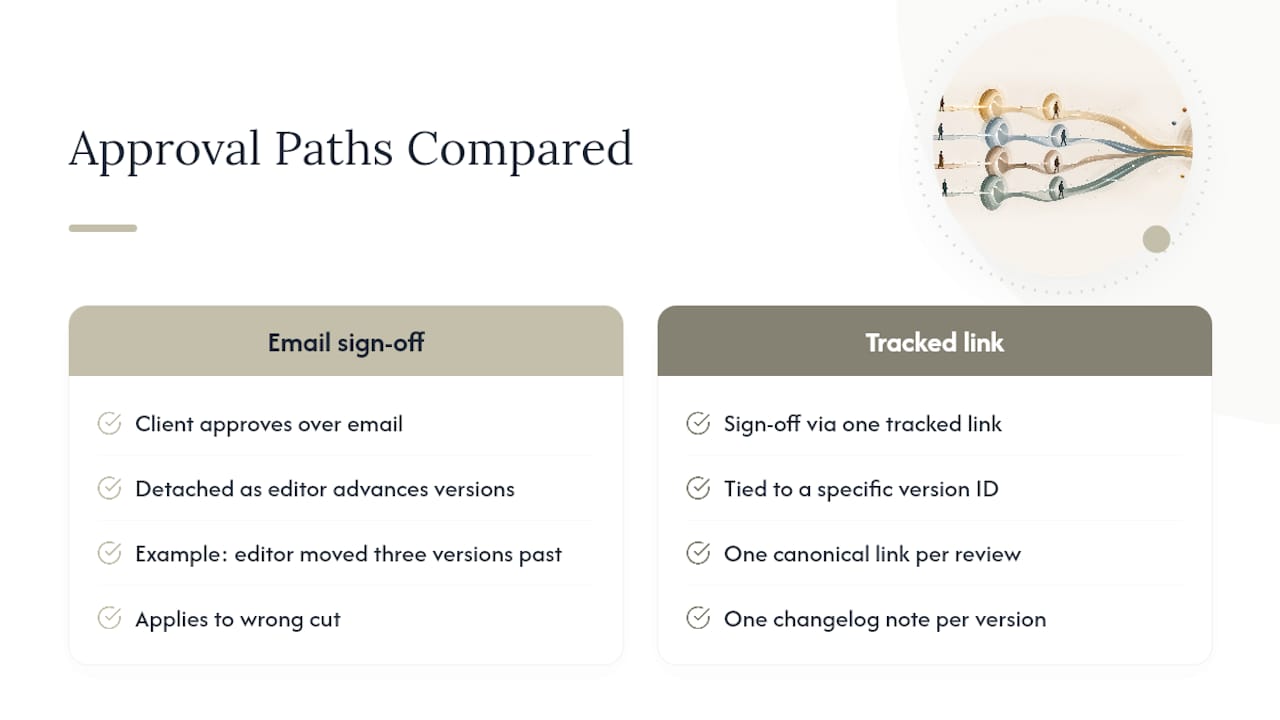
The second failure is over-governance. Teams bolt on five approval stages for a project that needs two, and creative velocity dies. The right balance is minimal but enforced: one named approver, one canonical link, one changelog note per version. Nothing more, nothing less.
Small teams especially should resist adding roles for the sake of process. A single owner for media, one for editorial, and one final approval authority is often enough to make an audit trail work without slowing anyone down.
— Lorenz
How Posthive Keeps Your Audit Trail Honest
Posthive builds the checklist above directly into how projects get managed. Every version carries its own immutable ID and changelog, approval gates are explicit rather than implied, and master, mezzanine, proxy, and cutdown files stay linked to their source instead of drifting apart in separate folders.

Because Posthive gives unlimited free seats on every plan, clients and reviewers get direct access to approve the right version without anyone paying per seat just to sign off on a cut. That matters most on projects with outside stakeholders who only need to weigh in occasionally but need clean version tracking every time they do. If your team is still chasing approvals through email threads, it’s worth checking the Pro and Enterprise plans and seeing which fits your current project volume.
Sources
This article draws on version control practices from Sohonet’s post-production guide, asset governance models from Playbook, file naming standards from Princeton’s records management manual, and review workflow benchmarks from Cutsio. For verifying that review work was genuinely completed, Bossy’s guidance on confirming finished work is worth a look too.
FAQ
What Is a Project Audit Trail in Post-Production?
It’s the chronological record of version changes, review comments, and approvals tied to a deliverable, showing who changed what and when. Posthive builds this record automatically by attaching a changelog and approval state to every version.
How Do You Create an Audit Trail for a Video Project?
Start by assigning an immutable version ID and timestamp to every export, then route all feedback through one canonical review link per version. Pair that with a named approval authority and a one-line changelog note, following the version increment guidance from Princeton’s records management standards.
What Metrics Show Whether Your Approval Process Is Working?
Track time to first view, review cycle time, approval cycle count, and resend rate. These metrics come from established review workflow benchmarks and tell you exactly where approvals stall.
Why Should You Never Reuse a Filename for a Revised Export?
Reusing a filename risks someone approving an outdated cut while a newer version already exists under the same name. Incrementing the version number every time keeps the approval tied to the exact file it was meant for.
Does Posthive Cost Anything to Try?
Posthive offers Pro at $49 per month and Enterprise at $99 per month, both listed on the pricing page. Every plan includes unlimited free seats for team members and clients.