Enforce Two Rounds: Revision Request Workflow for Creative Teams
Enforce Two Rounds: Revision Request Workflow for Creative Teams

Run this: prepare a review package with a one-line changelog, share one canonical review link per version, collect time-coded comments in a single window, consolidate them into one checklist, revise with a version bump, then close with a binary approve or changes-requested decision from a named approver. Three rules keep it from breaking: one link per version, fixed round scopes with a hard limit, and no revision starts without a consolidated list. Posthive builds this into its workspace, and editorial contributor Lorenz has watched it hold up under deadline pressure that kills looser processes.
TL;DR:
- Limit revision rounds to two, with the first addressing structure and the second focusing on polish, to prevent scope creep and keep projects within budget.
- Use a single, canonical review link per version, with clear naming conventions and a detailed changelog referencing exact timecodes to avoid confusion.
- Assign clear roles before starting revisions, including primary approver, consolidator, and editor, to streamline decision-making and reduce delays.
- Set strict review deadlines of 48 to 72 hours with explicit escalation paths for conflicting feedback, ensuring timely decisions and preventing bottlenecks.
- Enforce a straightforward workflow with tool features like time-coded comments, version locking, and automatic notifications to maintain accountability and tracking.
Table of Contents
- Step-By-Step Revision Request Workflow: Prepare, Share, Collect, Consolidate, Revise, Approve
- Who Owns the Decision? Defining Roles Before Round One
- Rules and Templates That Make the Revision Approval System Stick
- Version Naming and Changelog Discipline That Prevent Wrong-Cut Feedback
- Setting Deadlines and Resolving Conflicting Feedback
- Tooling Checklist: What a Post-Production Workspace Needs to Run This
- Tracking and Documenting Change History for Accountability
- Communicating Revision Outcomes Without Losing the Client’s Trust
- Training New Team Members on the Revision Workflow
- Handling Urgent Requests Without Breaking the Whole System
- Why Simple Rules Beat Complicated Process Diagrams
- This platform is built around exactly the sequence this article walks through: one canonical version link, time-coded comments, version locking, and a binary approval record, all inside a single workspace instead of scattered across email and messaging apps. Clients keep ownership of their deliverables and versions, while teams keep the task tracking and changelog discipline that stops rounds from sprawling past their contracted limit.
- Sources
Step-By-Step Revision Request Workflow: Prepare, Share, Collect, Consolidate, Revise, Approve
Most revision request processes fall apart not because feedback is bad, but because it arrives in six places at once with no deadline attached. A five-stage structure fixes that: upload and share, collect on a timer, consolidate, revise, approve. Here’s how each stage actually runs.
- Prepare the package. Give the file a clear title, a one-sentence changelog (“Cut trimmed to 90 seconds, color pass added”), and a specific ask (“Flag anything on pacing or dialogue, not color, this round”).
- Share one canonical link. Every stakeholder reviews the same version through the same URL. Set an expiry date and restrict downloads if the deliverable is client-sensitive.
- Collect feedback on a timer. Comments should be time-coded to the frame or timestamp they reference, and the window should close on schedule, not whenever the last person remembers to log in.
- Consolidate before touching the edit. Someone (see the roles section below) merges every comment into a single checklist and flags contradictions before revisions start.
- Revise with version discipline. Increment the version number, write a fresh changelog line, run quality control, then re-share through a new canonical link.
- Close the gate. The approver returns a binary answer: approved, or changes requested. Record their name and the date next to the decision.
Structured guidance to reviewers about what stage the work is at and what kind of feedback is useful measurably raises the share of usable comments, which is the difference between a two-round process and a six-round one. Skip the consolidation step and you’ll get contradictory notes arriving mid-edit, which is how a simple color tweak turns into three days of reopened files.
Who Owns the Decision? Defining Roles Before Round One
A revision approval system without named roles defaults to “whoever emails last wins,” and that’s how projects drift. Four roles need names attached before the first review link goes out:
- Primary approver — the one person whose sign-off ends the round. Name them in the kickoff document, not in a group thread three weeks later.
- Secondary reviewers — people who can comment but whose notes get filtered through the approver if they conflict.
- Consolidator — usually the producer or account lead, responsible for merging feedback and flagging contradictions before edits start.
- Editor or producer — executes the approved changes and owns version control.
For teams of three to ten stakeholders, a simple RACI table (Responsible, Accountable, Consulted, Informed) mapped against these four roles removes almost all of the “wait, who decides this?” friction later. Confirm the approver and reviewer list out loud on the first client kickoff call. Nail this down early and half your revision request management problems disappear before they start.
Rules and Templates That Make the Revision Approval System Stick
An elaborate flowchart doesn’t stop scope creep. A short, enforced rule does. Capping revisions at two rounds with pre-production sign-off on script or storyboard prevents the open-ended feedback loop that quietly eats agency margins.
Set these defaults before the project starts:
- Two to three rounds, period. Round one covers structural notes (pacing, story, sequence). Round two covers polish (color, sound, minor trims). Anything raised outside its round gets logged for a future change order, not squeezed into the current one.
- Close the window before editing starts. Consolidating every stakeholder’s notes into one checklist before the editor opens the project file stops rolling revisions cold.
Pro Tip: Put your revision round limit in the contract, not just the kickoff email. “Two rounds included; additional rounds billed at [rate] per round” turns an awkward renegotiation into a line you just point to.
Contract language matters here. A single sentence like “This scope includes two revision rounds; structural change requests after Round 1 approval will be quoted as a separate change order” saves the account team from an uncomfortable call in week four. A guide on structuring creative change requests walks through wording that holds up across client types.
Version Naming and Changelog Discipline That Prevent Wrong-Cut Feedback
Half of all “wrong version” confusion traces back to sloppy file naming. Fix the naming convention once and the problem mostly disappears.
- Use a consistent pattern:
ProjectName_v3_2026-03-14.mp4, neverFINAL_v2_reallyfinal.mp4. - Write one changelog sentence per version, referencing exact timecodes: “0:42 to 0:58 trimmed for pacing; VO leveled throughout.”
- Increment the version number for every change, even a two-second trim. Never reuse a filename or a review link.
- One canonical link per version keeps reviewers from commenting on a stale cut by mistake.
- Once a version is approved, lock it from further edits and archive it separately from working files.
A deliverable version tracking guide breaks down naming templates that scale past a single freelancer’s system, which matters once three editors touch the same project.
Setting Deadlines and Resolving Conflicting Feedback
A revision tracking system needs a clock attached to it, or “this week” becomes next week. Set a standard review window of 48 to 72 hours and state it in the reviewer’s timezone, not yours: “Feedback due Thursday, 5 PM Eastern.”
Conflicts happen the moment two stakeholders disagree on the same cut. Build the escalation path in before it’s needed:
- Secondary reviewer notes that contradict each other get routed to the primary approver, who makes the final call.
- Document that decision in writing, even a one-line note in the project thread, so nobody relitigates it in Round 2.
- A brand-new structural request after Round 1 approval becomes a change order, not a favor. Communicate the added cost and timeline before starting the work.
Track three numbers to know if your workflow for revision requests is actually working: review cycle time (how long from share to decision), approval cycle count (how many rounds a project actually takes versus the contracted limit), and late reviewer count (how often a stakeholder misses the window). Teams that watch these three catch scope creep and unresponsive clients months before they become write-offs. Marking exactly who approved each version and archiving that record is what stops a dispute in month six from becoming a “well, who signed off on this?” argument with no answer.
Tooling Checklist: What a Post-Production Workspace Needs to Run This
A revision tracking software setup needs six things working together, or the process above stays theoretical:
- Playback-first review links that don’t force reviewers to download a file first.
- Time-coded comments pinned to a specific frame, not a vague “around the middle.”
- Version locking once a cut is approved, so nobody accidentally edits over it.
- An automatic changelog tied to each version bump.
- Notifications that ping reviewers when a new version is ready and when a deadline is approaching.
- Access controls with link expiry, particularly for client-facing or unreleased material.
The integration pattern is straightforward: export from your NLE, upload to the workspace, generate one canonical share link, collect comments inside that same window, consolidate, then bump the version and repeat. Posthive sets this up natively, including branded links and expiring access for sensitive cuts, which matters more than it sounds like once you’re delivering to a client who forwards links without thinking twice. Setup details live in Posthive’s documentation.
Pro Tip: Set link expiries to match your revision round deadline, not a generic 30 days. An expired link is a natural forcing function that stops stakeholders from commenting on a version you’ve already replaced.
Tracking and Documenting Change History for Accountability
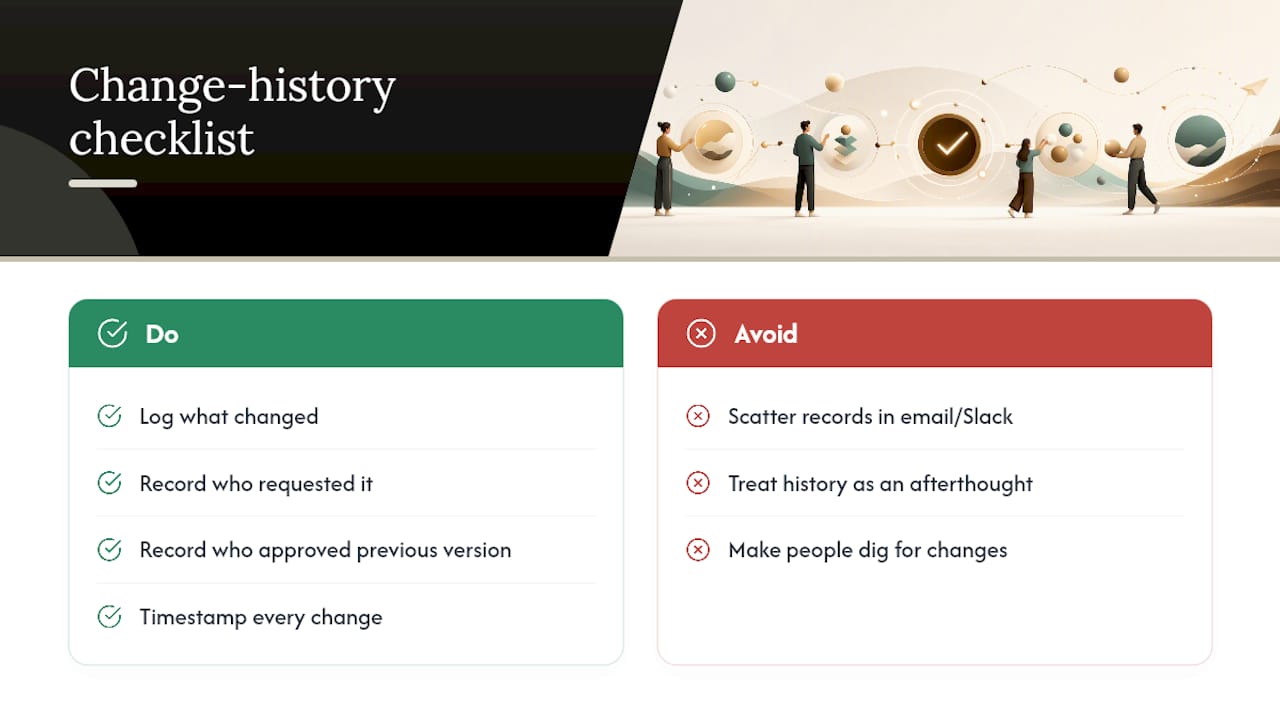
A revision approval process without a paper trail turns every dispute into a memory contest. The fix is a running changelog attached to the project, not scattered across email threads and Slack messages that get archived and forgotten.
Every version bump should log four things: what changed, who requested it, who approved the previous version, and when the change happened. This doesn’t need to be elaborate. A shared document or a workspace’s built-in version history works, as long as it’s consistent and nobody has to dig for it.
The payoff shows up months later. When a client asks “why does this look different from what we approved in January,” a proper change history answers in thirty seconds instead of triggering a scramble through old emails. It also protects the production side: if a client approved Version 4 and now wants changes reversed, the record shows exactly what was signed off and when, which settles billing disputes before they start.
For agencies managing several concurrent projects, tracking editor tasks alongside change history keeps accountability tied to the person doing the work, not just the version number. That distinction matters when a freelance editor rotates off a project mid-production and someone else needs to pick up exactly where the record left off.
Treat the changelog as part of the deliverable, not an afterthought. A locked, archived version with a complete history attached is worth more to a client relationship than a slightly faster turnaround with no record behind it.
Communicating Revision Outcomes Without Losing the Client’s Trust
How you deliver a decision matters almost as much as the decision itself. A revision approval system that ends in silence, or in a vague “looks good, mostly,” leaves stakeholders guessing about what actually happened.
State outcomes plainly. If a round is approved, say so in writing, name the version number, and confirm what happens next (final delivery, next phase, invoice trigger). If changes are requested, summarize what’s changing in plain language before the editor starts work, so the client isn’t surprised by the next cut.
When a request falls outside the contracted scope, say that directly and early, rather than quietly absorbing the extra work or springing a change order at delivery. A short line like “This note falls outside our two included rounds. We can add it as a quick change order at [rate], or hold it for a future update” respects the client’s time and protects the relationship better than either silently doing the extra work or refusing without explanation.
For multi-stakeholder projects, send outcome summaries to everyone who commented, not just the approver. Reviewers who see their notes acknowledged, even the ones that didn’t make the cut, stay engaged in later rounds instead of assuming their feedback vanished into a void. A short note explaining why a suggestion wasn’t adopted (budget, timeline, or conflict with another stakeholder’s note) prevents that same suggestion from resurfacing in Round 3.
Training New Team Members on the Revision Workflow
A workflow that lives only in one producer’s head disappears the moment that producer takes vacation. Onboarding needs to be explicit, not absorbed by osmosis over a few stressful projects.
New editors and coordinators should learn four things in their first week: where the canonical review link lives for any given project, what the naming and versioning convention looks like, who the primary approver is on active accounts, and what the escalation path is when feedback conflicts. Walking a new hire through one full round on a real (or sample) project, start to finish, teaches more than a written policy document ever will.
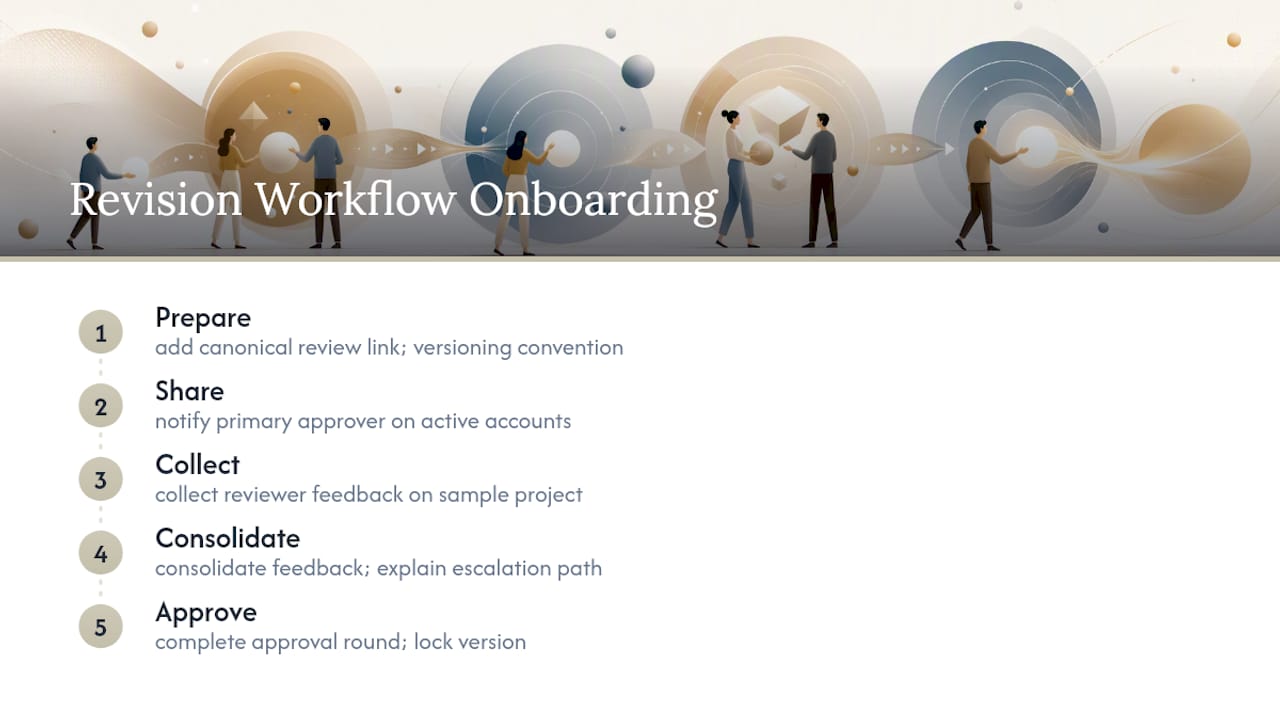
A creative ops workflow guide works well as a shared onboarding reference, since it lays out the same prepare-share-collect-consolidate-approve sequence new team members need to internalize quickly.
Freelance editors joining a production company mid-project face a sharper version of this problem: they’re stepping into someone else’s naming convention and someone else’s client relationships with no ramp-up time. Give them the versioning cheat sheet and the current approver’s name on day one, before they touch a single file. It’s a five-minute conversation that saves a week of “wait, which version is the client actually reviewing?”
Handling Urgent Requests Without Breaking the Whole System
Every workflow has an exception clause, and revision requests are no different. A client calls with an urgent fix two hours before a launch, or a stakeholder spots something after the review window already closed. The question isn’t whether to make exceptions. It’s how to make them without letting “urgent” become the default excuse for skipping the process entirely.
Define what actually counts as urgent before it happens: a factual error, a legal or compliance issue, a broken asset, something with real consequences if it ships as-is. Preference changes and last-minute creative second-guessing don’t qualify, even when they’re framed with urgency.
When a genuine exception hits, keep three things intact even under time pressure: someone still approves the change explicitly, even if that approval happens over a phone call instead of the usual written sign-off. The version still gets a new number and a changelog line, even a quick one. And the exception gets logged after the fact, so it doesn’t quietly become the new normal for that account.
The habit to watch for is exception creep, where every request starts arriving marked “urgent” because the last one got fast-tracked without pushback. Hold the line on what qualifies, and the exception process stays useful instead of becoming the workflow’s back door.
Why Simple Rules Beat Complicated Process Diagrams
The best revision request workflows aren’t the most detailed ones. They’re the ones short enough that a tired editor at 11 PM on a Thursday still follows them correctly. A twelve-step flowchart with branching logic for every scenario looks thorough in a slide deck and gets ignored in practice, because nobody has the bandwidth to consult it mid-project.
Clients push back on round limits more than any other rule, usually with some version of “we’re not being difficult, we just want it right.” The honest answer isn’t to cave. It’s to point out that unlimited rounds don’t actually produce a better result faster, they just produce a longer, more expensive path to the same decision that two focused rounds would have reached anyway.
If you want one lever that speeds up approvals more than any policy change, it’s this: make the canonical link the only place feedback is valid, and say so explicitly in your first email on every project. Once a client learns that a text message or a hallway comment won’t get tracked or acted on, they route feedback through the right channel without being reminded twice.
— Lorenz
This platform is built around exactly the sequence this article walks through: one canonical version link, time-coded comments, version locking, and a binary approval record, all inside a single workspace instead of scattered across email and messaging apps. Clients keep ownership of their deliverables and versions, while teams keep the task tracking and changelog discipline that stops rounds from sprawling past their contracted limit.

That combination is what cuts coordination overhead without handing over control of the files themselves. Reviewers get one link, one deadline, and one decision to make. Producers get a record of who approved what and when, without digging through a week-old email thread to settle a dispute. If your current process still relies on forwarded attachments and a shared spreadsheet nobody updates consistently, it’s worth comparing that against a system built for this specific job. Check out Posthive’s platform and see what your first project would look like inside it.
Sources
- Video Review and Approval Workflow: A Practical Guide | Fastio
- The Perfect Video Revision Workflow: Eliminating Infinite Feedback Loops | Yuktis