Template First Video Deadline Tracking for Creators Using Posthive
Template First Video Deadline Tracking for Creators Using Posthive

Video deadline tracking works when you build the schedule backward from a confirmed delivery date, run one shared board as the single source of truth, break the project into stage based mini deadlines with a named owner for each, and bake in buffer time before you need it. Everything else, the templates, the KPIs, the tool choice, exists to support that one structure. Skip the backward planning and no app will save the deadline.
TL;DR:
- Building a schedule backward from the confirmed delivery date and defining clear handoffs with named owners minimizes missed deadlines.
- Setting buffer times as scheduled, visible blocks based on historical data and project complexity prevents schedule overruns.
- Using one centralized board for stage tracking, version control, and task ownership reduces miscommunication and file mismanagement.
- Tracking stage-to-stage durations and approval latency early enables proactive adjustments, preventing project slips.
- Time allocated for pre-production should be at least twice the shoot days to avoid rushed planning causing delays later.
Table of Contents
- What Are the Core Principles of Video Deadline Tracking?
- What Templates Should You Build at Kickoff?
- Which Tools Actually Belong in a Video Workflow?
- How Long Should Each Type of Video Project Take?
- Which KPIs Actually Predict a Missed Deadline?
- How Do You Design Review Cycles That Don’t Drag?
- What Does a Seven-Day Pilot Look Like?
- How Does Posthive Put This System Into Practice?
- What Happens the First Week You Actually Run This?
- Start Running This System Inside Posthive
- Sources
What Are the Core Principles of Video Deadline Tracking?
Most missed deadlines aren’t a speed problem. They’re a structure problem. Four rules separate teams that ship on time from teams that scramble every single project.
Work backward from the confirmed final delivery date. Not the date you hope for, the date the client or platform actually locked in. Everything else on the calendar, ingest, rough cut, review rounds, color, export, gets scheduled in reverse from that fixed point.
Build in buffer, and make it visible. Exports fail. Codecs get rejected. A reviewer goes on vacation. If your schedule has zero slack, one bad Tuesday blows the whole timeline. Standard corporate video projects need about 8 weeks from kickoff to delivery, and complex jobs stretch to 12 weeks or more precisely because approval rounds and deliverable volume eat the buffer nobody planned for.
One single source of truth. When shot lists, scripts, and delivery logistics live in separate documents, teams lose track of how a change in one place ripples through the rest. Keeping the creative and operational plan together is what prevents that blind spot.
Named ownership, not vague status. Every stage needs one person accountable for the next action, not a shared “in progress” tag three people assume someone else is handling.
The four principles in short form:
- Reverse plan from the real delivery date, never the wished for one
- Treat buffer as a scheduled block, not leftover time
- Run one board everyone checks, not five scattered documents
- Assign a name to every handoff, not a status color
What Templates Should You Build at Kickoff?
Before anyone touches a timeline, build three things. Skipping this step is the single most common reason projects drift.
- A deliverable export matrix. One table listing every final file: codec, resolution, aspect ratio, language or caption version, exact file name, and where it ships. Defining codec, frame rate, loudness, and naming rules at kickoff prevents the export rework that causes most last-minute failures.
- A project stage template. Map the handoffs explicitly: ingest → rough cut → internal review → client review → captions → QC → scheduled delivery. Structuring the work as a five-phase production flow, brief, pre-production, production, post, delivery, with clean handoffs between phases does more to prevent late deliveries than optimizing any single phase in isolation.
- Naming and folder rules. Version numbers, initials, dates, in a fixed order, applied the same way every time. Nobody should have to ask “which cut is current.”
For the deliverable matrix, cover:
- File name pattern (project_version_date_initials)
- Codec and resolution per platform
- Language and caption variants
- Delivery destination (client portal, ad platform, broadcast spec)
Which Tools Actually Belong in a Video Workflow?
You need four categories, not four apps doing the same job. A task tracker or project board holds the stage template and mini deadlines. A review and approval surface centralizes frame-accurate feedback so notes don’t scatter across email and text threads. A calendar handles the macro schedule and buffer visibility. A time log captures stage-to-stage duration so your next estimate is based on data.
Standalone reminder apps have a place, they’re fine for a solo editor tracking one export date, and listings like Deadline Tracker on the App Store show the category exists. But a production team juggling ten deliverables across three clients needs tracking that’s woven into the actual workflow, not a notification sitting apart from the files it refers to.
Configure notifications narrowly:
- Alert on status change (draft moved to review)
- Alert when an approver is required and hasn’t acted
- Alert 48 hours before a deadline, not every hour after
Turn off the full activity feed. Nobody needs a ping for every comment on every frame; that noise is what makes people start ignoring notifications altogether. Set up two automations and stop there: upload triggers a card creation with an assigned owner, and approval triggers a move to the next stage.
Pro Tip: If a notification doesn’t require a decision or an action within 48 hours, it shouldn’t interrupt anyone. Route it to a digest instead of a real-time ping.
How Long Should Each Type of Video Project Take?
Timeline length depends entirely on format, and treating every project like a corporate video is how solo creators and small teams blow their own schedules.
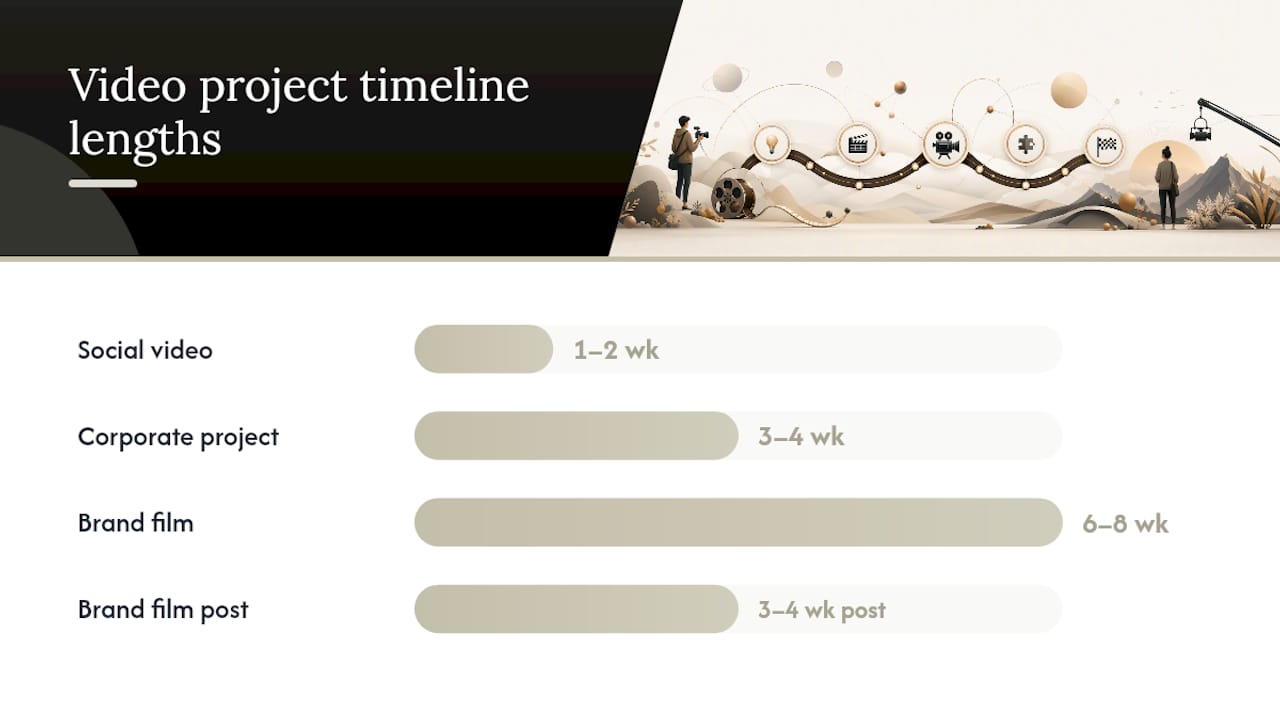
Social videos typically run 1 to 2 weeks end to end. Corporate projects run 3 to 4 weeks. Full brand films run 6 to 8 weeks, and post-production alone commonly eats roughly half that schedule, not a quarter, half. That allocation surprises people who assume shooting is the long pole.
Pre-production deserves more calendar time than most teams give it. Pre-production should get at least twice the time allocated to shoot days, because solving a problem in planning is far cheaper than fixing it in the edit bay three weeks later.
Rough starting allocations by project type:
- Social (1–2 weeks): a few days pre-production, one shoot day, remainder in edit and one fast review round
- Corporate (3–4 weeks): roughly a week of pre-production, several shoot days, two weeks split between edit and two review rounds
- Brand film (6–8 weeks): two or more weeks of pre-production, multi-day shoot, remaining weeks in post with two to three structured review rounds
A production calendar that starts from the confirmed delivery date and reserves time for uploads, review rounds, and alternate exports is what actually survives contact with a real project. If you’re timing a release around a platform or distribution window, that same backward logic applies, as release day planning in music makes clear when a curator window forces the whole calendar to shift.
Which KPIs Actually Predict a Missed Deadline?
Track stage-to-stage timing, not overall project status. The gap between “rough cut submitted” and “first client feedback received” tells you far more than a green checkmark on a task list. If that gap was two days on your last three projects and it’s already four days on this one, you have an early warning before the deadline is even close.
Revision count and approval latency are the two strongest predictors of a slip. A project sailing through one review round on schedule behaves nothing like one stuck on round three with feedback trickling in over a week. Stakeholder approval cycles are the single most common source of delay on video projects, more than shoot days, more than editing time.
The early warning rule that actually works: if a stage takes 1.5 times longer than your historical average for that stage, flag it immediately instead of waiting for the final deadline to arrive and discovering the problem too late.
Dashboard basics worth tracking:
- Days from ingest to rough cut
- Days from rough cut to first approval
- Number of revision rounds per deliverable
- Days the deliverable sat waiting on an approver
Granular, task-level time data makes the true bottleneck visible early, and it’s almost never where teams assume it is.
How Do You Design Review Cycles That Don’t Drag?
Feedback delay is the most fixable bottleneck in the entire pipeline, and fixing it is mostly a matter of structure, not speed.
- Name an approver of record. One person signs off per stage, not a committee that never quite agrees.
- Set a fixed review window. Three to five business days, published up front, so “still reviewing” isn’t an open-ended excuse.
- Keep feedback frame-accurate and centralized. Timecoded comments on one review surface beat scattered emails and screenshots every time.
- Run a short weekly sync. Fifteen to thirty minutes, focused only on blockers and next actions, not status theater.
- Log scope-add requests as trade-offs. A new ask after lock should show up as “this adds two days,” visibly, not absorbed silently into the existing deadline.
What Does a Seven-Day Pilot Look Like?
- Write the brief and deliverable matrix on day one.
- Build one master board with the stage template loaded in.
- Name an owner for every stage before day three.
- Set the first review window and communicate it to every approver.
- Track stage-to-stage timing daily starting day one, not retroactively.
Pro Tip: Watch one number in week one: the gap between “submitted for review” and “feedback received.” If that number improves, the system is working.
How Does Posthive Put This System Into Practice?
A single workspace with built-in version control and task tracking closes the exact gap that causes most missed handoffs, the moment where a note lives in email while the actual file lives somewhere else entirely.
- One board covers the stage template: ingest, review, captions, QC, scheduled delivery
- Version history removes the “which cut is current” question that stalls approvals
- Task ownership sits next to the file itself, not in a separate spreadsheet
For a deeper build, see our guides on video project management for producers and editor task tracking for stage-level KPIs.
What Happens the First Week You Actually Run This?
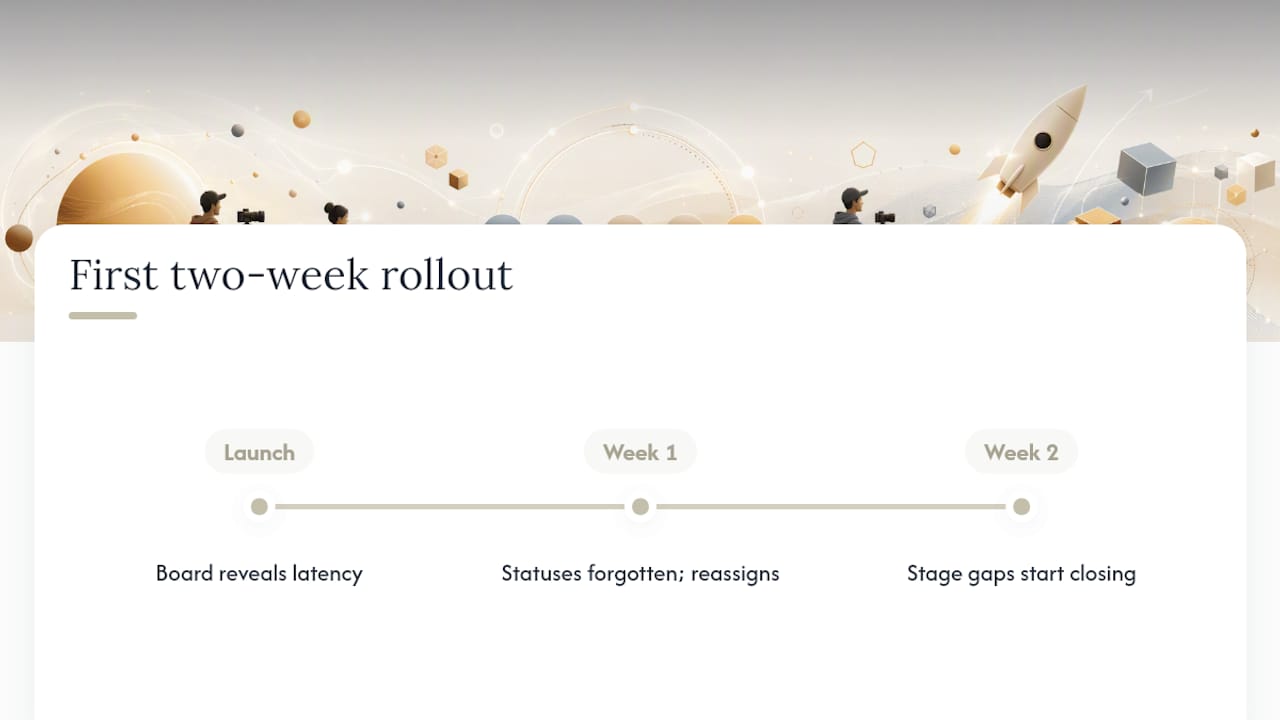
Rolling this out for the first time, the biggest shift wasn’t the board itself, it was watching approval latency show up as a number instead of a vague feeling that “reviews take too long.” Week one is rough: people forget to update status, owners get reassigned mid-stage. By week two, the stage-to-stage gaps start closing on their own because everyone can see them.
Pro Tip: Don’t fix the tool in week one. Fix the naming convention. Everything downstream depends on it.
— Lorenz
Start Running This System Inside Posthive
A single shared workspace where the deliverable matrix, the stage template, and the version history live in one place instead of three supports this whole system. That matters because the biggest failure point in video deadline tracking isn’t the schedule, it’s the gap between where the plan lives and where the actual files live. A workspace that links version control directly to task tracking closes that gap, preventing approvals from getting lost in email threads while files sit in separate folders.

Start with the calendar template and adapt the stage structure from this guide directly inside your workspace. Some platforms offer a free tier to test the workflow with a real project, and paid plans provide more storage and additional feature access as volume grows. You can also pull a ready-made post-production calendar template and folder rules to skip the setup work entirely. Try Posthive and build your first master board this week.
Sources
- How long does video production take? | Lemonlight (timeline template)
- How long does professional video production take? | Think Branded Media
- How to organize a video production from start to finish | Storyflow