Video Project Management for Production Team Leads
Video Project Management for Production Team Leads
Video project management is the repeatable system that keeps a video project on brief, on time, and on budget, from the first client call through final delivery. If your team is losing hours to version confusion, scattered feedback, and missed handoffs, the fix is not a better editor or a faster machine. It is a tighter process.
Start here, before anything else:
- Set one source of truth. Every brief, asset, approval, and note lives in one shared workspace. If it is not there, it does not exist.
- Assign a phase owner. Pre-production, production, post, and delivery each need one person accountable for outputs, not a committee.
- Lock two review rounds. Unlimited revisions are a budget leak. Define the rounds upfront in the brief and hold the line.
- Track three numbers from day one: revision rounds per deliverable, total production time, and budget variance.
A structured video production workflow can reduce production time by up to 60% while improving consistency across projects. That is not a marginal gain. It is the difference between a team that scales and one that scrambles.
Key Takeaways
Effective video project management comes down to three non-negotiable practices: a single source of truth, owner-assigned handoffs, and a two-round review discipline enforced from the brief stage.
| Point | Details |
|---|---|
| Single source of truth | Every brief, asset, version, and approval lives in one shared workspace, no exceptions. |
| Assign phase owners | Each production phase needs one accountable person; shared ownership produces no accountability. |
| Enforce two review rounds | Define rounds in the brief; anything beyond Round 2 is a scope change, not a revision. |
| Track three core metrics | Revision rounds, production time per deliverable, and budget variance, tracked weekly not at close. |
| Posthive centralizes the workflow | Version control, frame-accurate review, and client approvals in one platform reduce handoff friction from day one. |
Table of Contents
- What makes video project management different from general PM?
- Why structured workflows pay off for video teams
- Common challenges unique to video projects and how to address them
- Stage-by-stage checklist: who owns what and when
- Proven best practices that reduce rework and keep projects moving
- What should you require from video project management software?
- Sample project timeline and deliverable checklist
- How to track timeline and budget through the project
- How to handle client feedback and scope changes without losing control
- Communication and collaboration practices that actually work for video teams
- Risk identification and mitigation during video production
- What running post-production workflows actually teaches you
- Posthive brings these practices into one workspace
- Sources
What makes video project management different from general PM?
General project management handles tasks, timelines, and budgets. Video project management does all of that and then layers on file sizes measured in terabytes, frame-accurate review cycles, creative intent that must survive four or five handoffs, and clients who give feedback in the form of “make it pop more.”
The discipline is deliverable-driven and handoff-centered. A software sprint has a definition of done that is binary: it works or it does not. A video deliverable has a definition of done that is subjective until someone with sign-off authority says otherwise. That subjectivity is where projects bleed time and money.
Three roles define the structure:
- Creative director / lead editor: owns creative intent from brief to picture lock.
- Production coordinator / project manager: owns logistics, scheduling, and budget tracking.
- Client or stakeholder lead: owns approvals at defined gates, not at every step.
The single most common production failure is information loss at handoffs. When the brief does not survive into pre-production, or the production notes do not reach the editor, the team rebuilds context from scratch, and that rebuilding is where revision counts spike and budgets slip.
The media-specific constraints that change how PM works in practice: large files that cannot live in a shared email thread, versioning that requires frame-level precision rather than document-level diff, and proxy workflows that let editors work on compressed files while the originals stay archived. General PM tools were not built for any of that.
Why structured workflows pay off for video teams
The operational case is straightforward. Fewer revision rounds mean lower labor costs. Faster delivery means more capacity for the next project. Predictable budgets mean better client relationships and fewer write-offs.
The metrics worth tracking from the start:
- Revision rounds per deliverable: industry norm is two structured rounds. More than three is a process failure, not a creative one.
- Production time per minute of finished video: establishes a baseline for quoting and capacity planning.
- Budget variance: actual spend versus estimated, tracked weekly rather than at the end.
- Time-to-publish: from final approval to live delivery, which reveals bottlenecks in the distribution step that teams often ignore.
Structured workflows reduce production time by up to 60%, and the quality improvement is not incidental. When a team is not firefighting version confusion, they spend that time on the work that actually shows on screen.
Common challenges unique to video projects and how to address them
Most video projects fail the same way. The problems are predictable, which means they are also preventable.
Version chaos is the most common. An editor sends “v3_final_FINAL_USE_THIS.mp4” and the client approves “v3_final_revised2.mp4.” Neither is the right file. The fix is a naming convention enforced at the project level: ProjectName_Deliverable_v##_YYYYMMDD. No exceptions.
Pro Tip: Assign one person as the version gatekeeper. Only that person exports and names deliverable files. Everyone else works on internal cuts.
Scattered feedback is the second killer. When notes arrive via email, Slack, a phone call, and a sticky note on a monitor, the editor spends more time consolidating feedback than acting on it. Frame-accurate, timestamped review tools solve this. If your current process requires an editor to cross-reference three channels to understand one note, the process is broken.

Oversized assets slow every handoff. A 4K raw file that takes 45 minutes to upload is a 45-minute delay in every review cycle. Proxy workflows and cloud-based storage with direct NLE integration are not luxuries for large productions. They are table stakes for any team doing more than one project at a time.
Missed handoffs are where information loss does the most damage. When the production coordinator hands off to the editor without a structured package (selected takes, annotated shot list, production notes), the editor makes assumptions. Those assumptions become revision rounds.
Scope creep in video is rarely a client problem. It is a brief problem. A vague brief invites interpretation, and every interpretation the client did not intend becomes a revision.
Scope creep is addressed at the brief stage, not the revision stage. A brief that specifies deliverable count, aspect ratios, music licensing scope, and number of review rounds leaves almost no room for “while we’re at it” additions.
Stage-by-stage checklist: who owns what and when
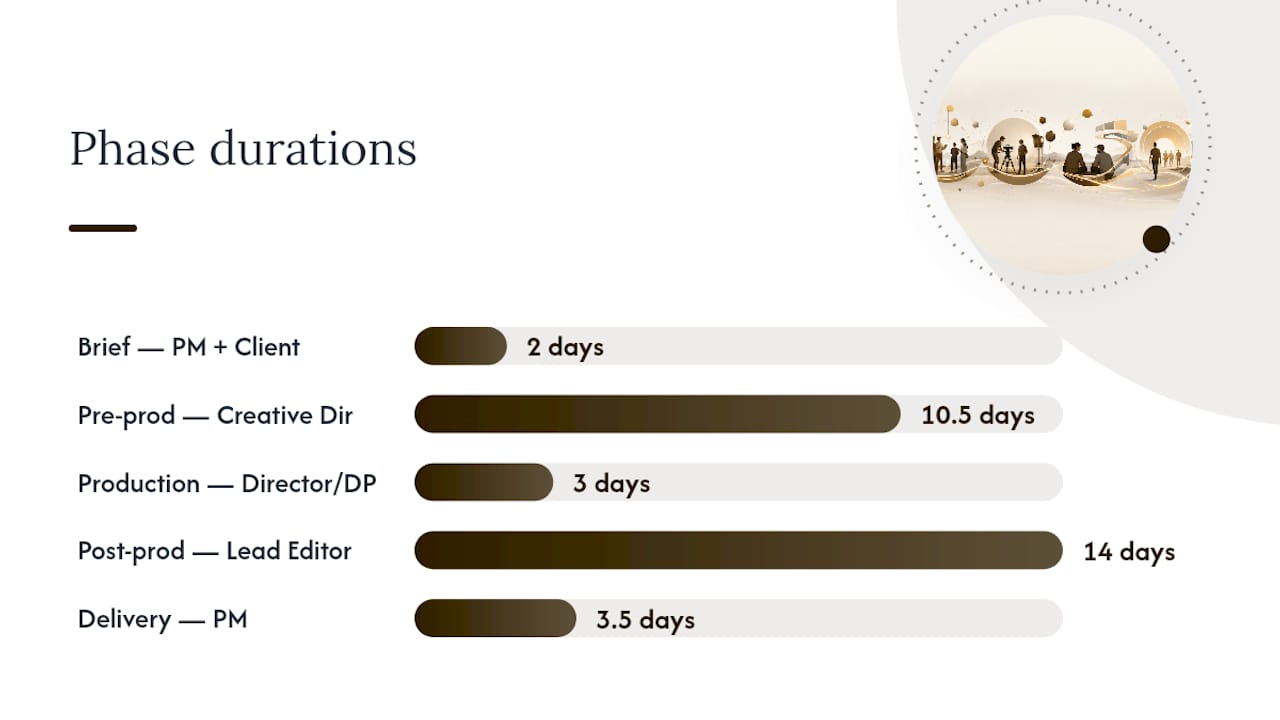
The production lifecycle runs cleanest as five phases. Failures happen at the handoffs between phases, not within them, which is why the table below includes handoff artifacts alongside tasks and owners.
| Phase | Key Tasks | Typical Duration | Owner | Handoff Artifact |
|---|---|---|---|---|
| Brief | Scope, deliverables, review rounds, budget sign-off | 1–3 days | Project manager + client lead | Signed brief document |
| Pre-production | Script, shot list, location scouting, talent, schedule | 1–2 weeks | Creative director | Annotated shot list + call sheet |
| Production | Filming, audio capture, B-roll, on-set notes | 1–5 days | Director / DP | Selected takes log + raw asset folder |
| Post-production | Edit, color, sound mix, graphics, review rounds | 1–3 weeks | Lead editor | Picture lock file + revision notes |
| Delivery | Export specs, platform upload, client approval, archiving | 2–5 days | Project manager | Approved master file + archive link |
Milestone gates to enforce:
- Picture lock: no new footage or structural changes after this point. Any request past picture lock is a scope change, not a revision.
- Delivery specs confirmed: export settings, platform requirements, and file naming locked before the editor touches the export queue.
- Client sign-off: written approval (email or in-platform) before any file is published or archived as final.
The handoff artifacts are not optional documentation. They are the mechanism that keeps creative intent alive when a project moves from one person to the next.
Proven best practices that reduce rework and keep projects moving
These are ordered by impact. The first two alone will eliminate the majority of revision rounds and budget overruns on most teams.
- Single source of truth. One workspace holds the brief, assets, feedback, versions, and approvals. If a team member has to ask where something lives, the system has already failed.
- File naming and version control. Establish the convention before the first file is created. Enforce it with a checklist at each phase gate. Version numbers are sequential and never descriptive (“final,” “approved,” “use_this”).
- Two structured review rounds. Round one is for structural and content feedback. Round two is for polish. Anything outside those two rounds is a scope change. Put this in the brief.
- Template briefs. A brief template with required fields (deliverable count, aspect ratios, music scope, review rounds, approval contacts) prevents the vague brief that causes scope creep. Build it once, use it on every project.
- Owner assignment per phase. Every phase has one accountable person, not a shared responsibility. Shared responsibility is no responsibility.
Start there before adding complexity.
A minimum viable workflow of 3–5 steps with single-person owners consistently outperforms an elaborate process that teams quietly ignore. Build the simplest version that covers your actual failure points, run it on two or three projects, then add steps only where you see gaps.
Pro Tip: When introducing a new workflow template, run it on one low-stakes internal project first. Let the team find the friction points before a client deadline is attached.
Change management for production teams is less about persuasion and more about removing friction. If the new process takes more steps than the old one, the team will revert under pressure. Design for the path of least resistance.
What should you require from video project management software?
The feature set that matters for video teams is different from what a marketing or engineering team needs. Flexible views, custom workflows, and no-code automation help coordinate timelines and reduce manual status work, but video teams also need capabilities that general-purpose tools rarely include out of the box.
Media-first features to require:
- Large-file handling: direct upload and playback of high-resolution video without requiring a separate transfer tool.
- Frame-accurate review and approval: timestamped comments tied to specific frames, not just a comment thread on a file.
- Built-in version control: the platform tracks which version is current, who approved it, and when, without relying on file naming conventions alone.
- Proxy workflows: compressed preview files for review, with the original high-res file preserved for export.
- Secure media delivery: watermarked preview links, access-controlled sharing, and expiring download links for client deliverables.
Integrations to look for:
- NLE compatibility (direct export or import from Premiere Pro, DaVinci Resolve, or Final Cut Pro).
- Cloud storage sync (Google Drive, Dropbox, or S3-compatible storage).
- Calendar integration for milestone and deadline visibility.
- API or webhook support for connecting to existing tools.
Hybrid planning that combines Gantt, Kanban, and calendar views with resource forecasting is particularly valuable for keeping complex production schedules on time and under budget. A tool that forces you into one view type will always create blind spots.
Security and compliance:
- Role-based access controls so clients see only what they need to see.
- Watermarking on preview deliverables.
- Retention policies for archiving completed projects.
Purpose-built video production platforms package deliverable-based boards, frame-accurate review, client portals, and large-file support in a single environment. The alternative is stitching together a general PM tool, a file transfer service, a review platform, and a storage solution, and then managing the gaps between all four.
Sample project timeline and deliverable checklist
This template covers a typical 4–6 week video project. Copy the milestone structure into your PM board and assign owners before kickoff.
| Week | Milestone | Deliverable | Owner | Approval Required |
|---|---|---|---|---|
| Week 1 | Brief sign-off | Signed brief + deliverable list | Project manager | Client lead |
| Week 1–2 | Pre-production complete | Shot list, script, call sheet | Creative director | Internal (PM) |
| Week 2–3 | Production wrap | Raw assets + selected takes log | Director / DP | Internal (PM) |
| Week 3–4 | First cut delivered | Edit v1 + review link | Lead editor | Client (Round 1) |
| Week 4–5 | Revised cut delivered | Edit v2 + revision notes | Lead editor | Client (Round 2) |
| Week 5–6 | Picture lock + final export | Master file + delivery specs | Lead editor + PM | Client (Final) |
| Week 6 | Archive and close | Archive link + project summary | Project manager | Internal |
Checklist for each milestone gate:
- Brief: deliverable count confirmed, review rounds agreed, budget signed.
- Pre-production: shot list annotated, locations confirmed, talent contracted.
- Production wrap: all raw assets uploaded, selected takes logged, production notes attached.
- First cut: review link sent with timestamped comment instructions, deadline for feedback set.
- Revised cut: all Round 1 notes addressed and documented, no new structural changes.
- Picture lock: client sign-off in writing, delivery specs confirmed.
- Archive: master file named per convention, project folder closed and access restricted.
Pro Tip: Import this table directly into Posthive as a deliverable board. Assign owners and set due dates at kickoff so every team member sees the full timeline from day one.
How to track timeline and budget through the project
Timeline and budget tracking work best when they are continuous, not retrospective. A project manager who checks budget variance at the end of a project is doing a post-mortem, not management.
Set weekly check-ins against the milestone table above. The question at each check-in is not “are we on track?” but “which milestone is at risk and what does it need?” That specificity forces a real answer instead of a status update.
Who owns what in tracking:
- Project manager: budget variance, milestone status, client communication log.
- Creative director: creative scope, revision round count, picture lock integrity.
- Lead editor: time logged per deliverable, version log, export queue.
For budget, track three numbers weekly: hours logged versus estimated, external costs (music, stock, talent) versus budgeted, and any scope changes that have not yet been priced. A scope change that is not documented and priced within 24 hours of the request becomes a free addition by default.
Hybrid planning tools that combine Gantt and Kanban views with resource forecasting give a project manager visibility into both the schedule and the workload simultaneously. A Gantt shows whether the timeline is slipping. A Kanban shows where the work is actually stuck. You need both.
How to handle client feedback and scope changes without losing control
Client feedback is not the problem. Unstructured client feedback delivered outside a defined process is the problem. The distinction matters because one is manageable and the other is not.
The two-round review structure is the primary control mechanism. When a client knows they have two rounds and that anything outside those rounds is a change order, they consolidate feedback rather than sending it piecemeal. That consolidation alone reduces revision cycles significantly.
When a scope change request arrives, the response is always the same: acknowledge it, document it, and price it before any work begins. A simple change request log with columns for description, requester, date, estimated hours, and approval status is enough. The log makes scope creep visible rather than invisible.
For stakeholder management, the most effective practice is a single point of contact on the client side. When feedback arrives from three different stakeholders with conflicting notes, the editor cannot act on it without making a judgment call. That judgment call becomes a revision. Require the client to consolidate feedback through one named contact before it enters the review platform.
Communication and collaboration practices that actually work for video teams
Video teams have a specific communication problem that most general collaboration advice does not address: the work is asynchronous by nature (an editor works alone for hours), but the feedback is synchronous by expectation (the client wants to discuss the cut on a call). That mismatch creates delays.
The fix is structured asynchronous communication with defined synchronous checkpoints. Feedback on cuts goes through the review platform with timestamped comments, not a call. Calls are reserved for brief kickoffs, milestone check-ins, and final approvals. Everything else is written and logged.
Practical collaboration rules for video teams:
- All feedback on video deliverables goes through the review platform. No email, no Slack, no phone notes.
- Every task has one owner and one due date. No shared ownership, no “ASAP” deadlines.
- Status updates happen on the project board, not in a chat thread. If it is not on the board, it has not happened.
- Internal cuts are shared with a clear brief: “This is a rough cut for pacing feedback only, not color or audio.” Scoping the review prevents feedback on elements that are not ready.
The automation features in modern project tools can handle routine status updates, deadline reminders, and handoff notifications without manual intervention. That frees the project manager to focus on the decisions that actually require judgment.
Risk identification and mitigation during video production
Risk in video production is predictable. The same five or six things go wrong on most projects, which means a risk register for a video project is not a theoretical exercise. It is a checklist of things that will probably happen.
Common risks and their mitigations:
- Key person dependency: the lead editor or director is the only person who knows the project. Mitigation: document the project state at every milestone gate so a replacement can pick it up within a day.
- Equipment or location failure: a shoot day lost to equipment failure or a location falling through. Mitigation: confirm backup equipment and a contingency location in pre-production, not on the day.
- Client approval delay: the client misses the feedback deadline, compressing the post-production schedule. Mitigation: build a two-day buffer after each review deadline before the next milestone begins.
- Scope creep past picture lock: a client requests structural changes after the cut is locked. Mitigation: the picture lock sign-off is written and explicit. Any post-lock request is a new deliverable with a new price.
- Asset loss or corruption: a hard drive fails or a file is overwritten. Mitigation: three-copy backup (local, external, cloud) enforced at the end of every shoot day.
A risk register does not need to be elaborate. A simple table with risk, likelihood, impact, and mitigation owner is enough. Review it at the weekly check-in and update it when new risks emerge.
What running post-production workflows actually teaches you
The conventional wisdom in production management is that better tools fix broken workflows. They do not. A disorganized team with Posthive is still a disorganized team. The tool surfaces the problem; it does not solve it.
The operational changes that deliver the most impact are almost always the smallest ones. Enforcing two review rounds instead of open-ended revisions cuts revision cycles more reliably than any software feature. Recording take selections with a one-line note (“take 3, best energy, clean audio”) at the end of a shoot day saves an editor two hours of guesswork. A brief that specifies aspect ratios and music licensing scope prevents the most common scope creep conversations entirely.
Three things that non-practitioners consistently underestimate:
- The cost of context-switching at handoffs. When an editor receives a raw asset folder with no production notes, they spend the first hour of every project reconstructing intent. That hour is invisible in the budget but real in the schedule.
- The value of a two-review discipline. Teams resist it because it feels rigid. In practice, it forces clients to consolidate feedback, which makes the feedback better and faster to act on.
- The compounding effect of a bad brief. A vague brief does not cause one problem. It causes every problem downstream, because every ambiguity becomes a decision point, and every decision point becomes a potential revision.
Test one change on the next project. Pick the single practice from this article that addresses your team’s most frequent failure point, run it for two projects, and measure revision rounds before and after. The number will tell you whether to keep it or adjust it.
Posthive brings these practices into one workspace
Most post-production teams are running three or four tools to cover what one purpose-built workspace should handle: a file transfer service for assets, a separate review platform for client feedback, a general PM tool for tasks, and email for approvals. The friction between those tools is where projects lose time.

Posthive is built specifically for this workflow. Version control, frame-accurate collaborative review, deliverable boards, task and deadline tracking, and secure media delivery are all in one platform. Clients get a clean approval experience without needing a login to a tool they will never use again. The team gets a single source of truth that survives every handoff.
The sample timeline in this article maps directly into Posthive’s project boards. Import the milestone structure, assign owners, and the platform tracks progress, version history, and approvals automatically. Free, Pro, and Enterprise plans cover teams from solo freelancers to full production companies, with storage tiers scaled to actual production volumes. Start a free trial at Posthive and run the next project through it before committing to a plan.
Sources
The sources below represent the most useful references for teams building or refining a video production workflow, from process design through tool selection.
- Video Production Workflow Guide 2026: From Concept to Publication | Vibbit
- How to Build a Video Workflow Your Team Actually Uses - VID Blog
- Jira | Project Management for the AI Era | Atlassian
- Project & Work Management Software - ProjectManager