Video Review Software Cost 2026: Budgets from under $20 to $1,000+
Video Review Software Cost 2026: Budgets from under $20 to $1,000+

Most video review software costs fall into low, mid, and high pricing tiers suitable for small teams, growing agencies, and enterprise setups with heavy storage and compliance needs. Pricing usually runs on a per-seat or storage hybrid model. Pick a budget band that matches your team size, then trial the top contender with a real project before committing to annual billing.
TL;DR:
- Video review software prices range from free tiers with limited storage to enterprise plans exceeding thousands of dollars monthly, depending on features and usage.
- Cost factors include storage volume, reviewer seats, high-bitrate streaming, security features, and integrations, which significantly impact overall billing.
- Billing models vary between per-seat, reviewer-seat, storage-based, per-project, and hybrid, with annual plans generally offering 15-20% savings over monthly payments.
- Hidden charges such as overage fees, transcoding costs, and additional modules can cause unexpected budget increases if not clarified upfront.
- For teams, budgeting should directly reflect project size, review cycle speed, and desired automation, with negotiation often reducing overall costs.
Table of Contents
- How Much Does Video Review Software Cost Per Month?
- What Pricing Models Do Video Review Vendors Use?
- Which Features Push Your Bill Higher?
- What Should Different Team Sizes Budget for Video Review Software?
- What Questions Should You Ask Before Signing?
- What Do Creative Teams Actually Trade Off on Cost?
- Where Posthive Fits Into Your Budget
- Sources
How Much Does Video Review Software Cost Per Month?
Vendors price video review software across four rough tiers, and knowing which tier fits your team saves you from either overpaying for enterprise muscle you don’t need or getting stuck on a free plan that chokes your workflow at the worst moment.
Free and freemium tiers exist mostly as a taste test. They cap you on storage (often 2GB to 5GB), limit active projects to one or two, and restrict the number of reviewers who can comment without creating an account. These work fine for a solo editor sending a single client a rough cut, but tend to limit capacity once multiple projects or clients with slower feedback are involved.
Indie and entry plans run roughly $7 to $30 per user monthly, or sometimes a flat $10 to $30 monthly for a small seat allotment. You get more storage (usually 100GB to 500GB), a handful of active projects, and basic version tracking. This tier suits freelancers and two-person teams who need real project history but not much else.
Team and pro plans land between $30 and $150 monthly, or $15 to $50 per user depending on the vendor’s model. This is where features start multiplying: custom branding on review links, frame-accurate commenting, approval workflows, and integrations with tools like Slack or Adobe Creative Cloud. Public plan pages from vendor comparisons show starter tiers commonly sitting in the $7 to $25 per user range, with team tiers climbing to $19 to $150 monthly once you add seats and storage.
Enterprise and custom pricing is where the real spread happens. Once you need single sign on, audit logs, dedicated support, or storage measured in terabytes, vendors move you to a quote based on your actual usage. That can mean anywhere from $500 to several thousand dollars monthly, and it rarely shows up on a public pricing page.
Cost snapshot: Aggregated pricing data across the category shows a range running from free entry tiers all the way to enterprise contracts that stretch into the thousands per month, driven almost entirely by seat count and storage volume.
Watch for these hidden charges before you sign anything:
- Storage overage fees that kick in silently once you cross your plan’s cap, often billed per extra GB or TB.
- Per-reviewer charges for external clients or freelancers who need commenting access but aren’t full team members.
- Transcode or rendering fees on plans that bill separately for converting high-resolution footage into web-playable proxies.
- Add-on module costs for features like transcription, translation, or advanced analytics that look bundled on the pricing page but aren’t.
What Pricing Models Do Video Review Vendors Use?
The reason two vendor quotes for what looks like the same service can differ by 300% usually comes down to which pricing model each one runs, and most buyers never normalize the numbers before comparing them.
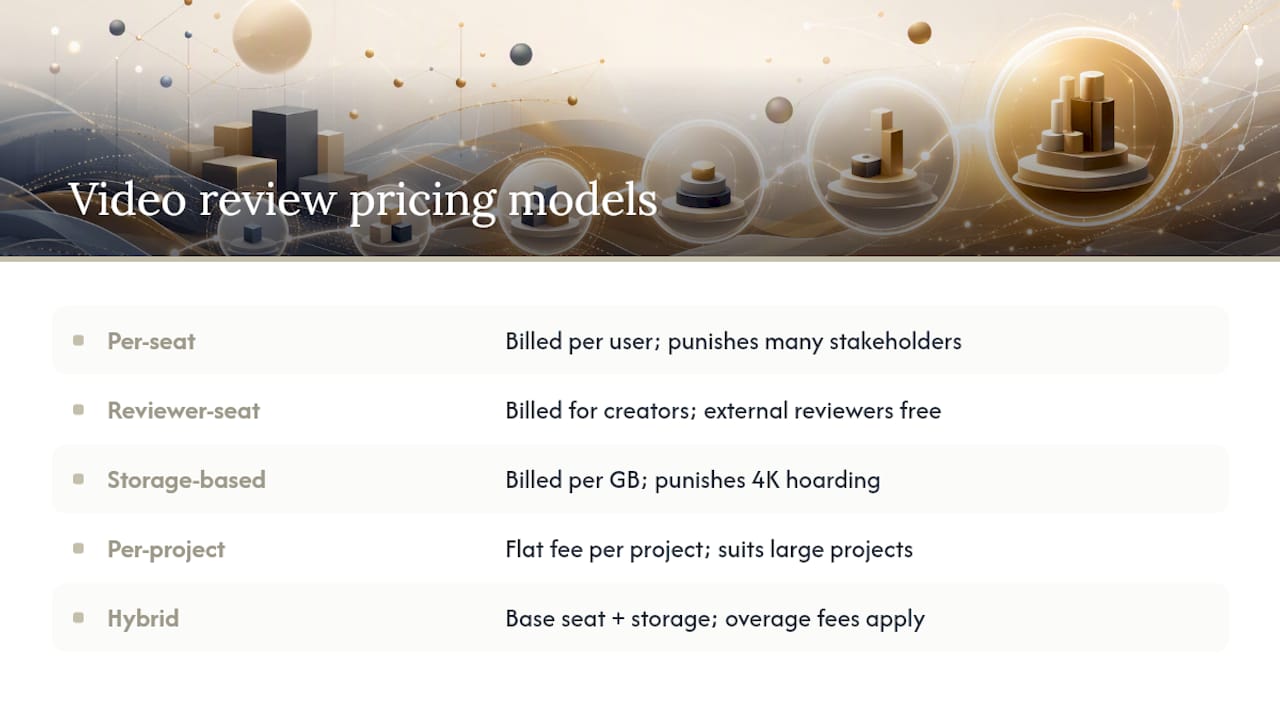
Per-seat pricing charges you for every team member with an editing or admin login. It’s predictable and easy to budget, but it punishes teams with a lot of internal stakeholders who only need occasional access.
Reviewer-seat pricing flips that logic. Some platforms charge only for the people actually creating and managing projects, then let unlimited external reviewers (clients, stakeholders, freelance collaborators) comment for free. This model tends to save money for agencies juggling many clients with light touchpoints, since the client never counts against your seat total.
Storage-based billing charges by the gigabyte or terabyte you keep active on the platform, independent of how many people are using it. This model rewards teams with tight archiving discipline and punishes anyone who lets raw 4K footage pile up in active project folders. Comparisons of leading platforms consistently flag storage and reviewer-seat structures as the two biggest levers separating a $30 monthly bill from a $300 one.
Per-project or metered models charge a flat fee per active project rather than by seat or storage. These work well for production companies that run a handful of large projects at a time rather than a constant stream of small ones.
Hybrid models, which combine a base seat fee with a storage allotment and then charge overages on both, are increasingly the norm. They’re also the hardest to compare across vendors because two platforms can quote you a similar base price while burying wildly different overage rates in the fine print.
Billing cadence changes your effective monthly cost too. Annual plans typically run 15% to 20% cheaper than paying month to month, but they lock you in before you’ve stress-tested the platform on a real deadline. Monthly billing costs more per month but gives you an exit if the workflow doesn’t fit.
Pro Tip: Ask every vendor to quote you in the same unit, dollars per active project per month, including estimated storage and reviewer costs. It’s the only way to compare a per-seat platform against a storage-based one without a spreadsheet headache.
Which Features Push Your Bill Higher?
Not every feature costs the same to add, and understanding which ones actually move your bill helps you negotiate instead of just accepting whatever tier a sales rep points you toward.
Storage volume is the single biggest lever. Hot storage (footage actively being reviewed and edited) costs vendors more to serve than cold storage (archived, rarely accessed files), and most platforms pass that difference on. A team storing 2TB of active 4K footage will pay noticeably more than one storing 500GB of compressed proxies, even on the same nominal plan.
Seat structure matters just as much. A platform charging per paid seat with unlimited free reviewers can cost half what a strict per-seat competitor charges once you factor in every client and stakeholder who needs to leave a comment.
Streaming quality adds cost in ways buyers underestimate. Frame-accurate, high-bitrate playback for 4K or 8K footage requires more transcoding and more bandwidth than standard-definition proxies, and vendors that support this well often charge a premium for it.
Security and compliance features are the classic enterprise upsell. Single sign on, granular permissions, audit logs, and formal SLAs rarely appear on a starter plan, and adding them almost always means jumping a full pricing tier rather than paying a small add-on fee.
Integrations and API access round out the list. Guides covering the category repeatedly point out that integrations with Adobe, Slack, or Asana, along with automation via API, tend to sit behind the highest paywall a vendor offers.
Here’s what typically drives a bill up, ranked by how often it surprises buyers:
- Storage volume, especially active 4K or 8K footage kept in hot storage.
- Paid seat counts when a platform doesn’t offer free reviewer access.
- High-bitrate streaming and frame-accurate scrubbing on large files.
- Enterprise security add-ons like SSO, audit logs, and dedicated SLAs.
- Custom integrations and API access for workflow automation.
Version control tools that track file history efficiently can quietly reduce your storage footprint, since you’re not duplicating full-resolution files every time someone makes a note.
What Should Different Team Sizes Budget for Video Review Software?
Abstract pricing tiers only get you so far. Here’s how the numbers actually shake out once you map them to real team profiles.
-
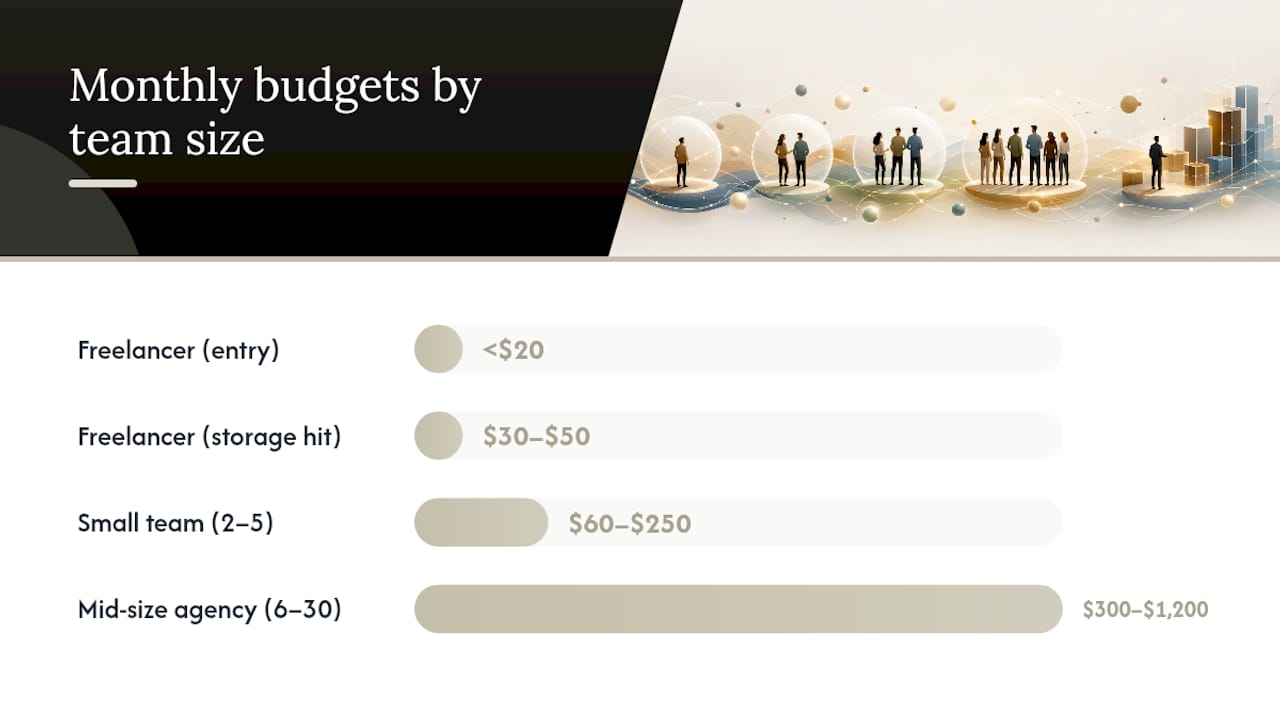
Freelance editor or solo shooter. Most freelancers land on a free tier or something under $20 monthly, provided they keep archived projects off the platform. A freelancer editing three client videos monthly at 50GB each fits comfortably inside most entry tiers. The moment storage habits get sloppy (keeping six months of raw footage active), that same freelancer can blow past a 100GB cap and get bumped into a $30 to $50 monthly plan.
-
Small team of two to five. Expect somewhere between $60 and $250 monthly. A five-person team on a $15 per-seat plan with 500GB of storage runs about $75 monthly on seats alone, plus whatever the storage tier adds, often another $20 to $50. Add one client who needs frequent commenting access, and if the platform charges for reviewer seats, that’s another $10 to $20 monthly.
-
Mid-size agency of six to thirty. Budgets here typically range from $300 to $1,200 monthly, depending heavily on how many integrations and how much storage the agency carries across active client work. An agency running 15 seats at $40 each lands at $600 monthly before storage, and a 2TB active storage need can add another $150 to $400 depending on the vendor’s overage rates.
-
Enterprise production company. Custom quotes here commonly start at $1,000 monthly and climb from there, with onboarding costs (migration, training, dedicated support setup) often adding a one-time fee equivalent to one or two months of the subscription. Enterprise-tier proofing tools command higher price points specifically because of the automation, compliance certifications, and dedicated account management bundled into the contract.
The math that trips teams up: adding a single paid seat to a per-seat plan at $40 monthly seems small until you multiply it across a hiring wave. Adding 5 people in a growth quarter adds $200 monthly, not counting the storage those five people will inevitably generate. Similarly, one additional terabyte of active storage on a hybrid plan can add $50 to $150 monthly depending on the vendor’s overage pricing, which is often steeper than the base rate per gigabyte.
A scheduling and archive framework that moves finished projects to cold storage on a set cadence is one of the more effective ways mid-size teams keep this number from creeping upward every quarter.
What Questions Should You Ask Before Signing?
Every vendor’s pricing page tells you the sticker price. It rarely tells you what happens when you go over your limits, and that gap is where budgets blow up six months into a contract.
Run through this checklist before you sign anything:
- Does the billing model charge per seat, per reviewer, by storage, or some hybrid?
- Are external reviewers and clients free, or do they count against your seat total?
- What exactly counts toward your storage cap, raw footage, proxies, exports, or all three?
- How are overages billed, per gigabyte, in blocks, or with a hard cutoff that blocks uploads?
- Is there a formal SLA for uptime and support response, and does it cost extra?
- Can you cancel monthly, or does the quoted rate require an annual commitment?
Ask vendors these questions directly, word for word if you have to:
- “Are reviewer or client seats free, and is there a cap on how many can be active at once?”
- “What specifically counts toward my storage allotment, and how is overage billed?”
- “Are transcoding and rendition generation included, or billed separately per file?”
- “What happens to my active projects if I downgrade or cancel mid-cycle?”
Red flags worth taking seriously: a sales rep who can’t answer the storage question in plain terms, pricing pages that hide the overage rate entirely, or a quote that changes materially between the first call and the contract. Reviewer accounts of the category frequently mention storage confusion and unexpected reviewer-seat charges as the top sources of billing surprises, which tells you these aren’t rare edge cases.
A transparent vendor will give you a written breakdown of base cost, per-unit overage rates, and what happens at renewal, without you having to ask three times.
Pro Tip: Before you commit to annual billing, run one real project through the platform on a monthly plan first. Time how long the full review cycle takes and note every place the workflow creates friction. Trials with a real project consistently surface costs vendor documentation glosses over, like transcode delays or reviewer confusion that adds an extra approval round.
What Do Creative Teams Actually Trade Off on Cost?
The honest answer to “which plan should I buy” is almost always “it depends on how much a slow approval cycle costs you,” and most buyers never do that math.
If your team burns days waiting on client sign off, paying more for a platform with faster commenting, frame-accurate markup, and fewer review rounds usually pays for itself within a quarter. The math is simple: one extra week of delay on a paid production almost always costs more than the difference between a $50 plan and a $150 one.
If your projects are simple and your clients respond quickly regardless of tooling, staying on a cheaper plan and working around its limits (manually archiving old footage, capping active projects) is the smarter move. Don’t pay for automation you don’t need.
Negotiation matters more than most buyers realize. Vendors routinely offer discounted annual rates, waived onboarding fees, or temporary storage bumps if you simply ask, especially for mid-size teams evaluating multiple platforms at once. A tighter review workflow often cuts the number of paid reviewer seats you need before you even get to the negotiating table.
— Lorenz
Where Posthive Fits Into Your Budget
Some platforms build around the idea that tools reducing hidden costs—such as clear version history and centralized task tracking—matter more than a low sticker price alone. These platforms may bundle version control, task tracking, cloud storage, and client approval tracking into tiered plans.

That structure suits a specific set of buyers best: freelancers who need to keep client ownership of deliverables clear without juggling separate tools, small production teams tired of chasing feedback across email threads, and agencies that need one workspace where clients can review, comment, and approve without a dozen back and forth messages. Teams that sometimes lose time figuring out which cut a client actually approved benefit from improved version management.
The best way to test whether it fits your budget is to run one real project through it, the same way you’d test any platform. Upload actual client footage, invite your usual reviewers, and time the full approval cycle from first cut to sign off. Check the Posthive pricing page for Creator, Pro, and Enterprise tier details, then start with Posthive on your next project to see how the numbers compare to what you’re paying now.
Sources
The pricing bands and market patterns referenced throughout this guide draw on a small set of publicly available resources. ThemeDev’s roundup of video review platforms supplied the entry-to-enterprise pricing bands and common hidden fee patterns. Evercast’s comparison of video review and feedback tools informed the breakdown of per-seat, storage, and hybrid pricing models. G2’s user reviews for enterprise proofing platforms supported the discussion of why enterprise tiers command higher price points.
- 14 Video Review Software to Use in 2026 - ThemeDev
- 10 best video review and feedback software 2026 edition | Evercast Blog
- Frame.io reviews | G2