Stop Version Chaos: Video Transcription Workflow for Production Teams
Stop Version Chaos: Video Transcription Workflow for Production Teams

Build a repeatable pipeline that extracts audio, runs ASR, cleans and timestamps the text, then formats and routes captions and transcripts to publishing destinations. The best video transcription workflow follows four stages: extract, transcribe, post-process, and format. Done right, it outputs SRT/VTT captions, searchable JSON, chapter markers, and clean copy for repurposing, giving teams faster turnaround and a consistent audit trail on every file.
TL;DR:
- Using automated transcription pipelines reduces review time from several minutes to seconds per minute of video and improves consistency across multiple files.
- Building each pipeline stage carefully—audio extraction, transcription, post-processing, and formatting—prevents costly rework and maintains output quality at scale.
- Default to verbatim mode with segment-level timestamps for accurate caption timing and diarization, then run a separate cleanup pass for readable, publish-ready transcripts.
- Implement validation gates and limit concurrency to catch low-confidence segments early and avoid bottlenecks or errors in mass processing.
- Storing transcripts and captions alongside a clear version history and integrating reviewer tasks streamlines handoffs and enhances security with role-based access and encryption.
Table of Contents
- Why a Video Transcription Workflow Matters More Than You Think
- How Do You Build the Core Transcription Pipeline?
- Verbatim or Smart Transcription: Which Mode Should You Use?
- Scaling Up: Batch Jobs, Webhooks, and Validation Gates
- What Quality Control Should You Build Into the Pipeline?
- Where Do Transcription Outputs Actually Live?
- A Production Team Workflow Example
- Security and Privacy in Video Transcription Workflows
- What Does It Cost to Build and Scale a Transcription Workflow?
- Where Automation Pays Off and Where It Doesn’t
- Run Your Transcription Workflow Inside Posthive
- Sources
- FAQ
Why a Video Transcription Workflow Matters More Than You Think
Most people scroll past sound. A large share of social video gets watched with the sound off, which means a large share of consumers watch video muted, according to Verizon Media data reported by Forbes. Skip captions and you lose the majority of your audience before the message lands.
Transcription is the foundation under a lot more than captions, though. Once a video becomes searchable text, it feeds:
- Caption files for accessibility compliance and viewer retention
- SEO through indexed transcripts that search engines can crawl
- Repurposing into blog posts, social clips, and show notes
- Translation and localization from a single clean source file
- Internal search across a media library, so editors can find the exact clip they need by typing a phrase
Manual captioning runs on the order of several minutes of labor per minute of footage once you factor in typing, timestamping, and proofing. An automated pipeline compresses that to a review pass measured in seconds per minute of video, with humans checking output instead of generating it from scratch. That shift, from typist to editor, is the entire economic case for automating this workflow.
How Do You Build the Core Transcription Pipeline?
The pipeline has four stages, and getting each one right prevents the rework that eats up whatever time automation was supposed to save.
-
Extract the audio. Demux the audio track from the video container and resample it to 16 kHz mono before sending it anywhere. Most speech recognition models were trained on audio at or near that sample rate, and feeding a downsampled mono track into the transcription step avoids wasted bandwidth on stereo separation the model doesn’t use. Export as WAV or FLAC for lossless intake; save compressed formats for the final delivery, not the transcription input.
-
Transcribe the audio. Decide between file-based and realtime transcription up front, since they call for different infrastructure. File transcription suits completed recordings you can batch, while realtime transcription serves live streams and needs a persistent connection instead of a single upload. For anything over roughly 25 to 30 minutes, chunk the file into segments to stay under most API duration and size limits, then stitch the timestamps back together after transcription. If your project needs speaker attribution, request diarization at this stage. It’s far cheaper to ask for it once than to reprocess later.
-
Post-process the transcript. Raw ASR output is usually full of filler words, false starts, and the occasional mangled proper noun. A language-model cleanup pass strips “um,” “you know,” and repeated words while preserving meaning. Decide whether you need verbatim output (every stutter and filler intact, useful for legal or research contexts) or a smart cleanup for anything meant for public consumption. Inject a custom glossary of brand names, product terms, and industry jargon before this pass runs. It catches the errors that plain ASR reliably gets wrong.
-
Format and export. Generate SRT or VTT for caption files, a structured JSON transcript for search indexing, and chapter markers for longer content. Decide sidecar versus burned-in captions based on destination: sidecar files (SRT/VTT attached separately) preserve flexibility for editing and localization, while burned-in captions suit short-form social where the platform won’t reliably render external caption tracks.
Pro Tip: Before running a fresh transcription pass on archival footage, check whether human-made subtitles already exist. Manual subtitles are often more accurate for domain-specific terminology than a first-pass ASR run, and reusing them saves both compute cost and cleanup time.
For teams building this in an existing post-production stack, mapping these four stages onto a structured captioning workflow keeps the handoffs between extraction, transcription, and review from getting lost in email threads.
Verbatim or Smart Transcription: Which Mode Should You Use?
Not every use case wants the same transcript. Modern transcription models like Gemini offer two distinct modes, and picking the wrong one creates rework downstream.
- VERBATIM mode captures every word exactly as spoken, filler words included, and supports word-level timestamps and speaker diarization for up to eight speakers. Use it when you need precise caption timing or need to know who said what.
- SMART mode produces cleaner, more readable prose but is incompatible with timestamps and diarization. Use it for blog repurposing or summary generation, never for caption files that need to sync to the video.
- Custom vocabulary improves accuracy on brand names and technical terms but has its own compatibility limits with other features, so check documentation before combining settings.
- Word-level timestamps can slightly reduce raw transcription accuracy compared to segment-level timestamps, a tradeoff worth knowing before you default to the most granular setting available.
The practical default for production teams: run VERBATIM with segment-level timestamps for the primary transcription pass, since that gives you accurate caption timing and diarization in one step. Then run a separate SMART cleanup pass on the same audio (or on the verbatim transcript) to generate the readable copy you’ll use for blog posts, show notes, or summaries. Trying to get one pass to do both jobs is where most teams get frustrated with output quality.
Scaling Up: Batch Jobs, Webhooks, and Validation Gates
A workflow that handles one file gracefully often falls over at fifty. Scaling requires deliberate choices about job type, monitoring, and failure handling.
- Batch versus synchronous transcription. Use asynchronous batch jobs for archives and backlogs; reserve synchronous, fast transcription for time-sensitive single files where someone is waiting on the result.
- Webhook design. Configure callbacks to notify your system when a job completes rather than polling an API repeatedly. Log every callback with a job ID so a failed webhook delivery doesn’t silently drop a file from the pipeline.
- Concurrency limits. Split large archives into batches of roughly 5 to 10 concurrent jobs to balance throughput against rate limits, a pattern that holds up well in orchestrated captioning pipelines built on tools like n8n.
- Validation node checks. Before anything gets rendered or published, run automated checks for caption line length, segment duration, and confidence scores below a set threshold.
- Retry and dead-letter routing. Failed jobs go into a retry queue with exponential backoff; jobs that fail repeatedly route to a manual review queue instead of blocking the pipeline.
Pro Tip: A validation node that catches line-length and low-confidence segments before rendering saves far more review time than catching those errors after captions are already burned into a video file.
What Quality Control Should You Build Into the Pipeline?
Automation without guardrails just produces errors faster. A lightweight but firm QA layer keeps throughput high without letting bad transcripts reach viewers.
- Set automated gates. Flag any segment below your confidence threshold, any caption line over roughly 42 characters, and any output containing an unrecognized brand term for manual review.
- Size the human review queue. Budget a rough guideline of one to three minutes of reviewer time per minute of video for spot-checking automated output, more for content with heavy jargon or multiple speakers.
- Reserve full manual transcription for edge cases. Legal depositions, heavily accented audio, and overlapping multi-speaker conversations still often need a human transcriptionist from the start rather than an ASR-plus-cleanup pass.
- Track versions and provenance. Log which model produced which transcript version and who edited it, so a caption error six months later can be traced back to its source instead of triggering a guessing game.
Editor task tracking systems can carry that reviewer workload without turning into a separate spreadsheet nobody updates, which is where a lot of ad hoc QA processes quietly fall apart.
Where Do Transcription Outputs Actually Live?
A transcript that sits in one tool and never reaches your CMS or your editors isn’t finishing the job. Integration determines whether the pipeline actually saves time or just moves the bottleneck downstream.
- Storage pattern: keep a sidecar JSON transcript, an SRT/VTT caption file, and an edited canonical text version together in your content management system, tied to the same media ID.
- Search indexing: feed the JSON transcript into a search index with timestamps intact, so editors can search spoken content and jump straight to the matching video moment.
- Player and platform exports: sidecar files work for most web players and long-form platforms; short-form social generally needs burned-in captions since many apps won’t render external caption tracks reliably.
- Reviewer handoff: route the draft transcript into an editor’s review interface as a task, not a raw file drop, so corrections get tracked instead of scattered across comments and messages.
Version control matters here as much as the transcription itself. A clear versioning setup for video assets keeps the caption file, the edited transcript, and the final render from drifting out of sync as revisions pile up.
A Production Team Workflow Example
Picture a five-person production team publishing three long-form videos and a dozen social clips weekly. Their pipeline looks like this:
- An audio extraction node pulls the 16 kHz mono track the moment a new file lands in shared storage.
- A transcription job runs VERBATIM mode with segment timestamps, tagged with the project ID.
- A cleanup pass generates SMART copy for the blog repurpose, run separately from the caption version.
- The pipeline exports SRT/VTT and a JSON transcript, then creates a reviewer task automatically.
- A reviewer opens the task inside a shared post-production workspace, checks flagged low-confidence segments, and approves the final files.
What actually saves time here isn’t the transcription step. It’s that nobody has to manually notify the reviewer, hunt for the latest file version, or wonder which transcript the published caption came from. Posthive’s version control and task tracking close that gap, so the handoff between “transcript generated” and “captions approved” happens inside one audit trail instead of across four disconnected tools.
Security and Privacy in Video Transcription Workflows
Transcripts often contain more sensitive material than the video itself. Client names, unreleased product details, and personal information spoken on camera all end up as searchable text the moment transcription runs, which changes the risk profile of your media storage.
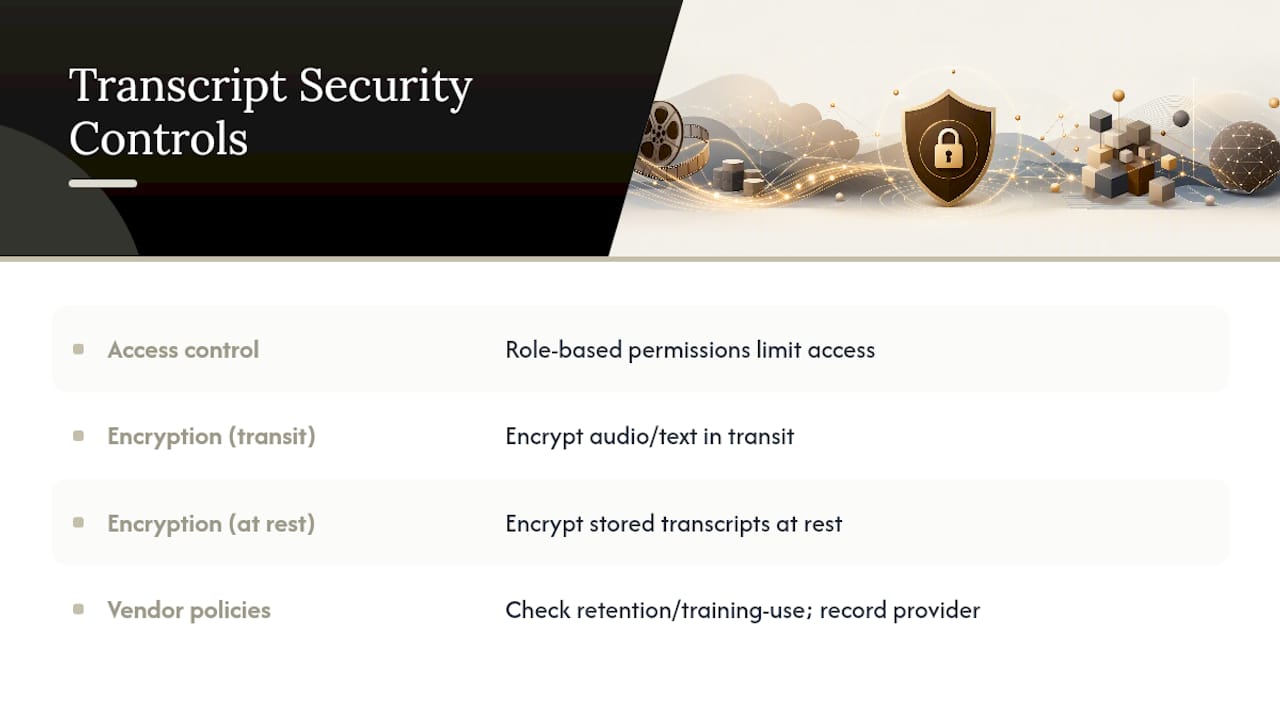
Start with access control. Not every team member needs to see every transcript, especially on client-facing production work where confidentiality clauses apply. Role-based permissions on your storage and workspace tools limit exposure to people who actually need the file.
Encryption matters at two points: while audio and transcripts move between your extraction tool, the transcription API, and your storage, and while they sit at rest in your CMS or workspace. Confirm your transcription provider encrypts data in transit and doesn’t retain audio or text longer than necessary to process the job.
Contracts and data retention policies deserve a direct read, not an assumption. Some transcription APIs use submitted audio for model training unless you opt out; others delete input data immediately after processing. For client work under NDA, that distinction isn’t a technicality; it’s the difference between compliant and noncompliant. Build a habit of checking each vendor’s data handling terms before routing sensitive footage through their API, and keep a record of which provider processed which project for accountability later.
What Does It Cost to Build and Scale a Transcription Workflow?
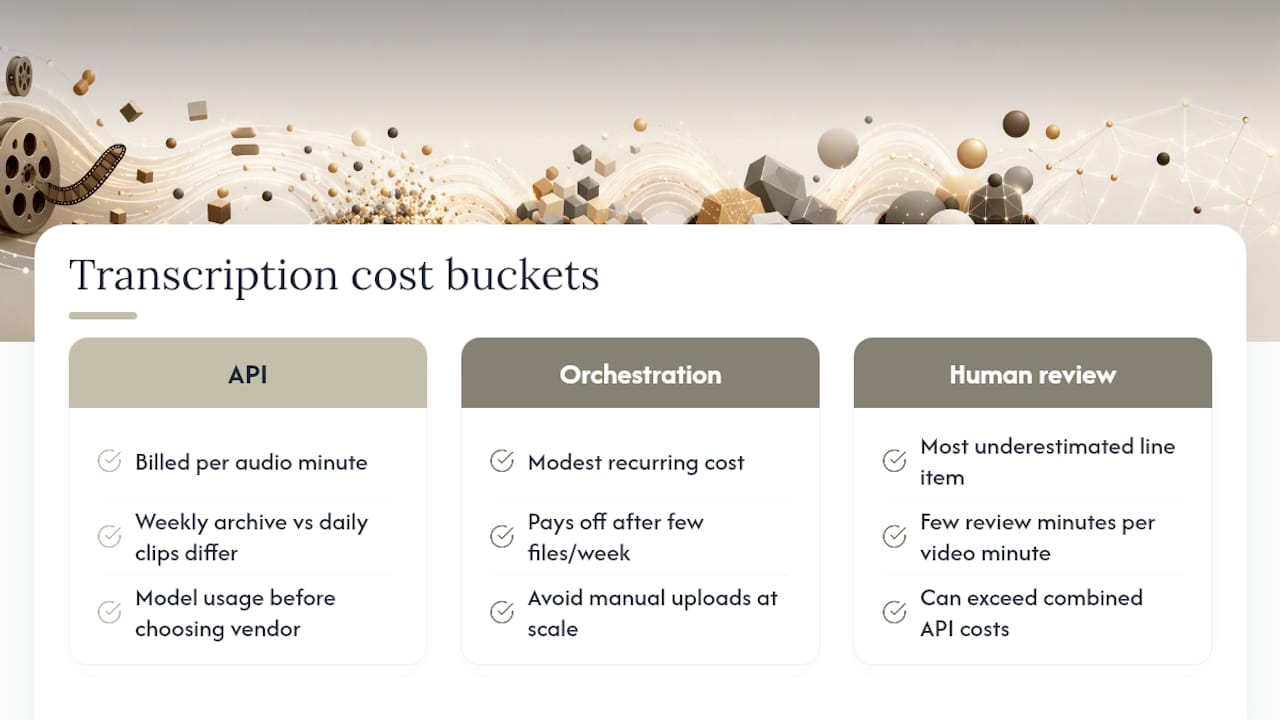
Costs break into three buckets: transcription API usage, orchestration and storage, and human review time. Transcription APIs typically bill per minute of audio processed, so a weekly archive of a few hours of footage adds up differently than a daily flow of short clips, and it’s worth modeling both before committing to a vendor.
Orchestration tools, whether a workflow builder or a custom script, add a modest recurring cost but pay for themselves once you’re processing more than a handful of files a week. The alternative, someone manually uploading files and downloading results, doesn’t scale past a very small team.
Human review time is the line item most teams underestimate. Budgeting a few minutes of reviewer time per minute of video, as outlined earlier, translates into real payroll hours once volume climbs. A team publishing ten hours of video weekly might spend meaningfully more on review labor than on API costs combined, particularly early on before glossary terms and validation thresholds are tuned.
Plan for volume growth from day one. A pipeline that works cleanly at ten files a week can break in unexpected ways at two hundred, usually at the concurrency limits or the review queue, not the transcription step itself. Budget for orchestration and QC capacity ahead of the volume that will actually need it, not the volume you have on day one.
Where Automation Pays Off and Where It Doesn’t
Automation earns its keep on volume and consistency: every file gets the same extraction settings, the same validation checks, the same export formats. That consistency is worth more than raw speed. Where I’d push back on the industry’s rush toward end-to-end automation is the last mile. Publish-ready copy, especially anything client-facing, still benefits from a human pass. Watch time-to-caption, human-edit minutes per video, and publish error rate as your core metrics. Start with one channel, measure those three numbers for a month, then expand.
— Lorenz
Run Your Transcription Workflow Inside Posthive
An integrated workspace can combine transcript, caption files, reviewer tasks, and version history, so team members do not have to chase down which file is current. Instead of exporting a transcript, emailing it to a reviewer, then hunting for their notes days later, the whole handoff lives in one place with a visible audit trail.

That matters most for teams juggling multiple projects at once. Version control can track edits to transcripts or caption files back to their authors, helping reduce confusion over the final versions. Task tracking can route transcripts directly to the appropriate reviewer immediately after job completion, instead of waiting in shared folders. For teams delivering work under deadlines, such integration can significantly save time in publishing workflows.
If your team is ready to see how transcription fits into a broader post-production workspace, start a trial with Posthive and map your own pipeline into it.
Sources
- Verizon Media says 69 percent of consumers watch video with the sound off (Forbes)
- Audio transcription - generateContent API | Google AI for Developers
- Transcription guide | OpenAI developer docs
- Add captions to AI videos automatically (Treza Labs)
FAQ
What is the best way to transcribe videos?
The most reliable method extracts audio, runs it through an ASR model with the settings your output needs (verbatim for timestamps, smart for readability), then applies a cleanup pass before exporting captions and transcripts. For high-volume teams, automating that sequence beats manual transcription on both speed and consistency.
Do transcriptionists make good money?
Rates vary widely by specialization and market. Transcription that requires legal, medical, or heavy-accent expertise generally commands higher rates than general-purpose transcription, which is increasingly handled by automated pipelines with human review layered on top.
Can ChatGPT transcribe video?
ChatGPT itself doesn’t process audio or video directly, but OpenAI’s transcription API can transcribe audio extracted from video files. You still need to extract the audio track separately before sending it through the API.
What is the best software for transcribing video?
There’s no single best tool. It depends on whether you need verbatim accuracy with diarization, fast turnaround for short clips, or a workspace that connects transcription to review and publishing. Teams already managing post-production in a shared workspace often get more value from linking transcription directly into that system, such as Posthive, rather than running it as a disconnected step.
How to transcribe videos at scale without losing quality?
Build a validation node that flags low-confidence segments and formatting issues before anything gets rendered, then route only the flagged content to human reviewers. That keeps the review queue focused on actual problems instead of forcing someone to check every file line by line.