Protect Unpaid Drafts for Creators: 30–50% Opacity Watermarks
Protect Unpaid Drafts for Creators: 30–50% Opacity Watermarks

Yes, send a watermarked review copy when you’re sharing an unpaid preview, an early cut, or anything that could leak before payment clears. Do it with a visible, center-burned watermark at moderate opacity, and keep the clean master file offline until approval is signed off. Skip watermarking only when a password-protected link or a low-resolution proxy already covers the risk. The rest comes down to placement, platform behavior, and a workflow that doesn’t slow down your client.
TL;DR:
- Watermarking is essential for early or unpaid review copies sent before payment or final approval, especially with untrusted clients or shareable content.
- Burned-in watermarks offer the strongest protection because they survive platform compression and casual recording, unlike overlay or forensic watermarks.
- Placement at the center of the frame and opacity between 30 to 50 percent maximize deterrence without obstructing review quality.
- Testing watermark robustness on the actual upload platform ensures it remains detectable after compression and cropping, preventing false security.
- Implementing structured workflows with clear version control, consistent naming, and approval gates reduces leaks and disputes more effectively than relying solely on watermarks.
Table of Contents
- When Should You Use a Watermarked Review Copy?
- How to Watermark a Video for Review: Placement and Settings
- Does Watermarking Actually Survive Platform Processing?
- Reviewer-Friendly Workflow: Naming, Versioning, and Approval Gates
- What Are the Copyright Risks Before You Upload?
- How Can Teams Build Security Into the Review Process?
- What Creators Get Wrong About Review Copies
- Keep Review Files Secure Without Slowing Down Approvals
- Sources
- FAQ
When Should You Use a Watermarked Review Copy?
Watermarking makes sense in a narrow but common set of situations, mostly ones where money hasn’t changed hands yet or the footage is going somewhere you can’t fully control. The clearest signal is timing: if a client hasn’t paid a deposit or signed a final invoice, a watermark on the review cut protects your leverage.
Typical situations that call for it include:
- Early drafts and rough cuts sent before any contract or payment milestone.
- Unpaid previews for prospective clients evaluating your work before hiring you.
- Teaser or trailer cuts shared with stakeholders who might forward them externally.
- New client relationships with no history of trust or no signed NDA in place.
- Public-facing content headed toward social media, festivals, or press before final sign-off.
The risk factors that push you toward watermarking are pretty consistent: a brand-new client, content that’s inherently shareable (music videos, branded spots, anything with a hook), or a deal structure where final payment is tied to final delivery. If any of those apply, a burned-in mark is cheap insurance.
Watermarking is overkill in plenty of cases, though. A trusted, repeat client reviewing an internal rough cut probably doesn’t need one. A password-protected link through a tool like password-protected video sharing often solves the same problem with less visual clutter. Low-resolution proxies work well too. A 480p export is functionally useless for redistribution but perfectly fine for approving color, pacing, or cuts. And when the stakes are genuinely high (celebrity talent, unreleased music, pre-launch product footage) per-recipient forensic watermarks tied to a login give you something a blanket overlay never can: attribution if the file leaks. Enterprise systems that gate downloads by user identity reduce redistribution risk in a way a single shared file can’t match.
How to Watermark a Video for Review: Placement and Settings
Not all watermarks do the same job, and picking the wrong type either annoys your reviewer or fails to protect you. There are three practical categories.
- Burned-in watermarks are rendered permanently into the video pixels. They survive screen recording, re-encoding, and most forms of casual capture, which makes them the default choice for review copies headed to anyone outside your immediate team.
- Overlay watermarks sit on top of the video in a player or preview tool but aren’t part of the file itself. They’re easy to apply and remove but offer close to zero protection once someone downloads or screen-records the file.
- Forensic or per-recipient watermarks embed a unique, often invisible identifier tied to the viewer. They don’t stop leaks, but they tell you who leaked it, which changes behavior more than visible marks ever do.
Placement matters almost as much as the type. Center placement covers more of the frame and is harder to crop out, which is why practitioner guidance consistently recommends it over corner placement for anything meant to deter redistribution rather than just brand a preview. Corner watermarks look cleaner and interfere less with the shot, but they’re trivial to crop away in seconds.
On opacity, aim for the 30 to 50 percent range. Below that, the mark barely registers as a deterrent. Above it, you’re asking your client to evaluate color grading and composition through a logo. Text (your studio name, project code, or “REVIEW COPY, NOT FOR DISTRIBUTION”) tends to communicate intent more clearly than a logo alone, especially for clients unfamiliar with your branding.
Pro Tip: Apply the watermark before your final compression pass, not after. Compression artifacts can blur a watermark applied post-encode, weakening it right when you need it most.
Keep the workflow simple: watermark the review proxy, deliver that, and store the clean, unwatermarked master somewhere it never gets emailed or uploaded until the project is fully approved and paid.
Does Watermarking Actually Survive Platform Processing?
Not always, and the research on this is more specific than most creators assume. Watermarking involves a genuine trade-off between how much data you embed, how invisible it stays, and how well it survives compression and re-encoding. You can’t maximize all three at once. A CMU analysis of watermarking design choices lays this out plainly: push for stronger robustness and you usually sacrifice either payload size or visual subtlety.
Platform processing is where a lot of watermarks quietly fail. When a file gets uploaded to YouTube, Vimeo, or a social platform, it typically goes through H.264/AVC transcoding, resolution scaling, and sometimes cropping to fit aspect ratio requirements. Each of those steps can degrade or destroy a watermark that looked perfectly fine on your export.
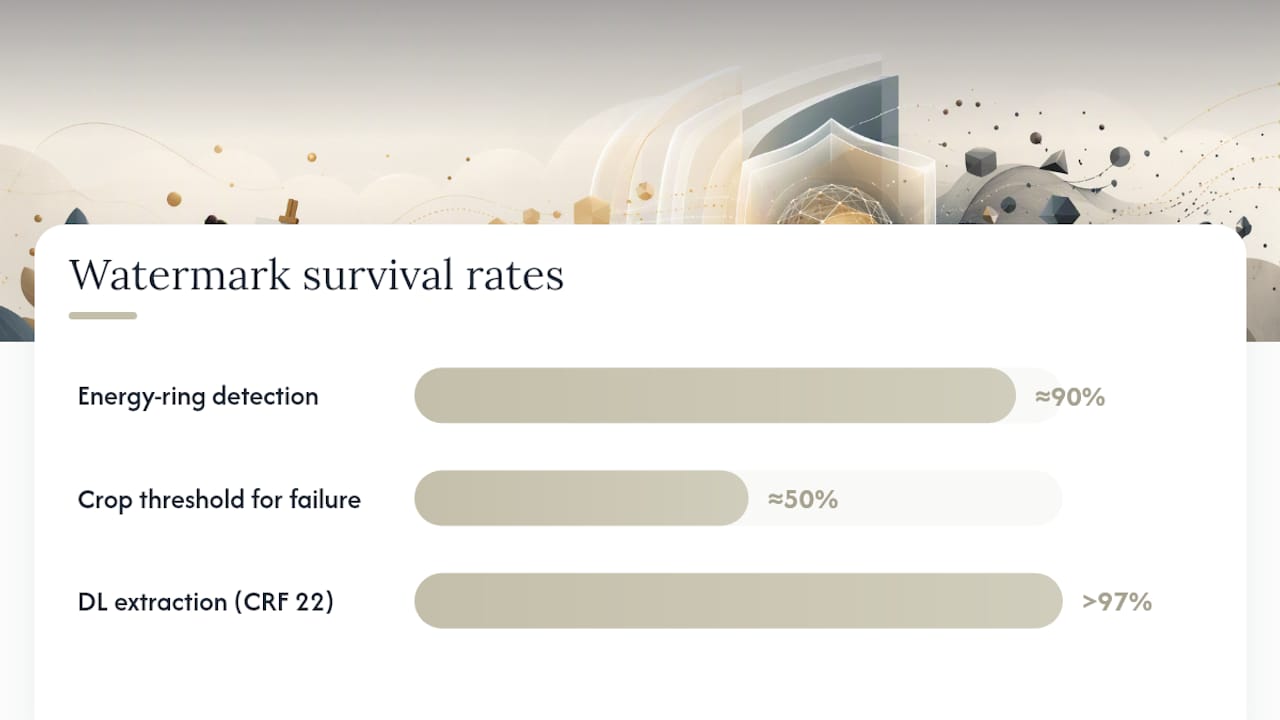
The numbers back this up in both directions. A 2025 study on blind video watermarking found that energy-ring based schemes held up well against common platform processing, with detection quality scores above 0.9 in many test cases. But that same study found detection failed once cropping removed more than roughly half the embedded ring area. Separately, a 2026 paper on deep-learning watermarking reported extraction accuracy above 97% under H.264 compression at CRF 22 when the model was trained on real encoder paths, but accuracy dropped noticeably at higher compression settings.
That gap between “works in testing” and “works after your client’s platform processes it” is the whole reason you test the actual delivery path, not just the export file. Before you send anything as final protection, run this checklist:
- Upload the review file through the exact platform or link method your client will use.
- Download it back and open it fresh, not from your original export.
- Check that the watermark is still visible (or still extractable, if forensic) after that round trip.
- Confirm your clean, unwatermarked master is saved somewhere separate and untouched.
Skipping that last step is the single most common mistake creators make. A watermark that survives your local export but not your client’s Slack upload or WeTransfer download isn’t protecting anything.
Reviewer-Friendly Workflow: Naming, Versioning, and Approval Gates
A watermark policy only works if the delivery process around it is consistent. Otherwise, someone eventually gets a link to the wrong version, or worse, the clean master.
- Send the first cut heavily watermarked. Center placement, visible text, moderate to strong opacity. This sets the expectation early that anything unapproved is marked.
- Keep the same watermark label through every revision round. Don’t quietly reduce opacity or move the mark between v1 and v3, or clients start to wonder what changed.
- Gate the approval step clearly. Require a written sign-off, an email confirmation, or a checked box in your project tool before moving to final delivery.
- Deliver the clean file only after that gate clears, ideally tied to final payment or a contract milestone.
Naming conventions matter more than most creators give them credit for. A file called ClientProject_v3_REVIEW_WATERMARKED.mp4 tells everyone downstream exactly what they’re looking at, while final.mp4 invites confusion the moment it gets forwarded. Structured version control practices make this almost automatic: every export gets a clear version number, a status tag, and a note on rights.
Include usage rights directly in the delivery notes, not just the contract buried in your inbox. A line like “Review copy only, not licensed for distribution, watermark must remain visible” attached to the file removes any ambiguity if the file gets shared further than intended.
For high-value or high-risk projects, consider sending shorter excerpts rather than full cuts for early feedback rounds. A 90-second segment lets a client judge tone, pacing, and color without putting your entire piece at risk if that link ends up somewhere it shouldn’t. Payment and approval gating work best when they’re explicit and repeated at every version milestone, not just assumed at the end.
What Are the Copyright Risks Before You Upload?
Watermarking protects against casual redistribution. It does nothing to protect against copyright claims, and creators regularly confuse the two.
YouTube’s own guidance is direct on this: copyright owners hold exclusive rights over their work, and automated systems like Content ID resolve claims case by case, without factoring in whether your file happens to carry a watermark. A watermarked clip using someone else’s music, footage, or licensed assets can still trigger a claim the moment it goes live, unlisted or not.
Fair use doesn’t offer a clean escape hatch either. It’s evaluated on the specific facts of how content is used, not on whether you slapped a logo across the frame. If a project sits anywhere near that line (commentary, parody, review content using third-party clips) talk to a lawyer before publishing, not after a claim lands. Related monetization policies, including how platforms treat reused or recycled content, add another layer creators often miss until a channel gets flagged.
Practical mitigations that actually reduce risk before upload:
- Set anything not fully cleared to private or unlisted, never public.
- Use password protection on review links shared outside your immediate team.
- Apply per-recipient forensic watermarks when the content is sensitive enough to warrant tracing a leak.
- Keep dated records of every license, release form, and client approval, since these matter far more than a watermark if a dispute ever reaches a claim review.
How Can Teams Build Security Into the Review Process?
Most of the friction around watermarking doesn’t come from the watermark itself. It comes from clients and creators tracking versions, permissions, and approvals across scattered email threads and file links. That’s a workflow problem, not a video problem, and it’s exactly where Posthive’s approach to version control and secure sharing fits.
Testable controls worth building into any review process include:
- Per-recipient sharing links instead of one link forwarded to an entire distribution list.
- Password protection on every review copy, watermarked or not.
- Preserved clean masters stored separately from anything that gets uploaded or shared.
- Audit logs showing who viewed, downloaded, or commented on each version.
Each of these maps directly to the risks covered earlier: a leaked link, an untracked version, or a client who claims they never saw the watermark disclaimer. Client ownership of deliverables inside a single workspace also solves a subtler problem: everyone knows which version is the approved one, because there’s only one source of truth instead of five email attachments with similar filenames.
The most overlooked fix, though, is contractual, not technical. Put your watermark policy directly in the statement of work: when watermarked copies get sent, what opacity and placement you use, and when the clean master gets delivered. That single paragraph prevents most disputes before they start. For deeper workflow guidance, Posthive’s blog on production security practices covers version tracking and client communication in more detail.
What Creators Get Wrong About Review Copies
The biggest source of friction isn’t the watermark itself. It’s the assumption gap between “this is a review copy” and “this is basically done.” Clients often treat a watermarked cut as finished work they can already share with their boss, their partner, or their own clients, simply because it looks polished. Creators, meanwhile, assume the visible mark makes that intent obvious. It rarely does.
The fix is wording, not more watermark. I’d also push back on the instinct to over-watermark trusted, repeat clients. It signals distrust where none is warranted and can quietly damage a relationship that took months to build.
For review notes, something as simple as “Approved copies will be delivered watermark-free once final payment is received” sets expectations without sounding adversarial. Say it once, in writing, at the start of the project, and most of these conflicts never happen.
— Lorenz
Keep Review Files Secure Without Slowing Down Approvals
Posthive gives creative teams and clients a single place to manage the exact risks this article covers: who has access to which version, whether a file was password protected, and what got approved versus what’s still under review. Plans allow multiple users to log in and review directly instead of forwarding watermarked exports through email threads that lose track of themselves.

Version control keeps every watermarked draft and clean master clearly labeled and separated, so nobody accidentally sends the wrong file. Centralized deliverable management means approvals happen in one workspace instead of scattered across chat apps, and audit logs can show who viewed or downloaded a given cut. None of that replaces a solid contract or a real watermark strategy, but it removes the version confusion that causes most leaks in the first place. If you’re ready to put a secure review workflow in place, check out the Pro and Enterprise plans and see which fits your team’s project volume.
Sources
The technical claims in this article draw on a handful of sources worth reading directly if you want the full detail behind the trade-offs. The CMU blog on watermarking design choices explains the payload-versus-robustness tension. The Scientific Reports study and the CSTFMark compression paper both quantify how watermarks hold up under real platform processing. YouTube’s copyright help page covers Content ID mechanics, and Velocaption’s practical guide informs the placement and opacity recommendations here.
- No free lunch in LLM watermarking: trade-offs in watermarking design choices (CMU blog)
- Robust and blind video watermarking against online sharing platforms | Scientific Reports
- Copyright on YouTube - YouTube Help
- How to Add Watermarks to Video Before Sending to Clients
FAQ
Is It Good to Watermark Your Videos?
Yes, for unpaid previews, early drafts, or anything headed outside a trusted relationship. It won’t stop a determined leak, but a visible burned-in mark deters casual redistribution and signals the file isn’t approved for final use.
How Much Should a 3-Minute Video Cost?
Pricing for a 3-minute video varies widely by production complexity, talent, and post-production needs, so costs can differ significantly. What matters more for review workflows is protecting that investment; tools like Posthive’s Pro plan at $49 per month help teams manage versions and approvals so paid work doesn’t leak before final delivery.
What Does It Mean When a Video Is Watermarked?
A watermarked video carries a visible or embedded mark, typically a logo, text, or a hidden forensic identifier, indicating it’s a review copy, unlicensed for distribution, or traceable back to a specific recipient. It’s a signal of status and ownership, not a technical lock.
Can I Use Watermarked Videos on YouTube?
You can upload a watermarked video to YouTube, but the watermark itself has no bearing on copyright enforcement. Content ID evaluates claims case by case based on the underlying content, so a watermark won’t prevent a claim if the footage includes unlicensed material.