Project Handoff Checklist for Project Managers
Project Handoff Checklist for Project Managers

Use one master project handoff checklist that documents deliverables, access credentials, outstanding items, ownership, and a formal sign-off, and treat the handoff as incomplete until the receiving team confirms they can access and actually use every listed item. That confirmation step is the part most teams skip, and it’s the reason so many handoffs unravel in week two rather than day one. A strong handoff checklist covers five categories: deliverables, access, status, documentation, and ownership.
Three named references worth knowing before you build your own version: Posthive, which many creative and post-production teams use to centralize deliverables and version history during a transition; the tollgate review concept from formal project lifecycle handover guidance, which requires named owners and completion dates before anyone signs off; and the practice of a 30-day observation period after handover, recommended in the Adapt Consulting Company handover guide to catch issues that only surface once the original team has stepped back.
Here’s what to do in the next 24 to 72 hours:
- Pull every credential, license key, and admin account into one document and test at least one login yourself.
- Draft a one-page master checklist covering deliverables, access, open items, documentation, and ownership, even if it’s rough.
- Schedule the handoff meeting now, not after the checklist is “finished.” A deadline forces the gaps to surface.
Key Takeaways
A project handoff isn’t complete until the receiving team confirms they can access, understand, and act on every item in the checklist.
| Point | Details |
|---|---|
| Use one master checklist | Cover deliverables, access, outstanding items, documentation, ownership, and sign-off in a single living document. |
| Verify before you sign off | Run a live access test and a sample task during the acceptance meeting, not after. |
| Start handover planning early | Begin at project initiation with named owners and dates, not in the final week. |
| Keep a 30-day hypercare window | Stay reachable after formal handover to catch issues the validation step missed. |
| Consolidate creative handoffs in Posthive | Deliverables, version history, and client approvals stay in one workspace instead of scattered files. |
Table of Contents
- What Is a Project Handoff Checklist?
- Why a Handover Checklist Matters
- The Canonical Project Handoff Checklist: Core Sections
- How Do You Run a Project Handoff Step by Step?
- Where to Find Templates and Which Format to Use
- How Does the Checklist Change by Industry?
- Common Pitfalls That Sink a Handoff
- How Posthive Supports a Creative Project Handoff
- Roles and Responsibilities During Handoff
- What Metrics Show a Handoff Actually Worked?
- Handling Handoffs in Remote or Distributed Teams
- Tools and Software to Facilitate Handoff Beyond Templates
- What Good Handoffs Actually Feel Like
- Frequently Asked Questions
- Sources
What Is a Project Handoff Checklist?
A project handoff, sometimes called a handover, is the formal transfer of responsibility, knowledge, and control over a project from one person or team to another. It happens when a project manager rotates off, when an agency delivers finished work to a client, when a freelancer wraps a contract, or when an internal team passes ongoing operations to a new owner. The handoff itself is the moment accountability moves. The broader transition, everything from onboarding a new hire to renegotiating a support contract, is the wider container that handoff sits inside.
You’ll run into this in a few recurring situations:
- Client delivery. An agency finishes a campaign, website, or video project and hands final files, credentials, and documentation to the client’s internal team.
- Internal transition. A project manager moves to a new role or leaves the company, and a colleague inherits an in-flight project mid-stream.
- Recurring operational handoffs. Support tickets, on-call rotations, or maintenance contracts change hands on a schedule, sometimes weekly.
The distinction matters because a handover is specifically about who is accountable now. You can transition a client relationship gradually over months while the actual handover, the point where the new owner is on the hook if something breaks, happens in a single meeting or a single signed document.
Why a Handover Checklist Matters
Poor handoffs don’t fail loudly. They fail quietly, three weeks later, when someone can’t find the file that was supposed to be “in the shared drive” or discovers the domain renewal lapsed because nobody knew who owned it. Missing credentials, ambiguous ownership, and undocumented decisions are the three most common causes of post handoff breakdowns, and each one compounds the others. A missing password blocks a task. An unclear owner means nobody notices the block for days. An undocumented decision means the new team rebuilds something that was already solved, badly, from scratch.
Consider a common scenario: a production company delivers a finished video project, but the raw project files live on a freelance editor’s personal drive with no documented folder structure. The client’s internal team discovers this only when they need to make a minor revision six months later, and now they’re paying to reconstruct a project that already existed. That’s not a technology failure. It’s a checklist failure.
The single most common failure mode in handoffs isn’t a missing document. It’s a document that exists but was never verified as accessible or understood by the person receiving it. A PDF sitting in a folder nobody can find is functionally the same as no PDF at all. The fix isn’t more documentation. It’s a verification step, a live test where the receiving team actually opens the file, logs into the account, and confirms they can do the job, before anyone signs off.
The Canonical Project Handoff Checklist: Core Sections
A complete project handoff checklist has nine categories. Skip one, and you’ve built a gap that surfaces later as an emergency.
Project summary. A one-paragraph overview of scope, goals, and current status so the incoming team doesn’t have to reverse-engineer intent from old emails.
Deliverables inventory. Every finished asset, file, or output, with exact file names, locations, and version numbers.
Documentation and runbooks. Standard operating procedures, style guides, technical specs, and any decision log explaining why choices were made, not just what was chosen.
Access and credentials. Every login, API key, admin account, and domain registration, along with who currently owns each one and how to transfer it.
Outstanding items and status. Open tasks, known bugs, pending approvals, and anything mid-flight when the handoff happens.
Risks and known issues. Anything that could break, expire, or cause a problem in the next 90 days, flagged explicitly rather than buried in a status update.
Stakeholders and escalation. Names, roles, contact details, and who to call when something goes wrong at 2 a.m.
Training and knowledge transfer. A record of tacit knowledge, the stuff that never made it into a doc because the original owner just “knew” it.
Acceptance and sign-off. A formal record that the receiving party reviewed everything and agrees the handoff is complete.
| Category | What to provide | Who verifies it |
|---|---|---|
| Project summary | Scope, goals, current status, key decisions made | Outgoing project lead |
| Deliverables inventory | File names, locations, version numbers, formats | Incoming team lead |
| Documentation & runbooks | SOPs, style guides, technical specs, decision log | Incoming team lead |
| Access & credentials | Logins, API keys, admin accounts, renewal dates | IT or account administrator |
| Outstanding items & status | Open tasks, pending approvals, in-progress work | Both outgoing and incoming leads |
| Risks & known issues | Expiring licenses, unresolved bugs, budget flags | Outgoing project lead |
| Stakeholders & escalation | Contact list, roles, escalation path | Incoming team lead |
| Training & knowledge transfer | Session notes, recorded walkthroughs, Q&A log | Incoming team lead |
| Acceptance & sign-off | Signed confirmation of receipt and understanding | Both parties |
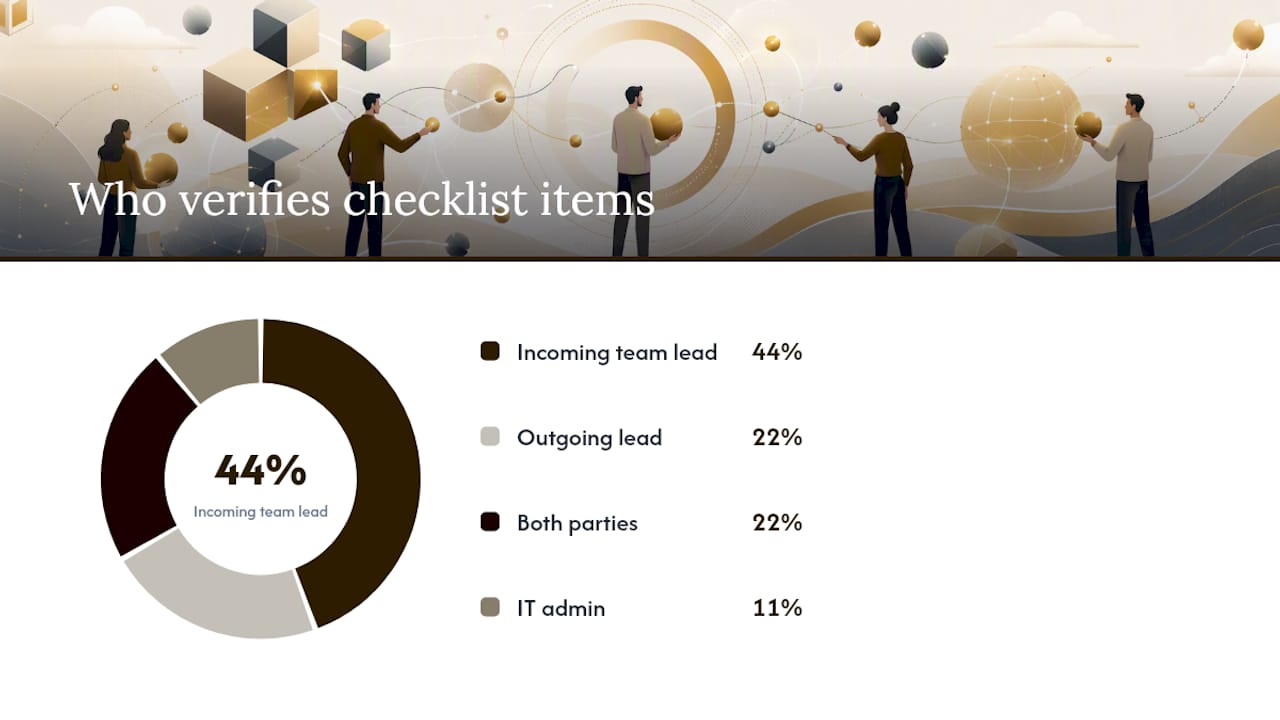
Store this checklist as a living document in whichever system your team already uses daily, a shared workspace, a task board, or a knowledge base, rather than a static file that gets buried after the handoff meeting. Tasking.space recommends starting with a one-page version and refining it after your first few handoffs rather than trying to build the perfect template on the first attempt.
How Do You Run a Project Handoff Step by Step?
A handoff process breaks into five phases, and rushing any one of them is where things go wrong.
- Prepare (days 1 to 3). The outgoing owner assembles the checklist draft, flags anything incomplete, and sets a realistic handoff date. Handover planning should ideally start during project initiation, not at the end, according to project lifecycle handover guidance, which recommends assigning named owners and completion dates from the outset rather than scrambling at project close.
- Inventory (days 2 to 5, overlapping with prepare). Every file, credential, and open task gets logged with a specific owner and location. No vague entries like “somewhere on the shared drive.”
- Knowledge transfer (days 4 to 7). This is where tacit knowledge moves, the reasoning behind decisions, the workarounds, the client’s unstated preferences. A recorded walkthrough beats a written doc here because tone and context carry information text can’t.
- Validation and acceptance. The incoming team tests access, runs a sample task, and confirms understanding before anyone signs anything. This is the tollgate review, and skipping it is the single most common shortcut that causes post handoff incidents.
- Closeout and hypercare. The outgoing team stays reachable for a defined window, typically 30 days, in case something surfaces that wasn’t caught during validation. Adapt Consulting Company’s handover research specifically recommends a 30-day observation period after formal handover to catch issues early adoption tends to expose.
Handoff meeting agenda (60 to 90 minutes):
- Project summary and current status (10 minutes)
- Deliverables walkthrough with screen share (20 minutes)
- Access and credentials transfer, live, in the room (15 minutes)
- Outstanding items and risks review (15 minutes)
- Q&A and knowledge transfer (15 minutes)
- Sign-off and next steps (5 minutes)
Verification to-do list for the receiving team:
- Log into every credential provided and confirm it works.
- Open every deliverable file and confirm it’s the correct, most current version.
- Execute one sample task end to end, not just review documentation about it.
- Read back a summary of the project status to the outgoing team to confirm shared understanding.
Simple projects can move through all five phases in a matter of days. Complex, multi-stakeholder projects, especially ones with technical dependencies or client-facing deliverables, need weeks for the core handoff plus a 30 to 90 day hypercare window layered on top.
Where to Find Templates and Which Format to Use
The right format depends on who’s receiving the checklist and how they’ll use it afterward.
- Google Docs or Word work well for client-facing deliverables where the document itself is the final artifact and formatting matters for a professional handoff package.
- Spreadsheets (Excel or Google Sheets) are better for tracking multiple deliverables, credentials, and owners in rows, especially when you need to sort or filter by status.
- Ticket or board templates inside your existing project management tool keep the checklist next to the actual work, so the incoming team doesn’t have to switch context to check status.
- Exported PDFs make sense as a final, dated snapshot for legal or client-acceptance purposes, but they’re a poor choice as the living working document because nobody wants to edit a PDF.
Whatever format you pick, the handover documentation itself should separate final deliverables from optional recommendations, a distinction Whatfix’s handover documentation guide calls out specifically, since blending “what’s done” with “what we suggest doing next” confuses acceptance criteria. Store the working version in wherever your team already lives, Confluence, SharePoint, or a shared workspace, and export a static copy only for formal sign-off records.
For creative and post-production teams specifically, a platform like Posthive can double as the living checklist location, since deliverables, versions, and approval status already sit in one place rather than scattered across a separate document.
How Does the Checklist Change by Industry?
The canonical nine categories hold across every industry, but each field adds its own non-negotiables.
Software and IT. Environment variables, deployment scripts, and API keys need explicit handoff, not just a mention that they exist. Repo ownership has to transfer formally, not just get shared as a collaborator. The Apiko software transition checklist recommends changing passwords and removing previous vendor accounts as standard security practice, plus agreeing an explicit knowledge transfer window before the outgoing developer disappears.
Construction. As-built drawings, warranties, and commissioning reports matter as much as the physical building itself. Certification documents and formal client sign-off aren’t optional paperwork, they’re often legally required before occupancy. Construction handover guidance notes that final handover should include QA and test reports, service manuals, and client training sessions where equipment is involved, not just a set of keys.
Creative and production. Source files, approved media masters, and complete version history need to transfer with clear labeling of which version is final. Brand guidelines and the exact terms of the client’s license for any stock or licensed assets need explicit documentation, since ambiguity here causes real legal exposure down the line.
Run a phased handover, spread over multiple sessions, when the project has technical complexity or multiple stakeholders who each need separate training. A single cutover meeting works fine for smaller, well-documented projects where one knowledge transfer session covers everything.
Common Pitfalls That Sink a Handoff
A handful of red flags predict a failed handoff before it happens.
- Missing credentials. If nobody can produce a complete list of logins on request, the handoff isn’t ready. Mitigation: require the credentials section to be 100% complete before scheduling the meeting.
- No verification step. A handoff where the receiving team just reads documents and nods is a handoff that hasn’t actually happened yet. Mitigation: build the live access test into the meeting agenda itself, not as an optional follow-up.
- Ambiguous ownership. “The team” owns something means nobody owns it. Mitigation: assign one named individual to every checklist item, even if responsibilities shift later.
- Last-minute planning. Starting the checklist the week of departure guarantees gaps. Mitigation: start handover planning at project initiation, as recommended in project lifecycle handover guidance.
- Incomplete documentation. Docs that explain “what” without “why” leave the incoming team unable to make good decisions later. Mitigation: require a short decision log alongside every runbook.
Pro Tip: Run a live access test and a sample operational task during the acceptance meeting itself, not as a follow-up email. Watching the incoming team actually log in and complete one real task surfaces gaps that a document review never will, and it turns “we think we’re ready” into “we confirmed we’re ready” in real time.
How Posthive Supports a Creative Project Handoff
Creative and post-production handoffs have their own texture: the deliverable is often a large media file, the version history matters as much as the final cut, and the client needs visibility without needing full production access. Posthive’s structure maps directly onto the canonical checklist for exactly that reason.
- Deliverables inventory lives in Posthive’s version management, so the incoming team sees the full history of a project, not just the final export, and can trace which cut the client actually approved.
- Access and credentials transfer through project-level permissions rather than shared passwords, so ownership of a project workspace moves without anyone changing a login.
- Review and approval tracking gives the incoming team a record of every client note and sign-off, which answers the “why was this decision made” question that usually gets lost in email threads.
- Client visibility stays intact through the transition, since clients maintain ownership over their deliverables and versions inside the platform rather than depending on whoever currently holds the files.
A typical creative handoff workflow looks like this: the outgoing editor uploads the final approved master with full version history intact, the client’s approval trail transfers with the project, and the new team lead inherits a workspace where nothing needs to be reconstructed from scattered folders or old email chains.
Roles and Responsibilities During Handoff
Every handoff needs three clearly assigned roles, and confusion between them is a top cause of dropped items. The outgoing owner is responsible for assembling the checklist, documenting decisions, and staying available through the knowledge transfer sessions. The incoming owner is responsible for reviewing everything, asking questions before sign-off rather than after, and running the verification tests. A sponsor or manager, someone not doing the day-to-day work, should approve the final sign-off, since the two people closest to the handoff often have incentive to call it “done” faster than it actually is.
Smaller teams sometimes collapse the sponsor role into the incoming owner, but that removes the one check that catches an overly optimistic handoff. If your team runs frequent handoffs, formalize who plays each role in advance rather than deciding it ad hoc every time.
What Metrics Show a Handoff Actually Worked?
Most teams never measure handoff success, which means they don’t find out it failed until something breaks. A few practical indicators work better than gut feeling. Track the number of support tickets or questions from the incoming team in the first 30 days, a high volume usually means documentation gaps rather than a slow learning curve. Track time to first independent task completion, how long before the new owner completes a task without help. Track whether the 30-day hypercare window gets used at all, since an outgoing team that fields zero questions either ran a flawless handoff or nobody’s found the gaps yet. And track whether the formal sign-off document actually got signed, a surprising number of “completed” handoffs never close that loop.
None of these need elaborate dashboards. A simple tally in the project tracker, reviewed at the 30-day mark, tells you more about handoff quality than any amount of documentation ever will.
Handling Handoffs in Remote or Distributed Teams
Remote handoffs lose the hallway conversation where tacit knowledge usually leaks out naturally, so you have to engineer that transfer deliberately. Record every knowledge transfer session rather than relying on live attendance, since time zones mean someone will inevitably miss the meeting. Replace the in-person “let me show you” moment with a recorded screen share walkthrough that the incoming team can replay as many times as needed.
Async documentation carries more weight on distributed teams, since you can’t lean on a quick desk-side question to fill a gap. Build slightly more buffer into the timeline, too. A handoff that takes a week in person often needs an extra few days remotely simply to coordinate schedules across time zones and get everyone into the same recorded session or shared document at the right moment.
Tools and Software to Facilitate Handoff Beyond Templates
A checklist template solves documentation. It doesn’t solve access transfer, version control, or ongoing visibility, which is where dedicated tools come in. Task and project management platforms keep the checklist next to the actual work rather than in a separate file nobody opens. Password managers with team-sharing features handle credential transfer more securely than a spreadsheet column labeled “passwords.” Cloud storage with granular permissions lets you transfer file ownership without physically moving anything.
For creative teams specifically, a workspace like Posthive combines version control, access management, and client approval tracking in one place, which removes the need to stitch together a separate password manager, a separate file server, and a separate approval log just to complete one handoff. When you’re evaluating any tool for this purpose, the test is simple: does it let the incoming team see everything they need without asking the outgoing team a single follow-up question?

What Good Handoffs Actually Feel Like
A handoff that’s working doesn’t feel dramatic. Nobody’s scrambling for a password at 5 p.m. on the last day, nobody’s discovering a decision that was never written down. It feels almost boring, which is exactly the point. Most of the drama I’ve seen in failed handoffs traces back to one shortcut: skipping the live verification step because everyone assumes the documents speak for themselves. They don’t. A document confirms something was written down. A verification test confirms someone can actually use it.
Three things to apply this week:
- Build your one-page master checklist today, even a rough draft, and put it somewhere your team already works.
- Schedule a live acceptance test as part of your next handoff meeting, not as an afterthought.
- Put a 30-day review on the calendar the same day you schedule the handoff itself, before the urgency fades.
Posthive Keeps Your Handoff Artifacts in One Place, Not Six
Posthive gives creative teams a single workspace where deliverables, version history, access permissions, and client approvals already live together, so a handoff checklist doesn’t mean chasing down files from five different tools before you can even start.

Instead of rebuilding a credentials spreadsheet and a separate approval log every time a project changes hands, your incoming team opens one workspace and sees the full picture: which master is final, who approved it, and what’s still outstanding. That’s a real difference from stitching together a shared drive, an email thread, and a password manager during every transition. If your team handles frequent handoffs between editors, freelancers, or client-facing leads, start a Posthive workspace and see how much of your checklist it already covers on day one. Every studio runs its own internal process, so treat this as one option worth testing against whatever you use now.
Frequently Asked Questions
What should be in a basic project handoff checklist? At minimum, cover deliverables, access credentials, outstanding items, documentation, ownership, and a formal sign-off. Start with a one-page version and expand it after your first few handoffs rather than trying to anticipate every edge case up front.
How long should a project handoff take? Simple projects can wrap in a few days. Complex or client-facing projects typically need one to two weeks for the core handoff, plus a 30 to 90 day hypercare period where the outgoing team stays reachable for questions.
Who should sign off on a project handoff? The incoming owner confirms they’ve reviewed and can execute everything, and ideally a sponsor or manager not directly involved in the daily work approves the formal sign-off, since that adds a check the two closest parties might skip.
What’s the difference between a handoff and a handover? In practice, the terms are used interchangeably in most project management contexts. Both describe the transfer of responsibility, access, and knowledge from one owner to another.
How do you make a checklist that people actually use? Determine the purpose first, identify the specific items that matter for your project type, organize them into clear categories, and assign explicit ownership and acceptance criteria to each one, an approach outlined in general checklist-creation guidance. A checklist without a named owner per item tends to get ignored.
Sources
- Project Handoff Checklist for Teams and Clients
- The Complete Guide to Project Handover: Purpose, Process, Risks, and Best Practice – Adapt Consulting Company
- Project Lifecycle Handover Process Guide – Project Management Formula
- Software Development Project Transition Checklist (Apiko)
- How to Create Helpful Handover Documentation (+Template) - Whatfix